Foreign medical program (fmp) registration form 2026

Get Form
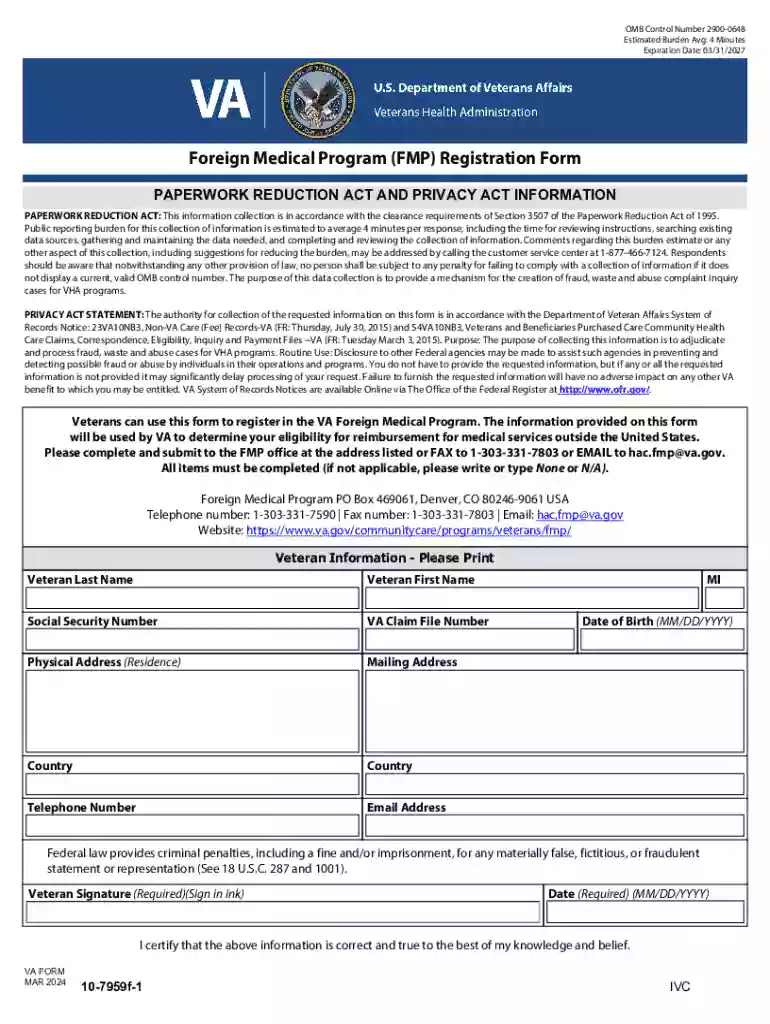
foreign medical program (fmp) registration form Preview on Page 1

Here's how it works

01. Edit your form online
Type text, add images, blackout confidential details, add comments, highlights and more.

02. Sign it in a few clicks
Draw your signature, type it, upload its image, or use your mobile device as a signature pad.

03. Share your form with others
Send it via email, link, or fax. You can also download it, export it or print it out.

Definition & Purpose of the Foreign Medical Program (FMP) Registration Form

The Foreign Medical Program (FMP) Registration Form is designed to facilitate the registration of veterans for reimbursement of medical services they receive outside the United States through the Veterans Health Administration. This form is vital for veterans who require medical care overseas, ensuring that they can access healthcare services without direct personal expense.

Key Functions

  • Eligibility Verification: Confirms a veteran's eligibility for benefits under the Foreign Medical Program.
  • Reimbursement Processing: Collects necessary information to process claims and reimbursements for the costs of overseas medical care.
  • Data Collection: Gathers personal and medical details required to facilitate coordination between international healthcare providers and the Veterans Health Administration.

How to Use the Foreign Medical Program (FMP) Registration Form

Veterans must carefully follow specific steps to ensure their registration process proceeds smoothly. Adhering to these instructions helps avoid delays in processing and reimbursement.

Step-by-Step Instructions

  1. Initial Information: Begin by entering your full legal name, date of birth, and Social Security number.
  2. Contact Details: Provide current mailing address, phone number, and email for all correspondence regarding your FMP registration and claims.
  3. Medical Information: Include details of your service-connected disabilities and the general nature of the medical treatment sought overseas.
  4. Additional Documentation: Attach any necessary medical reports or supporting documents that directly relate to your overseas healthcare needs.

How to Obtain the Foreign Medical Program (FMP) Registration Form

Accessing the FMP Registration Form involves several straightforward methods, ensuring veterans can easily acquire it no matter their location.

Sources for Form Access

  • Online Download: Visit the Veterans Affairs website to download a digital version of the form.
  • Local VA Offices: Contact your nearest VA medical center or regional office for a physical copy.
  • Mail Request: You can request the form to be sent to your address by calling the Foreign Medical Program office directly.

Steps to Complete the Foreign Medical Program (FMP) Registration Form

Completing the form accurately is crucial to prevent claims denial or processing delays. Follow these detailed steps:

Detailed Process

  • Section A: Enter personal information, ensuring accuracy for seamless identity verification.
  • Section B: Note any previous FMP registration and applicable reference numbers.
  • Section C: Describe your overseas medical needs, referencing specific treatments related to your service-connected disabilities.
  • Section D: Verify that all fields are complete and double-check for errors or omissions before submission.

Who Typically Uses the Foreign Medical Program (FMP) Registration Form

This form is primarily intended for U.S. military veterans who are planning to reside or receive medical care outside of the United States and require coverage for service-connected health issues.


decoration image ratings of Dochub

Common Users

  • Retired Veterans: Those who have settled overseas post-retirement and need access to medical services.
  • Temporary Assignments: Veterans temporarily living abroad for work or personal reasons.
  • Long-term Travel: Individuals planning extended stays in foreign countries who require ongoing medical care.
decoration image

Required Documents for Submission

Submitting the required documentation along with your registration form is essential to expedite the review process.

Essential Documents

  • Proof of Military Service: Documents such as DD Form 214 to verify military service and discharge status.
  • Medical Records: Comprehensive medical reports outlining current health conditions and history related to service-connected issues.
  • Identification: A valid government-issued ID to confirm your identity during the registration process.

Form Submission Methods (Online / Mail / In-Person)

Veterans have several options for submitting their FMP registration form, offering flexibility based on personal preference and accessibility.

Submission Options

  • Online: Upload the completed form and any attached documents through the VA’s secure web portal.
  • Mail: Send the form to the designated FMP processing center address provided on the VA’s website.
  • In-Person: Deliver the form directly to the nearest VA facility offering FMP services.

Legal Use and Compliance of the Foreign Medical Program (FMP) Registration Form

To ensure adherence to legal standards, veterans should acquaint themselves with compliance requirements.

Legal Considerations

  • Privacy Act Statements: Understand your rights under the Privacy Act, particularly concerning the sharing and safeguarding of your personal information.
  • Reimbursement Conditions: Familiarize yourself with the specific terms under which medical costs will be reimbursed, ensuring all necessary conditions are met.
  • Accuracy Obligation: Providing falsely or inaccurately filled out forms can lead to a benefits denial and potential administrative penalties.
be ready to get more

Complete this form in 5 minutes or less

Get form

Got questions?

We have answers to the most popular questions from our customers. If you can't find an answer to your question, please contact us.
Contact us
How to create fillable PDF forms with Acrobat. Open Acrobat. Select a file or scan a document. Add new form fields. To change existing text boxes or images, click Edit in the toolbar. Save your fillable PDF.
Try our free and document signer tool Form filling is quick and easy with the Adobe Acrobat Fill Sign tool. Upload a file, then add text, checkmarks, lines, and more.
Best free online form builder for quickly creating powerful forms Google Forms pros: Google Forms cons: Google Forms price: 100% free. Jotform pros: Jotform cons: Jotform price: Free plan available; paid plans start at $39/month. Feathery pros: Feathery cons:
Use eSignature to fill out a PDF form and sign it Flat forms are non-interactive forms that require extra effort and extra steps to be completed. An interactive form contains fields that you can select or fill in, eliminating the need to print the form and complete it by hand.
Login to your Canva account and search for form templates. Pick a design or start with a blank template. Choose a pre-made form template design. Customize your form. Edit your form by adding text, labels, logos, and other graphic elements. Download and print. Publish and share your form.

Security and compliance

At DocHub, your data security is our priority. We follow HIPAA, SOC2, GDPR, and other standards, so you can work on your documents with confidence.


Learn more
ccpa2
pci-dss
gdpr-compliance
hipaa
soc-compliance
be ready to get more

Complete this form in 5 minutes or less

Get form