Rmv1 form 2026

Get Form
rmv 1 form Preview on Page 1

Here's how it works

01. Edit your rmv 1 form online
Type text, add images, blackout confidential details, add comments, highlights and more.

02. Sign it in a few clicks
Draw your signature, type it, upload its image, or use your mobile device as a signature pad.

03. Share your form with others
Send rmv 1 form pdf via email, link, or fax. You can also download it, export it or print it out.

How to use or fill out rmv1 form with our platform

Form edit decoration
9.5
Ease of Setup
DocHub User Ratings on G2
9.0
Ease of Use
DocHub User Ratings on G2
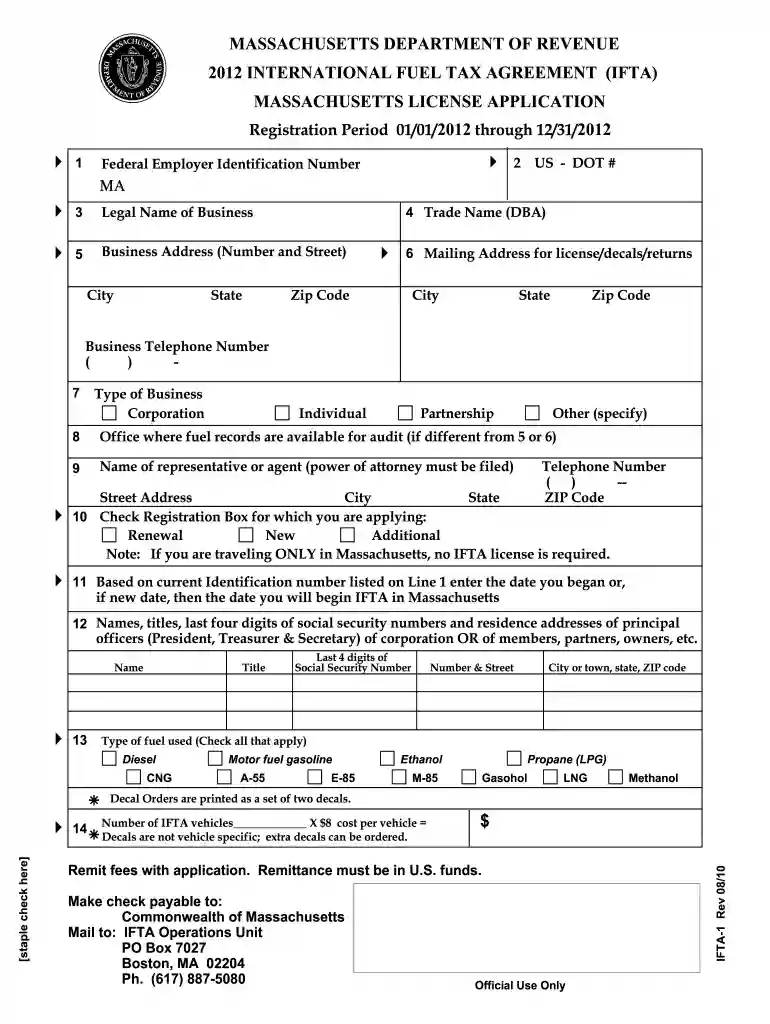
  1. Click ‘Get Form’ to open the rmv1 form in the editor.
  2. Begin by entering your Federal Employer Identification Number on Line 1. If you do not have one, provide your Social Security number.
  3. On Line 2, input your US DOT number if applicable. This is essential for interstate operations.
  4. Fill in the legal name of your business on Line 3. Ensure this matches official documents to avoid discrepancies.
  5. Complete Line 4 with your Trade Name (DBA) if you operate under a different name.
  6. Provide your business address on Line 5, including city, state, and zip code.
  7. If your mailing address differs from the business address, enter it on Line 6.
  8. Select the type of business from the options provided on Line 7.
  9. Continue filling out each section as instructed, ensuring all required fields are completed accurately before submission.

Start using our platform today to simplify filling out your rmv1 form for free!

See more rmv1 form versions

We've got more versions of the rmv1 form form. Select the right rmv1 form version from the list and start editing it straight away!
Versions Form popularity Fillable & printable
2023 4.5 Satisfied (30 Votes)
2022 4.8 Satisfied (119 Votes)
2021 4.3 Satisfied (67 Votes)
2020 4.3 Satisfied (133 Votes)
2019 4.4 Satisfied (187 Votes)
2018 4.4 Satisfied (161 Votes)
2016 4.3 Satisfied (234 Votes)
2015 4 Satisfied (34 Votes)
2014 4.2 Satisfied (73 Votes)
2013 4 Satisfied (59 Votes)
2010 4.9 Satisfied (54 Votes)
be ready to get more

Complete this form in 5 minutes or less

Get form

Got questions?

We have answers to the most popular questions from our customers. If you can't find an answer to your question, please contact us.
Contact us
The Massachusetts RMV-1 Application Form is used for vehicle registration, title transfer, and related processes. This form is essential for residents who need to register their vehicles or make changes to their vehicle title information.
Adding a Vehicle through File Maintenance Select Master Vehicle File Maintenance from the RTA main menu (MVM). Enter a vehicle number and choose Add. Specify whether to use a template (and the template vehicle number if using a template). Enter the vehicle information. Save the record.
The Registry of Motor Vehicles (RMV) must affirm insurance coverage prior to issuing or renewing a registration. This affirmation is done electronically via a direct interface to the RMV, or manually via a company- specific insurance stamp.
A Registration and Title Application form, or RTA, is required of all customers registering in the state of Massachusetts. You will need to complete this form even if youre picking up your vehicle out of state.
How To Transfer A Car Title The original title or bill of sale if the car is exempt from needing a title. The completed RMV-1 form. Your drivers license. If two people will have the title in their name, both must be present. Payment for all fees and taxes in check form.

Security and compliance

At DocHub, your data security is our priority. We follow HIPAA, SOC2, GDPR, and other standards, so you can work on your documents with confidence.

Learn more
ccpa2
pci-dss
gdpr-compliance
hipaa
soc-compliance
be ready to get more

Complete this form in 5 minutes or less

Get form

People also ask

Note that Registration-related transactions can be performed at an RMV Service Center without an appointment. Customers who are at least 65 years of age or have a disability can call the RMVs dedicated phone line at 857-368-8005 to schedule a license or ID appointment.
To establish requirements to ensure that the Massachusetts Registry of Motor Vehicles (RMV) Registration and Title Application (RTA) is completed properly to ensure that vehicles are lawfully registered and titled in accordance with G.L. Chapter 90 2 and G.L.

mass rmv1 form