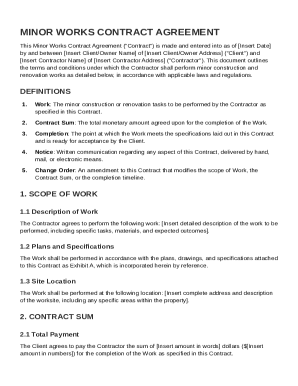
Electronic Parcel Shipping Order Form - The UPS Store 404 2026

Get Form
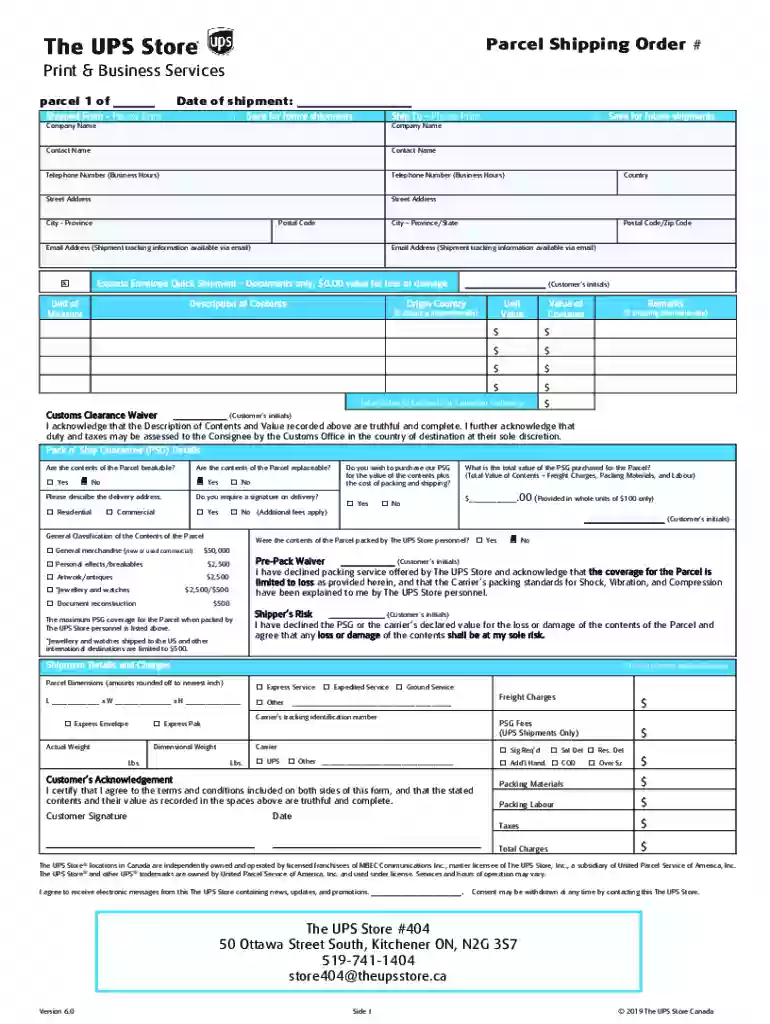
Electronic Parcel Shipping Order Form - The UPS Store 404 Preview on Page 1

Here's how it works

01. Edit your form online
Type text, add images, blackout confidential details, add comments, highlights and more.

02. Sign it in a few clicks
Draw your signature, type it, upload its image, or use your mobile device as a signature pad.

03. Share your form with others
Send it via email, link, or fax. You can also download it, export it or print it out.

Definition & Meaning

The "Electronic Parcel Shipping Order Form - The UPS Store 404" is a digital document used to facilitate the shipping of parcels through The UPS Store, specifically location 404. This form serves as a comprehensive tool to record all necessary shipping details, ensuring that parcels are processed correctly according to the customer's specifications and store guidelines. It includes fields for shipping addresses, delivery methods, and optional services, thereby streamlining the shipping process and reducing errors.

Steps to Complete the Electronic Parcel Shipping Order Form - The UPS Store 404

  1. Enter Shipping Details:

    • Start by filling in the sender's and recipient's addresses, ensuring accuracy to avoid delivery mishaps.
    • Select the desired shipping service offered by UPS, which may range from standard ground services to expedited options.
  2. Customer Acknowledgments:

    • Review and confirm all inserted details to prevent errors.
    • Acknowledge the terms and conditions provided, which cover liability limitations, customs regulations, and service guarantees.
  3. Select Pack n' Ship Guarantee:

    • Decide if you want to add the Pack n' Ship Guarantee for additional coverage on your parcel, understanding its extent and limitations.
  4. Finalize the Form:

    • Verify every aspect of the form for completeness before submission.
    • Print or email the completed form to The UPS Store 404, depending on your preferred submission method.

How to Use the Electronic Parcel Shipping Order Form - The UPS Store 404

Using the form effectively involves understanding its structure and its sections dedicated to specific aspects of shipping. Ensure you have all necessary information, such as exact addresses and package contents. If opting for insurance or guarantees, carefully read the associated clauses to assess their benefits and requirements. Also, remain aware of any deadlines related to shipping constraints or promotional offers from The UPS Store.

Key Elements of the Electronic Parcel Shipping Order Form - The UPS Store 404

  • Shipping Information: Collects detailed sender and receiver addresses.
  • Service Selection: Provides options for various UPS shipping services.
  • Guarantee Options: Includes choices for coverage like the Pack n' Ship Guarantee.
  • Terms and Conditions: Lists critical policies regarding liabilities and guarantees.
  • Signature Fields: Allows for electronic acknowledgments where necessary.

Legal Use of the Electronic Parcel Shipping Order Form - The UPS Store 404

Using this form legally binds both the customer and The UPS Store 404 to the conditions outlined within. The form's completion and submission can be considered an agreement to comply with specified terms, like those governing liability and service expectations. Hence, it is advisable to thoroughly read the form to understand your rights and obligations.

Important Terms Related to Electronic Parcel Shipping Order Form - The UPS Store 404

  • Liability: Defines the scope of responsibility held by The UPS Store in case of lost or damaged parcels.
  • Customs Regulations: Details requirements for international shipping.
  • Pack n' Ship Guarantee: A service option providing additional protection for shipped items.

Who Typically Uses the Electronic Parcel Shipping Order Form - The UPS Store 404

This form is typically used by individuals and businesses who require parcel shipping services offered by The UPS Store 404. Regular users include online retailers, small businesses, and individuals needing to send packages domestically or internationally. The electronic nature of the form is particularly useful for those who prefer digital solutions to physical paperwork.


decoration image ratings of Dochub

Software Compatibility and Integration

The electronic version of the form is compatible with various document management systems, including platforms that interface with common software like TurboTax or QuickBooks. This compatibility ensures that users can seamlessly incorporate shipping details into their existing business processes, enhancing efficiency and record-keeping.

Digital vs. Paper Version

Choosing between an electronic or paper version of the form depends on user convenience. The electronic version offers benefits such as ease of access, environmental friendliness, and integration with digital platforms, while the paper version may be suitable for those less familiar with digital tools or who need physical receipts.

be ready to get more

Complete this form in 5 minutes or less

Get form

Got questions?

We have answers to the most popular questions from our customers. If you can't find an answer to your question, please contact us.
Contact us
Youve got three options to get your package to UPS: We can come to you (for an additional fee) Schedule a pick-up. Drop it off at a UPS location. Be sure to bring your identification. Hand the labelled package to your friendly neighbourhood driver.
The UPS Store offers a wide range of shipping services for destinations within the United States. Whether you need an item to arrive overnight or regular ground delivery will do, the experts at your neighborhood The UPS Store have you covered. Just bring in the item youd like delivered and well take it from there.
Create a label online, then print it at the carrier dropoff location. USPS, UPS, and FedEx will all gladly print a label for you. First, youll need to go through the carriers online service, such as USPS Click-N-Ship, and enter the address information to create a label.
You can email your label to the store, use the UPS Stores printing services, and they will print the label for you (a fee may apply). UPS Customer Centers: These are UPS-owned facilities where you can drop off packages and also request assistance with printing labels.
Yes, with our Printing Services, you can come in with the label saved on a USB, or Email us the label when you at our store, and we can print and attach it on your item.

Security and compliance

At DocHub, your data security is our priority. We follow HIPAA, SOC2, GDPR, and other standards, so you can work on your documents with confidence.
Learn more
ccpa2
pci-dss
gdpr-compliance
hipaa
soc-compliance
be ready to get more

Complete this form in 5 minutes or less

Get form

People also ask

The UPS Store offers a wide variety of printing and finishing services, including electronic file access (e.g., e-mails, CDs, USB drives), color and black-and-white digital printing, black-and-white copies, binding, collating and laminating.
The good news is that you can get those supplies free from UPS! UPS will supply branded boxes, shipping tags, customs forms, label pouches, and best of all, blank thermal printing labels, free of charge, to the address you gave when you set up your UPS account.

Related links