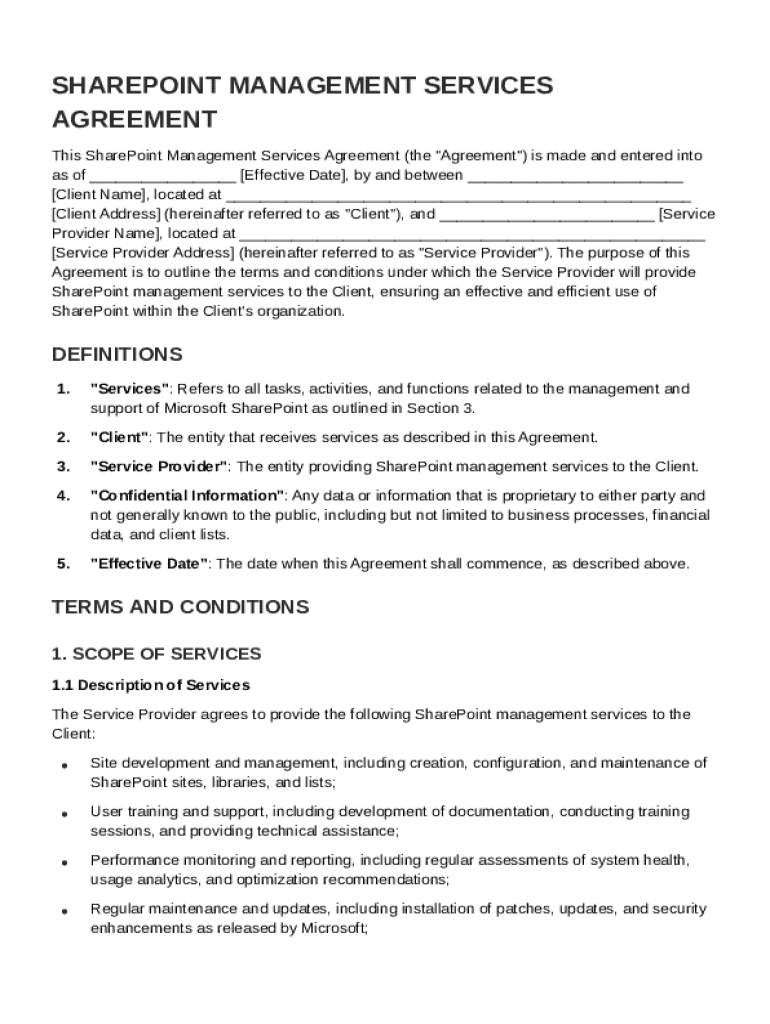







Definition and Purpose of the SharePoint Management Contract Template
The SharePoint Management Contract Template serves as a structured agreement detailing the terms and conditions for managing SharePoint services between a service provider and a client. It clearly outlines the roles and responsibilities of each party, ensuring a mutual understanding of service expectations. This contract is essential for both parties as it secures the service provider's services and offers the client a comprehensive guide on what to expect from the contract.
Key Elements
- Scope of Services: Details the specific SharePoint management services the provider will deliver, ensuring clarity on what is included in the contract.
- Payment Terms: Outlines the payment structure, including how and when payments are made.
- Confidentiality: Ensures all client data managed under the contract remains private and protected.
- Responsibilities of Both Parties: Clearly defines the obligations of the service provider and the client, minimizing misunderstandings.
How to Use the SharePoint Management Contract Template
To use the SharePoint Management Contract Template effectively, follow these steps to customize it according to your specific needs:
- Identify Parties: Start by filling in the names and contact details of both the service provider and the client.
- Specify Services and Deliverables: Clearly outline the SharePoint management tasks the provider will undertake.
- Agree on Terms: Negotiate and detail the payment terms, including any milestones or deadlines.
- Protection Measures: Include confidentiality and non-disclosure clauses to protect sensitive information.
- Finalize the Contract: Ensure both parties review and agree on all terms, then sign the document to make it legally binding.
Examples of Customization
- Industry-Specific Needs: Different industries may require specific security protocols or additional services, which should be included in the contract.
- Project-Based Adjustments: Adjust the deliverables to reflect whether the project is ongoing or for a specific duration.
Steps to Complete the SharePoint Management Contract Template
Completing the SharePoint Management Contract Template involves detailed attention to each section:
- Fill Out Basic Information: Inputs such as company names, contact information, and dates are fundamental.
- Clarify Service Scope: Clearly describe the services and tasks.
- Define Payment Structures: Specify amounts, due dates, and any penalties for late payment.
- Establish Confidentiality Protocols: Include clauses that address how confidential information will be handled and any penalties for breaches.
- Assign Responsibilities: Clearly state the responsibilities of both the service provider and the client.
- Revise and Review: Both parties should go over the contract to ensure all details are correct.
- Sign and Seal: Obtain signatures from authorized representatives of both parties to formalize the agreement.
Key Elements of the SharePoint Management Contract Template
Understanding the structure of the contract helps in negotiating its terms effectively:
Essential Clauses
- Governing Law: Indicates which state’s laws will be used to resolve disputes.
- Dispute Resolution: Describes the methods for resolving any disagreements, such as arbitration or mediation.
- Termination Conditions: Lists the criteria under which either party can terminate the contract earlier.
Detailed Breakdown
- Remedies for Breach: Specifies consequences for breaking the contract terms.
- Service Level Agreements (SLAs): Details the quality of service standards the provider agrees to meet.
Legal Use of the SharePoint Management Contract Template
Ensuring that the SharePoint Management Contract Template is legally sound involves understanding applicable laws and regulations.
- Compliance with Laws: All services delivered must comply with federal and state laws, potentially including data protection regulations.
- Regulatory Obligations: The contract might need to include clauses related to specific industry regulations, such as data encryption for data protection.
Compliance Examples
- Data Protection: If the client is governed by regulations such as GDPR, the contract should include compliance requirements.
Who Typically Uses the SharePoint Management Contract Template
The template is utilized by a variety of business entities and professionals who seek a clear framework for SharePoint services:


Common Users
- IT Service Providers: Companies offering SharePoint management as part of their IT solutions.
- Corporate Clients: Businesses requiring structured SharePoint solutions for intranet or extranet setups.
- Consultants: Independent consultants providing SharePoint expertise to organizations.
Real-World Scenarios
- Large Enterprises: Use the contract to manage complex, large-scale SharePoint environments efficiently.
- Small and Medium Businesses: Leverage templates to ensure cost-effective and organized SharePoint management solutions.

State-Specific Rules for the SharePoint Management Contract Template
The application of the contract can vary based on regional legal requirements:
Considerations by State
- Local Regulations: Contracts must adhere to local labor laws, especially if the provider operates in a different state than the client.
- Tax Obligations: Be aware of specific state taxes that need to be accounted for within payment terms.
Notable State Variations
- California: May require additional clauses related to data privacy laws under the California Consumer Privacy Act (CCPA).
- New York: Considerations for New York's SHIELD Act to protect the security and privacy of sensitive data.
Software Compatibility and Integration
SharePoint Management Contract Templates can integrate with various digital platforms, enhancing workflow and efficiency:
Compatible Platforms
- Document Management Systems: Templates are easily managed within systems like DocHub for editing and collaboration.
- Project Management Software: Integrates with platforms such as Microsoft Project for streamlining SharePoint project tasks.
Utilization Benefits
- Seamless Integration: Allows for easy information transfer between project documentation and contract management systems.
- Enhanced Collaboration: Supports real-time updates and collaboration among team members for efficient contract execution.
By addressing these core topics and aspects, the SharePoint Management Contract Template becomes a robust tool, facilitating clear communication and well-defined service delivery between providers and clients.