
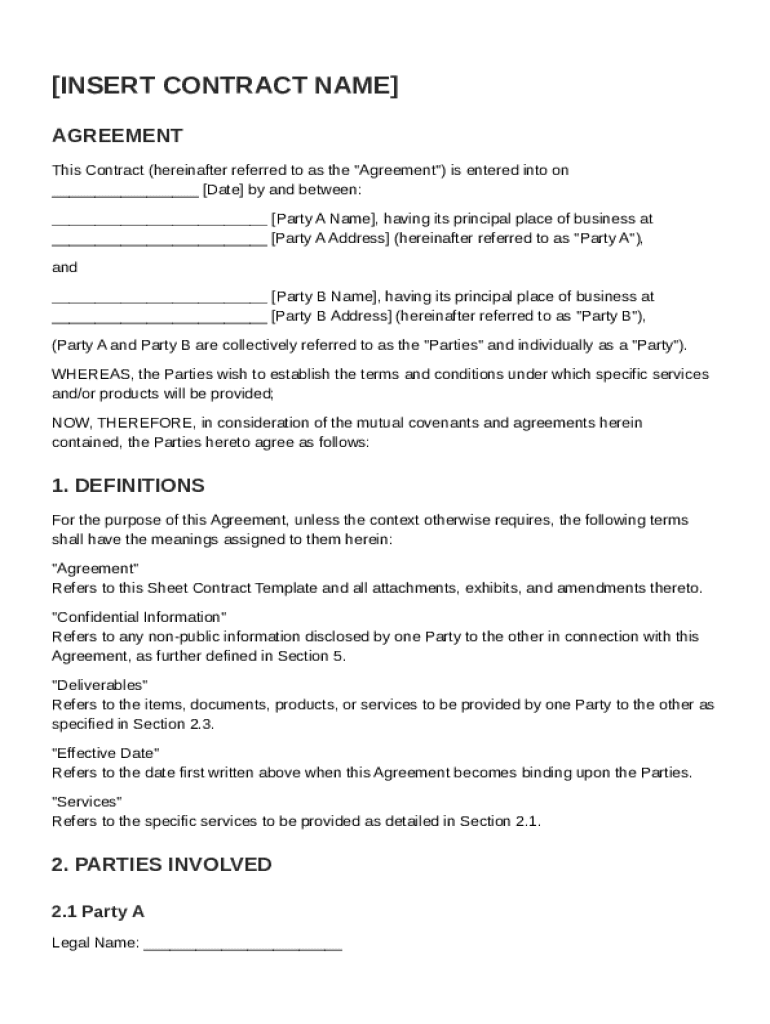







Definition & Purpose of Sheet Contract Template
A sheet contract template is a pre-designed digital document that serves as a blueprint for creating binding agreements between two or more parties. This template facilitates outlining terms, responsibilities, and conditions related to the provision of services or products. It allows users to quickly draft detailed contracts without having to start from scratch, thus ensuring consistency and compliance with legal standards. These templates typically include sections covering definitions, scope of work, payment terms, confidentiality clauses, and governing laws, among others.
Key Benefits of Using a Sheet Contract Template
- Efficiency: Streamlines the contract creation process by providing a ready-made framework.
- Consistency: Ensures all contracts contain standardized sections and language.
- Legal Compliance: Reduces the risk of missing critical legal elements, making contracts more robust.
How to Use the Sheet Contract Template
To effectively utilize the sheet contract template, follow these steps:
- Select the Template: Choose a template that fits the nature and scope of the agreement you wish to establish, such as service, sales, or partnership agreements.
- Customize Sections: Modify pre-defined sections like parties involved, contract duration, and specific obligations to suit your specific needs.
- Add Specific Details: Include any unique stipulations or terms applicable to your agreement that are not covered in the template.
Tips for Optimizing Use
- Leverage DocHub's Editing Tools: Use features like text insertion and image integration to personalize the content.
- Ensure Detail Precision: Pay extra attention to clauses related to compensation, termination, and dispute resolution.
Who Typically Uses the Sheet Contract Template
Sheet contract templates are commonly used by a diverse range of users, including:
- Small Business Owners: For creating standardized contracts with clients or vendors.
- Freelancers and Consultants: To outline the scope and terms of project-based work.
- Legal Professionals: To accelerate the contract drafting process for routine agreements.


Common Use Cases
- Service Agreements: Contracts for maintenance services, freelance design work, or consulting.
- Sales Contracts: Agreements related to the sale of goods or intellectual property.
- Partnership Agreements: Documents outlining terms between business partners or collaborators.
Key Elements of the Sheet Contract Template
A comprehensive sheet contract template should encompass several crucial elements:
- Definitions: Clarifies terms and abbreviations used throughout the document.
- Scope of Work: Details the tasks or obligations each party is responsible for.
- Confidentiality Clauses: Outlines terms for protecting sensitive information shared between parties.
Important Sections
- Payment Terms: Specifies compensation amounts, due dates, and methods.
- Dispute Resolution: Provides protocols for addressing disagreements or breaches.
- Termination Conditions: Defines circumstances and processes for ending the contract.
Legal Use of the Sheet Contract Template
Using a sheet contract template to draft agreements comes with legal implications:
- Enforceability: Proper completion and mutual agreement make templates binding under U.S. law.
- Amendments: Changes to a contract must be documented and agreed upon by all parties for legality.
- Compliance with Laws: Ensure your template complies with federal and state-specific regulations.
Recommendations for Legal Assurance
- Consult Legal Advisors: Have legal professionals review the contract when applicable.
- Regular Updates: Review and update templates periodically to align with legal changes.
Digital vs. Paper Version of the Sheet Contract Template
Choosing between digital and paper versions can impact the effectiveness and convenience of using a sheet contract template.
-
Digital Version:
- Advantages: Easier editing, sharing, and storage; quick digital signatures.
- Enhanced Security: SSL encryption and password protections safeguard data.
- Real-time Collaboration: Multiple parties can work simultaneously on a single document.
-
Paper Version:
- Traditional Validation: Some parties prefer physical signatures for authenticity.
- Hard Copy Records: Provides a tangible copy for archiving.
Steps to Complete the Sheet Contract Template
Completing the contract demands careful attention to ensure completeness and accuracy:
- Gather Necessary Information: Collect all relevant details about the parties, terms, and stipulations.
- Review Template Sections: Understand and prepare to customize each section to fit the specific agreement.
- Edit Fields: Utilize DocHub's editing features to input specific data and modifications.
- Proofread: Conduct a thorough review to catch errors or omissions before finalizing the contract.
- Sign and Distribute: Use electronic signature options to sign and share the contract with all parties involved.
Considerations for Effective Completion
- Precision in Language: Use clear, unambiguous language to avoid misunderstandings.
- Deadline Compliance: Ensure all required actions, such as signing, are completed by the agreed-upon deadlines.
State-Specific Rules for the Sheet Contract Template
Contracts may be subject to varying rules and standards depending on the state in which they are executed:
- Governing Law Clauses: Clearly specify which state's laws will govern the contract terms.
- State-Specific Clauses: Some states may require additional clauses or impose restrictions on standard terms.
Practical Advice for Navigating State Differences
- Research State Regulations: Understand state-specific requirements that may affect contract enforceability.
- Consult Local Legal Experts: In complex cases, seek guidance from professionals familiar with state law.
Versions or Alternatives to the Sheet Contract Template
While the sheet contract template is highly versatile, alternative forms or versions may better suit certain situations:
- Industry-Specific Templates: Specialized templates exist for distinct fields, such as real estate or healthcare.
- Software-Integrated Templates: Many productivity tools offer integrated solutions for immediate contract management.
Considerations for Choosing Alternatives
- Match to Industry Norms: Select a template that aligns with industry standards for best results.
- Evaluate Features: Compare functionalities like editing capabilities or legal compliance assurances in different templates.




