




Here's how it works

01. Edit your dv140 online
Type text, add images, blackout confidential details, add comments, highlights and more.

02. Sign it in a few clicks
Draw your signature, type it, upload its image, or use your mobile device as a signature pad.

03. Share your form with others
Send form dv 140 via email, link, or fax. You can also download it, export it or print it out.
How to use or fill out How to Get Child Custody and Visitation Orders with Your

- Click ‘Get Form’ to open it in the editor.
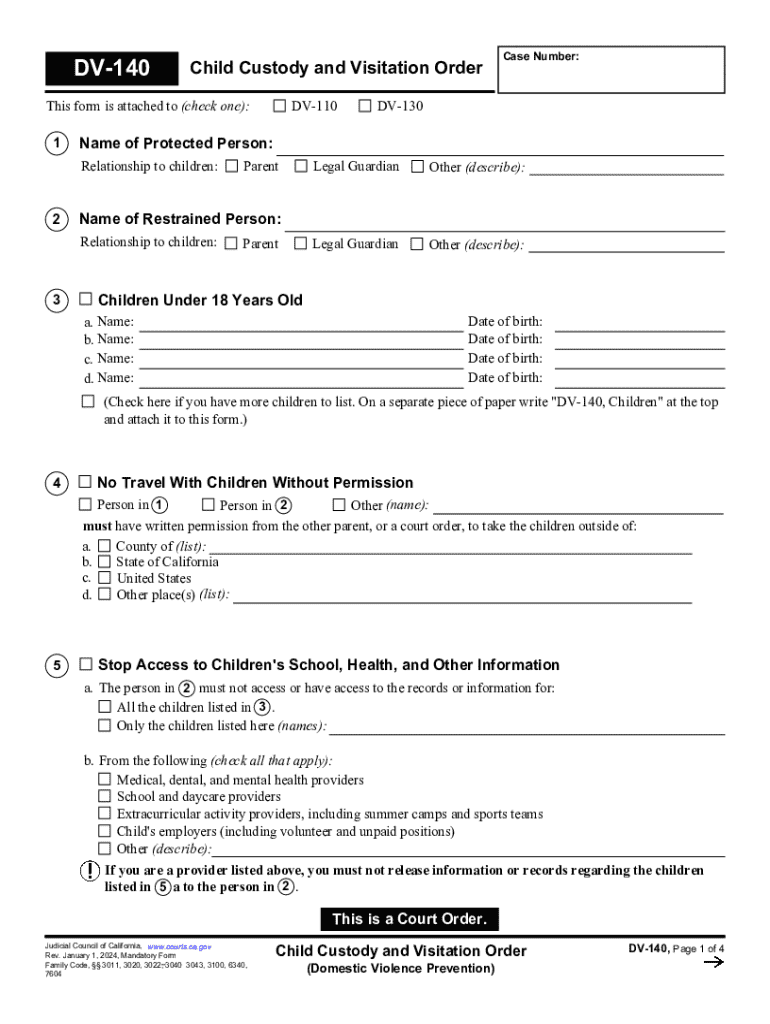
- Begin by identifying the parties involved. Check the appropriate box for 'Parent', 'Legal Guardian', or 'Other' and provide the names of the restrained and protected persons.
- List all children under 18 years old, including their names and dates of birth. If you have more children, indicate this and attach a separate sheet as instructed.
- Specify any restrictions on travel with the children, detailing required permissions for leaving specified areas.
- Indicate access limitations to children's records by checking applicable providers such as medical or educational institutions.
- Fill out custody arrangements, specifying legal and physical custody preferences, and include any necessary explanations for joint custody decisions.
- Detail visitation arrangements, including supervised visits if applicable, along with scheduling specifics.
- Review all entries for accuracy before saving your completed form.
Start using our platform today to easily fill out your Child Custody and Visitation Orders form for free!
Fill out How to Get Child Custody and Visitation Orders with Your online
It's free
It's free
See more How to Get Child Custody and Visitation Orders with Your versions
We've got more versions of the How to Get Child Custody and Visitation Orders with Your form. Select the right How to Get Child Custody and Visitation Orders with Your version from the list and start editing it straight away!
Security and compliance
At DocHub, your data security is our priority. We follow HIPAA, SOC2, GDPR, and other standards, so you can work on your documents with confidence.
Learn more


