Application for inspection 2018 docx-2026

Get Form
new jersey inspection housing certificate Preview on Page 1

Here's how it works

01. Edit your new jersey inspection housing certificate online
Type text, add images, blackout confidential details, add comments, highlights and more.

02. Sign it in a few clicks
Draw your signature, type it, upload its image, or use your mobile device as a signature pad.

03. Share your form with others
Send it via email, link, or fax. You can also download it, export it or print it out.

How to use or fill out Application for inspection 2018 docx with our platform

Form edit decoration
9.5
Ease of Setup
DocHub User Ratings on G2
9.0
Ease of Use
DocHub User Ratings on G2
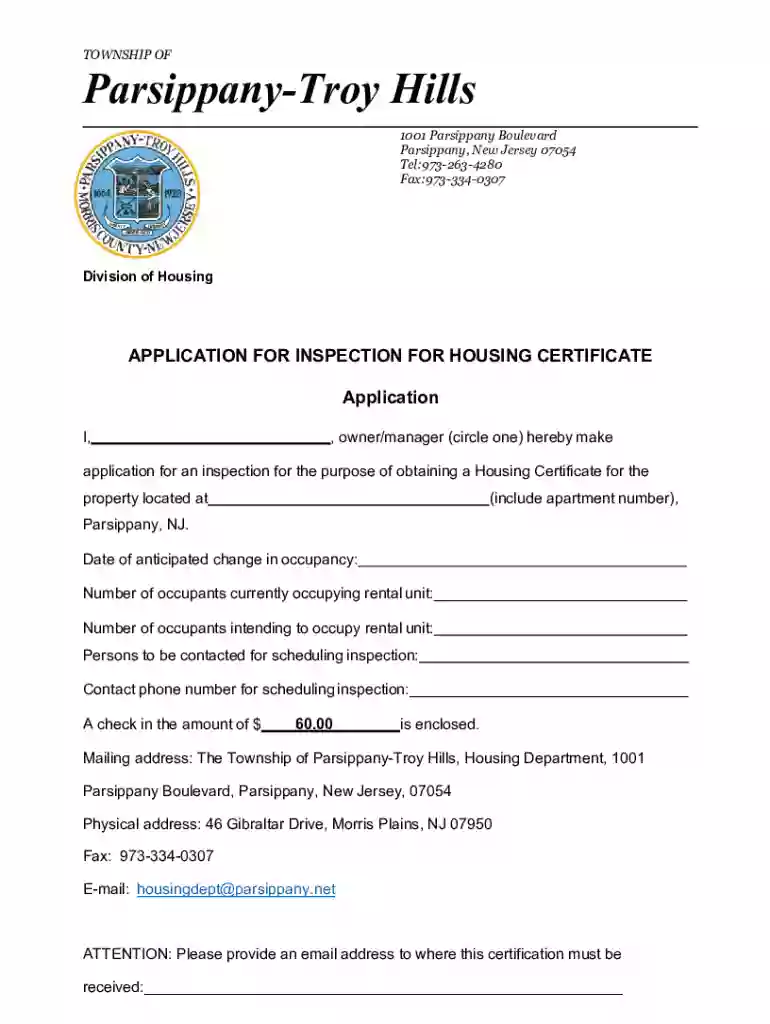
  1. Click ‘Get Form’ to open the Application for inspection 2018 docx in the editor.
  2. Begin by filling in your name as the owner or manager. Circle the appropriate title to indicate your role.
  3. Provide the property address, including the apartment number, where the inspection is requested.
  4. Indicate the date of anticipated change in occupancy and specify the current and intended number of occupants for the rental unit.
  5. List the persons to be contacted for scheduling the inspection along with their contact phone number.
  6. Enter the amount of $60.00 enclosed as a check for processing your application.
  7. Fill in your mailing address and provide an email address where you would like to receive certification.

Start using our platform today to easily complete and submit your Application for inspection!

See more Application for inspection 2018 docx versions

We've got more versions of the Application for inspection 2018 docx form. Select the right Application for inspection 2018 docx version from the list and start editing it straight away!
Versions Form popularity Fillable & printable
2024 4.8 Satisfied (57 Votes)
2023 4.6 Satisfied (29 Votes)
2023 4.2 Satisfied (33 Votes)
2023 4.8 Satisfied (51 Votes)
2023 4.3 Satisfied (30 Votes)
2023 4.4 Satisfied (43 Votes)
2023 4.1 Satisfied (50 Votes)
2022 4.8 Satisfied (52 Votes)
2022 4.1 Satisfied (32 Votes)
2022 4.7 Satisfied (57 Votes)
2022 4.8 Satisfied (152 Votes)
2022 4.8 Satisfied (68 Votes)
2022 4.3 Satisfied (38 Votes)
2021 4.8 Satisfied (60 Votes)
2021 4.8 Satisfied (162 Votes)
be ready to get more

Complete this form in 5 minutes or less

Get form

Got questions?

We have answers to the most popular questions from our customers. If you can't find an answer to your question, please contact us.
Contact us
The Work Inspection Request (WIR) is one of the quality controls processes that need to be monitored, evaluated, and reported in the project control system (PCS). This process is important for verifying and approving the work in place included in the monthly interim payment certificate (IPC) application.
An inspection request form is a document used to request inspections at various stages of a construction project. It provides essential details such as project information, location, type of inspection needed, and scheduling preferences.
What should you include in your Work Inspection Requests? Project and inspection details, such as the project name, location, date and time, and permit number. The items that will be inspected, with a clear description of the scope of work and specific areas or elements that need attention.
Things to consider when conducting a workplace inspection Listen to the concerns of workers and their representatives. Review and analyse workplace hazards and incident reporting data. Identify existing and potential hazards and determine their underlying cause.

Security and compliance

At DocHub, your data security is our priority. We follow HIPAA, SOC2, GDPR, and other standards, so you can work on your documents with confidence.

Learn more
ccpa2
pci-dss
gdpr-compliance
hipaa
soc-compliance