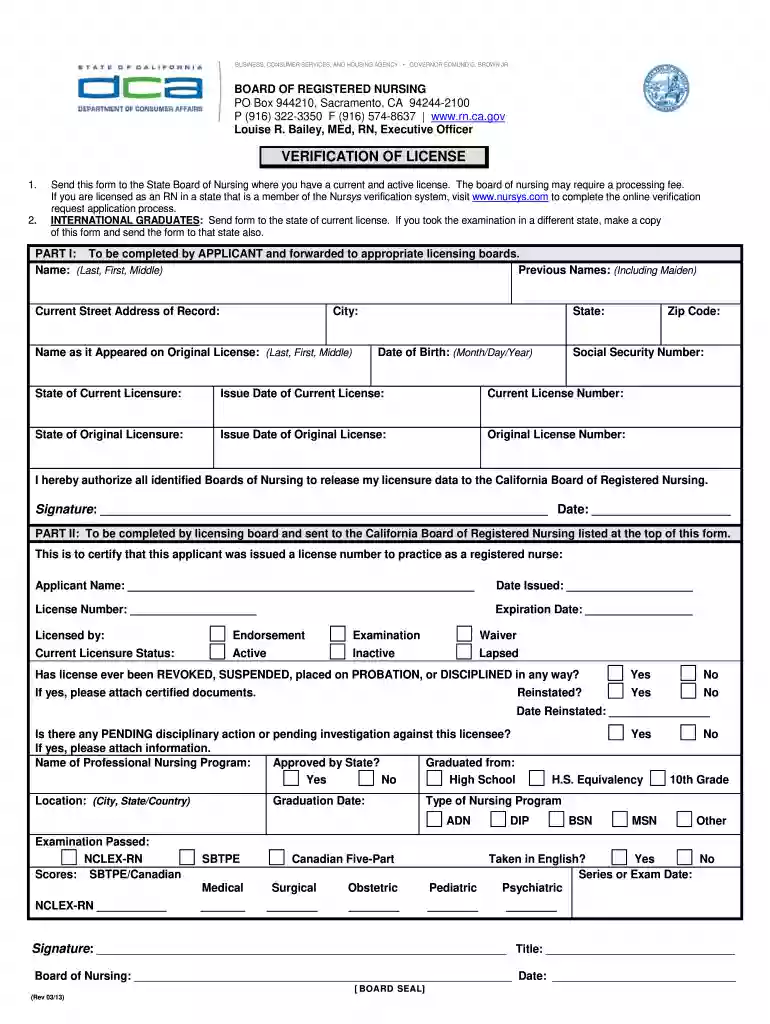
california board of nursing application form Preview on Page 1

California board of nursing 2026

Here's how it works

  • 01. Edit your california board of nursing application form online

    Type text, add images, blackout confidential details, add comments, highlights and more.

  • 02. Sign it in a few clicks

    Draw your signature, type it, upload its image, or use your mobile device as a signature pad.

  • 03. Share your form with others

    Send california bon via email, link, or fax. You can also download it, export it or print it out.

How to use or fill out California Board of Nursing with our platform

Form edit decoration
9.5
Ease of Setup
DocHub User Ratings on G2
9.0
Ease of Use
DocHub User Ratings on G2
  1. Click ‘Get Form’ to open the California Board of Nursing verification form in the editor.
  2. Begin by filling out Part I as the applicant. Enter your full name, including any previous names, and your current street address along with city, state, and zip code.
  3. Provide your date of birth and social security number. Then, indicate your state of current licensure and include the issue date and license number.
  4. Complete the section regarding your original licensure by providing the state, issue date, and original license number.
  5. Sign and date the authorization statement allowing nursing boards to release your data to the California Board of Registered Nursing.
  6. If applicable, ensure that Part II is completed by the licensing board before sending it to the California Board.

Start using our platform today for free to streamline your document editing and submission process!

See more california board of nursing application form versions

We've got more versions of the california board of nursing application form form. Select the right california board of nursing application form version from the list and start editing it straight away!

VersionsForm popularityFillable & printable
20254 Satisfied (34 Votes)
20254.8 Satisfied (31 Votes)
20254.3 Satisfied (34 Votes)
20254.2 Satisfied (34 Votes)
20254.6 Satisfied (55 Votes)
20254.5 Satisfied (44 Votes)
20254.2 Satisfied (37 Votes)
20254.7 Satisfied (34 Votes)
20244.3 Satisfied (21 Votes)
20244.6 Satisfied (51 Votes)
20244.5 Satisfied (23 Votes)
20244.8 Satisfied (29 Votes)
20244.1 Satisfied (28 Votes)
20244.9 Satisfied (51 Votes)
20244.4 Satisfied (31 Votes)

be ready to get more

Complete this form in 5 minutes or less

Got questions?

We have answers to the most popular questions from our customers. If you can't find an answer to your question, please contact us.

What is the fastest way to become a nurse in California? The fastest way for a non-nurse with a prior bachelors degree to become an RN in California is through a 12-15 month ABSN program.
You can become an RN in California through one of the following educational paths, as outlined by the California Board of Registered Nursing (BRN): Associate degree of nursing (ADN) program: An ADN program usually takes two to three years to complete. (ACCs program takes as few as 20 months!)
To check the most recent information available regarding an RN license or to view public documents regarding any actions taken, please check the individuals license status through the DCA License Search page.The license information provided through this search page is primary source data from the Board of Registered

Security and compliance

At DocHub, your data security is our priority. We follow HIPAA, SOC2, GDPR, and other standards, so you can work on your documents with confidence.

california board of nursing educational breakdown form

Understanding The California Board of Nursing

Jun 19, 2023 The Nursing Board of California is the regulatory body responsible for licensing and oversight of nurses and nursing assistants in the state ofRead more

Learn more
Board of Vocational Nursing Psychiatric Technicians - CA.gov

To contact the Board, call (916) 263-7800 or email bvnpt@dca.ca.gov. Disciplinary Guidelines. The Board of Vocational Nursing andRead more

Learn more
If you believe that this page should be taken down, please follow our DMCA take down process here