Green shield dependent 2026

Get Form
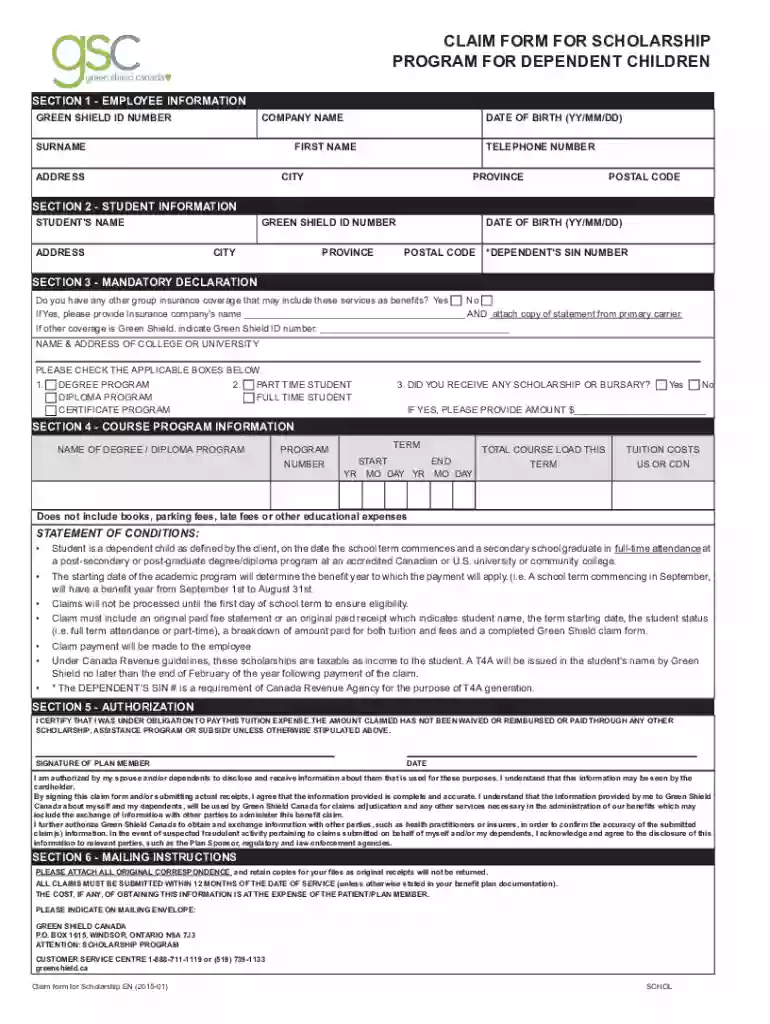
greenshield scholarship form Preview on Page 1

Here's how it works

01. Edit your greenshield scholarship form online
Type text, add images, blackout confidential details, add comments, highlights and more.

02. Sign it in a few clicks
Draw your signature, type it, upload its image, or use your mobile device as a signature pad.

03. Share your form with others
Send green shield dependent via email, link, or fax. You can also download it, export it or print it out.

How to use or fill out green shield dependent with our platform

Form edit decoration
9.5
Ease of Setup
DocHub User Ratings on G2
9.0
Ease of Use
DocHub User Ratings on G2
  1. Click ‘Get Form’ to open the green shield dependent form in the editor.
  2. Begin with Section 1, Employee Information. Fill in your Green Shield ID number, company name, date of birth, first name, surname, address, telephone number, province, city, and postal code.
  3. Move to Section 2 for Student Information. Enter the student's name and address along with their Green Shield ID number, province, city, date of birth, and postal code. Don’t forget to include the dependent's SIN number.
  4. In Section 3, Mandatory Declaration, indicate if you have other group insurance coverage by selecting 'Yes' or 'No'. If applicable, provide the insurance company's name and attach a statement from the primary carrier.
  5. Complete Section 4 by detailing the course program information including the name of the degree/diploma program and its term dates. Specify tuition costs while noting that additional fees are not included.
  6. Finally, in Section 5 - Authorization, certify your obligation to pay tuition expenses by signing and dating the form.

Start filling out your green shield dependent form online for free today!

See more green shield dependent versions

We've got more versions of the green shield dependent form. Select the right green shield dependent version from the list and start editing it straight away!
Versions Form popularity Fillable & printable
2024 4.8 Satisfied (57 Votes)
2023 4.6 Satisfied (29 Votes)
2023 4.2 Satisfied (33 Votes)
2023 4.8 Satisfied (51 Votes)
2023 4.3 Satisfied (30 Votes)
2023 4.4 Satisfied (43 Votes)
2023 4.1 Satisfied (50 Votes)
2023 4.8 Satisfied (43 Votes)
2022 4.8 Satisfied (52 Votes)
2022 4.1 Satisfied (32 Votes)
2022 4.7 Satisfied (57 Votes)
2022 4.8 Satisfied (152 Votes)
2022 4.8 Satisfied (68 Votes)
2022 4.3 Satisfied (38 Votes)
2021 4.8 Satisfied (60 Votes)
be ready to get more

Complete this form in 5 minutes or less

Get form

Got questions?

We have answers to the most popular questions from our customers. If you can't find an answer to your question, please contact us.
Contact us
You typically cant add a friend to your health insurance unless special circumstances are at play, such as: You have a defined relationship with the friend and provide financial support for over half of their expenses.
Family members eligible for coverage under your Self and Family enrollment are your spouse (including a valid common-law marriage) and children under age 26, including legally adopted children, stepchildren, and recognized natural (born out of wedlock) children.
Legally, child dependents can stay on their parents health insurance until age 26, even if they are eligible through their own employer. Even if you get married, even if you move out, even if you make a million dollars a year. If youre under 26, you can be carried as a child dependent by your parent.
Spouse/partner and/or unmarried children (as defined above), under age 21 who live with the applicant and are not regularly employed. NOTE: Children over 21 are eligible if they became dependent upon the subscriber by reason of mental or physical disability prior to their 21st birthday.
Any children for whom you are a legal guardian can qualify as dependents for dependent life insurance purposes. That includes biological children, adopted children, and stepchildren. However, dependents may lose eligibility at age 26, similar to how health insurance works.

Security and compliance

At DocHub, your data security is our priority. We follow HIPAA, SOC2, GDPR, and other standards, so you can work on your documents with confidence.

Learn more
ccpa2
pci-dss
gdpr-compliance
hipaa
soc-compliance
be ready to get more

Complete this form in 5 minutes or less

Get form