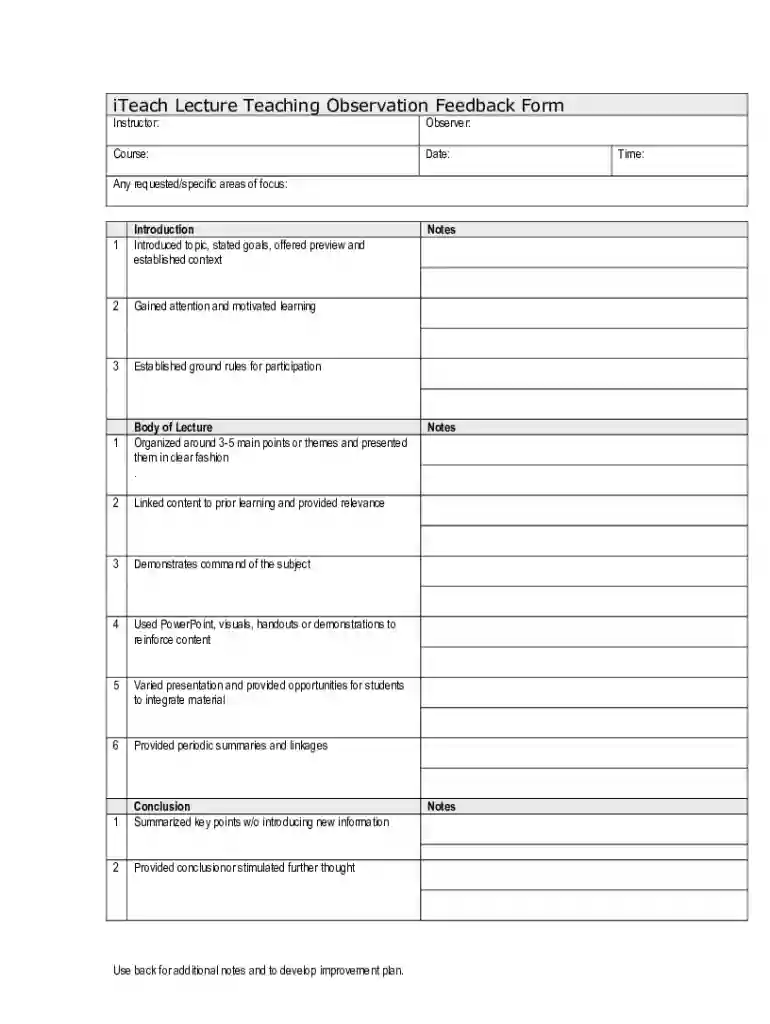
Classroom Observation CARE Form 2026

Get Form
Classroom Observation CARE Form Preview on Page 1

Here's how it works

01. Edit your form online
Type text, add images, blackout confidential details, add comments, highlights and more.

02. Sign it in a few clicks
Draw your signature, type it, upload its image, or use your mobile device as a signature pad.

03. Share your form with others
Send it via email, link, or fax. You can also download it, export it or print it out.

How to use or fill out Classroom Observation CARE Form with our platform

Form edit decoration
9.5
Ease of Setup
DocHub User Ratings on G2
9.0
Ease of Use
DocHub User Ratings on G2
  1. Click ‘Get Form’ to open the Classroom Observation CARE Form in the editor.
  2. Begin by filling in the instructor, observer, course, and date fields at the top of the form. This information sets the context for your observation.
  3. In the 'Introduction' section, evaluate how well the instructor introduced the topic and stated goals. Use checkboxes or comments to provide feedback on each component.
  4. Move to the 'Body of Lecture' section. Assess how organized the lecture was around main points. You can add notes on visuals used and student engagement opportunities.
  5. In the 'Conclusion' section, summarize your observations regarding how effectively key points were summarized without introducing new information.
  6. Complete the 'Delivery' section by noting strengths and areas for improvement based on your observations of enthusiasm, interaction, and time management.
  7. Utilize additional space provided for notes and recommendations to develop a comprehensive improvement plan.

Start using our platform today to streamline your form completion process for free!

See more Classroom Observation CARE Form versions

We've got more versions of the Classroom Observation CARE Form form. Select the right Classroom Observation CARE Form version from the list and start editing it straight away!
Versions Form popularity Fillable & printable
2024 4.3 Satisfied (21 Votes)
2024 4.6 Satisfied (51 Votes)
2024 4.5 Satisfied (23 Votes)
2024 4.8 Satisfied (29 Votes)
2023 4.7 Satisfied (42 Votes)
2023 4.4 Satisfied (48 Votes)
2023 4 Satisfied (63 Votes)
2023 4.5 Satisfied (26 Votes)
2023 4.6 Satisfied (34 Votes)
2023 4.2 Satisfied (30 Votes)
2023 3.9 Satisfied (31 Votes)
2023 4.3 Satisfied (42 Votes)
2023 4.7 Satisfied (39 Votes)
2023 4.4 Satisfied (22 Votes)
2023 4.2 Satisfied (51 Votes)
be ready to get more

Complete this form in 5 minutes or less

Get form

Got questions?

We have answers to the most popular questions from our customers. If you can't find an answer to your question, please contact us.
Contact us
First, you record your observations of a particular setting or situation--that is, take field notes. Next, you interpret those notes according to relevant criteria. Finally, you write a well organized paper that presents your observations and interpretations, usually with the aim of answering a research question.
The observation process is very straightforward: observe and reflect, document and gather evidence, plan and act, and finally, assess.
A formal classroom observation example might involve an administrator dropping in on a teachers classroom during a specific lesson. Normal evaluation observations are generally done once a year but may be done more often. For some teachers, this type of evaluation is when they thrive.
Teacher caring and support Showing students that you care about them as people and are interested in their well-being. Showing willingness to provide extra help to students when they need it. Ensuring that students feel they are being treated fairly. Finding ways to include topics that students want to talk about.
Some well-known methods include anecdotal observations, running records, time-sampling, sociograms and checklists. Photos, audio or video records as well as learning stories are also valuable ways to build understandings and interpret the learning, interests, abilities, and skills of children.

Security and compliance

At DocHub, your data security is our priority. We follow HIPAA, SOC2, GDPR, and other standards, so you can work on your documents with confidence.

Learn more
ccpa2
pci-dss
gdpr-compliance
hipaa
soc-compliance
be ready to get more

Complete this form in 5 minutes or less

Get form

People also ask

Classroom observations generally fall into two categories, informal observations, and formal observations. Informal observations tend to be shorter (3 to 20 minutes) and go by many names.
Types of Classroom Observation Learning walk through. Goal-setting and implementation walk through. Supervisory walk through.

Related links