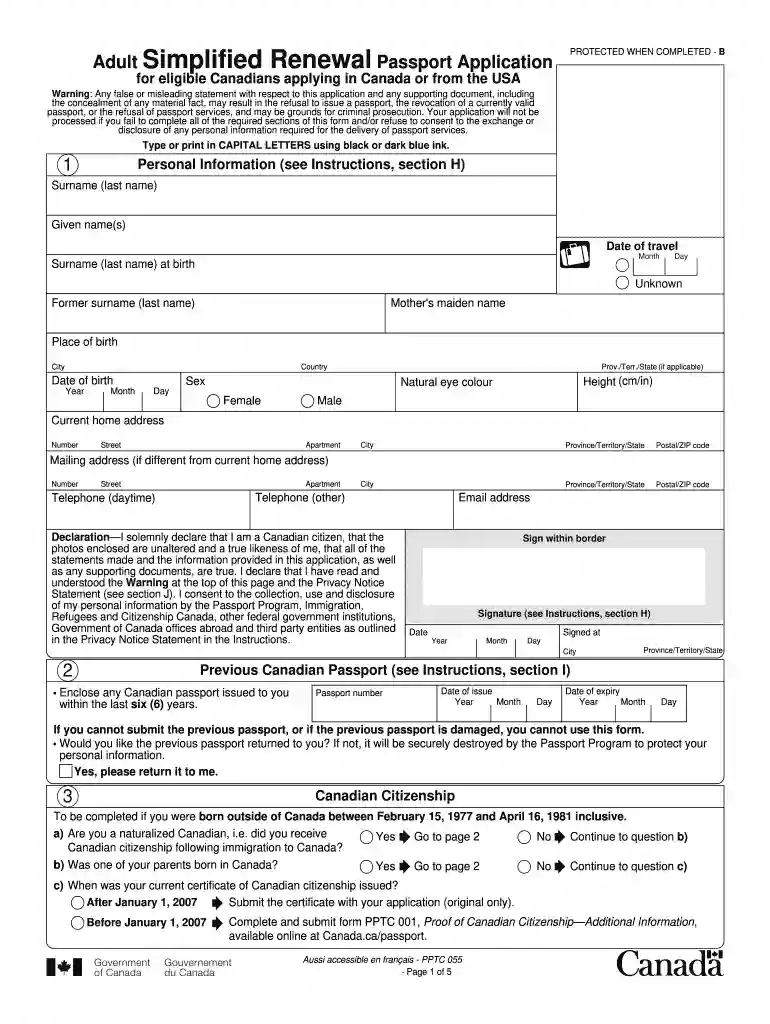
Passport renewal form canada 2015-2026

Get Form
adult passport renewal form Preview on Page 1

Here's how it works

01. Edit your adult passport renewal form online
Type text, add images, blackout confidential details, add comments, highlights and more.

02. Sign it in a few clicks
Draw your signature, type it, upload its image, or use your mobile device as a signature pad.

03. Share your form with others
Send passport renewal form via email, link, or fax. You can also download it, export it or print it out.

How to use or fill out passport renewal form Canada 2015 with our platform

Form edit decoration
9.5
Ease of Setup
DocHub User Ratings on G2
9.0
Ease of Use
DocHub User Ratings on G2
  1. Click ‘Get Form’ to open the passport renewal form Canada 2015 in the editor.
  2. Begin by filling out your personal information. Enter your surname, given names, date of birth, and place of birth in capital letters. Ensure that this information matches exactly with your previous passport.
  3. Complete the section regarding your previous Canadian passport. Include the number, date of issue, and expiry date. If you cannot submit your previous passport, note that you will need to complete a different application form.
  4. Indicate your citizenship status if born outside Canada between February 15, 1977, and April 16, 1981. Answer the questions regarding naturalization and provide any necessary documentation.
  5. Choose the period of validity for your new passport (5-year or 10-year) and provide additional personal information as required.
  6. Finally, review all sections for accuracy before signing and dating the declaration at the end of the form.

Start using our platform today to easily fill out your passport renewal form for free!

See more passport renewal form canada 2015 versions

We've got more versions of the passport renewal form canada 2015 form. Select the right passport renewal form canada 2015 version from the list and start editing it straight away!
Versions Form popularity Fillable & printable
2024 4.8 Satisfied (30 Votes)
2023 4.9 Satisfied (41 Votes)
2022 4.4 Satisfied (58 Votes)
2022 4.8 Satisfied (120 Votes)
2021 4.3 Satisfied (61 Votes)
2020 4.2 Satisfied (106 Votes)
2018 4.1 Satisfied (86 Votes)
2015 4.3 Satisfied (804 Votes)
2012 4.2 Satisfied (37 Votes)
be ready to get more

Complete this form in 5 minutes or less

Get form

Got questions?

We have answers to the most popular questions from our customers. If you can't find an answer to your question, please contact us.
Contact us
You must complete form PPTC 153, Adult General Passport Application.
PPTC 132: Declaration of Lost, Stolen, or Inaccessible Canadian Travel Document is an official form required when your passport has been:  Lost during travel or moving. Stolen in a public place or from your home. Damaged and cannot be submitted.
0:00 1:07 Option as they might run out of space for stamps. Dont forget to add your email address on yourMoreOption as they might run out of space for stamps. Dont forget to add your email address on your application to track its status with the online tracking. Tool. And thats it just a few steps.
Application - You will need Form DS-82. If you are renewing by mail: You can fill out Form DS-82 online, or. Download Form DS-82 [PDF, 1.3MB] and fill it out by hand, or.Sep 22, 2025
Yes, you can print a U.S. passport renewal form (DS-82) after filling it out online using the State Departments Form Filler tool on the travel.state.gov website, but you must print it single-sided on 8.5x11 paper, use black ink, and sign and date it before mailing; handwritten forms are generally not accepted for renewals, and only pages 5 6 typically need printing. Steps to print your DS-82 form: Go to the official source: Visit the U.S. Department of State passport forms page (pptform.state.gov) or the renewal page (travel.state.gov/renew). Use the Form Filler: Complete the DS-82 form online using the Form Filler tool for best results. Print Single-Sided: Print the completed form on one side of standard 8.5x11 paper. Use Black Ink: Fill out any handwritten parts (if applicable) in black ink; do not use correction fluid. Sign and Date: Sign and date the form after printing, but before mailing it. Include only necessary pages: You usually only need to print pages 5 and 6 of the PDF, as these contain the main application. Important Note: Ensure you dont sign until instructed or prompted by the form/instructions, and always print single-sided; double-sided forms are not accepted. AI can make mistakes, so double-check responsesPassport Forms - TravelSep 25, 2025 Print the form but do not sign it until we ask you to do so. Download the form if you are having issues with the form U.S. Department of State (.gov)Renew Your Passport by Mail - TravelUse our Form Filler tool to fill out your form on a desktop or laptop computer and then print it. Tips to complete your form: CompU.S. Department of State (.gov)

Security and compliance

At DocHub, your data security is our priority. We follow HIPAA, SOC2, GDPR, and other standards, so you can work on your documents with confidence.
Learn more
ccpa2
pci-dss
gdpr-compliance
hipaa
soc-compliance

People also ask

(DISPONIBLE EN FRANAIS - IMM 5444 F) This form is made available by Immigration, Refugees and Citizenship Canada and is not to be sold to applicants. NOTE: If you are applying to renew your present card, you should keep it until you receive your replacement card.
As of March 31, 2026, most fees for passports and travel document services will increase. Learn how these changes may affect your application. Passport applications from the US have to be mailed to Canada. We aim to process applications from the US within 20 business days, plus mailing time.
Follow these steps to renew your passport and track your status: Confirm you meet the requirements. Fill out your form online and print it. Submit your most recent passport. Submit other documents (if you are changing your name) Provide a photo. Pay your fees. Submit application. Enroll in email updates.

simplified passport renewal