






Definition & Importance of the 2014 IRS 990 Form
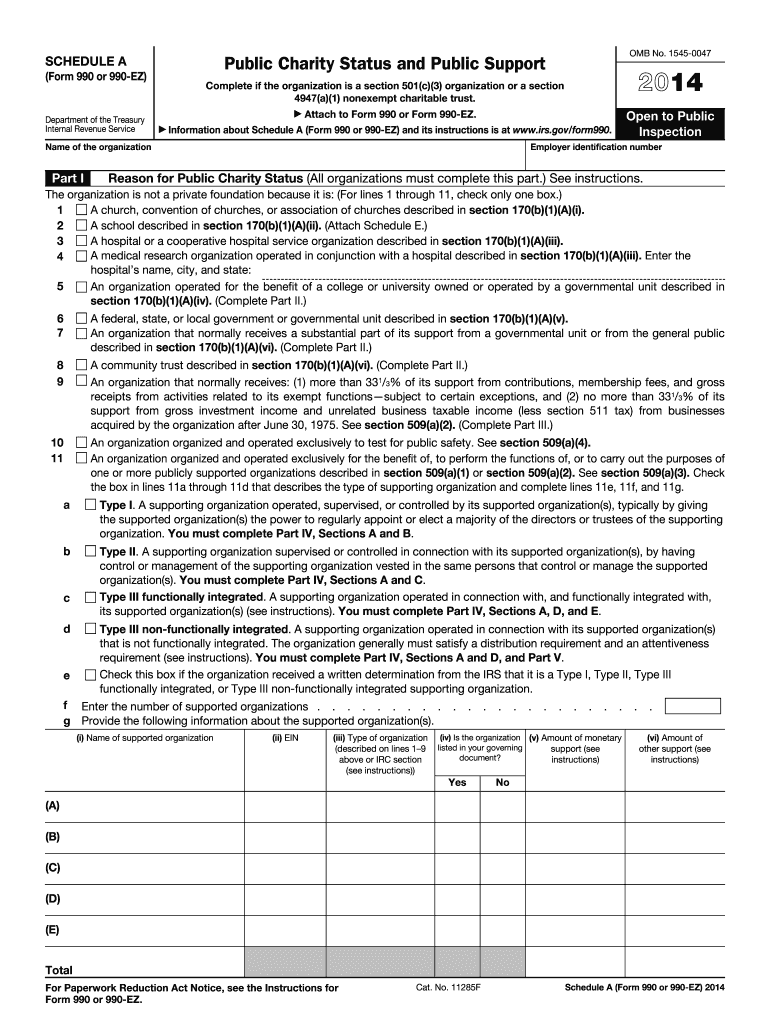
The 2014 IRS 990 Form is a critical document used by tax-exempt organizations, including section 501(c)(3) entities and nonexempt charitable trusts, to report their financial details to the Internal Revenue Service (IRS). This form is pivotal in outlining the organization's public charity status, sources of support, and compliance with federal tax regulations. Furthermore, it helps maintain transparency and accountability, offering insights into the financial operations and governance of charitable organizations, and assisting the IRS in ensuring that these entities continue to fulfill their tax-exempt purposes.
Steps to Complete the 2014 IRS 990 Form
Completing the 2014 IRS 990 Form involves several key steps:
- Gather Required Documents: Compile financial statements, records of donations, and other relevant financial data.
- Enter Basic Information: Fill in the organization's identification details, such as name, address, and EIN.
- Provide Financial Details: Report revenue, expenses, assets, and liabilities. This includes compensation for employees and officers.
- Public Charity Status: Indicate the criteria under which the organization qualifies as a public charity.
- Supplementary Schedules: Complete additional schedules like Schedule A for public support or Schedule B for contributors, according to the organization's activities.
- Review: Thoroughly check all entries for accuracy and completeness.
- Submission: Submit the form through the IRS's Electronic Filing process or mail it to the specified IRS address.
Who Uses the 2014 IRS 990 Form
The primary users of the 2014 IRS 990 Form are tax-exempt organizations, including:
- Public Charities: Recognized under section 501(c)(3).
- Private Foundations: Must file a different form, 990-PF.
- Nonexempt Charitable Trusts: As outlined in IRS designations.
- Other Nonprofits: Such as unions and trade associations eligible under IRS guidelines.
Key Elements of the 2014 IRS 990 Form
Understanding the crucial elements of the form is essential for accurate completion:
- Part I - Summary: Provides an overview of the organization's mission, program services, and summaries of revenues and expenses.
- Part II - Signature Block: The form must be signed by an authorized officer.
- Part III - Statement of Program Service Accomplishments: Details the main achievements of the organization.
- Part IV - Checklist of Required Schedules: Identifies additional schedules the organization needs to complete.
- Part V - Statements Regarding Other IRS Filings and Tax Compliance: Ensures the entity complies with federal requirements.
- Parts VI to XII: Cover governance, compensation, financial statements, and other disclosures.
IRS Guidelines for Completing the 2014 IRS 990 Form
The IRS provides comprehensive instructions to ensure the form is completed correctly:
- Eligibility: Ensure the organization meets criteria for using the 990 form.
- Accuracy: All numbers and statements must be correct and verifiable.
- Deadlines: Generally due on the 15th day of the 5th month after the fiscal year.
- Extensions: Nonprofits can request an extension using Form 8868.
Filing Deadlines & Important Dates
Timeliness is critical when filing the 2014 IRS 990 Form:
- Regular Deadline: Typically due on May 15th for calendar-year filers.
- Extension Requests: Use Form 8868 to apply for a 6-month extension.
- Late Filing: May result in penalties unless an extension has been granted.
Penalties for Non-Compliance
Failing to comply with IRS requirements can result in significant consequences:
- Monetary Penalties: Based on the organization's gross receipts.
- Loss of Tax-Exempt Status: After repeated non-filing.
- Increased Scrutiny: Potential audits and reviews from the IRS.
Software Compatibility for Filing
Using compatible software can streamline the filing process:
- Popular Tools: Many organizations use QuickBooks or TurboTax for financial management and form filing.
- IRS E-file: Free tools available for eligible organizations with smaller revenues.
- Third-Party Services: Various vendors offer tailored solutions for larger, more complex filings.
Examples of Using the 2014 IRS 990 Form in Practice
Understanding real-world scenarios helps grasp form application:
- Charitable Trust Case: A nonexempt charitable trust preparing its annual report detailing donations received and the percentage of public support.
- Public Charity Update: A 501(c)(3) organization updating its public charity status and documenting its planned fundraising activities.
Through these detailed sections, organizations can approach the 2014 IRS 990 Form with the clarity and confidence needed to maintain compliance and ensure continued tax-exempt benefits.