
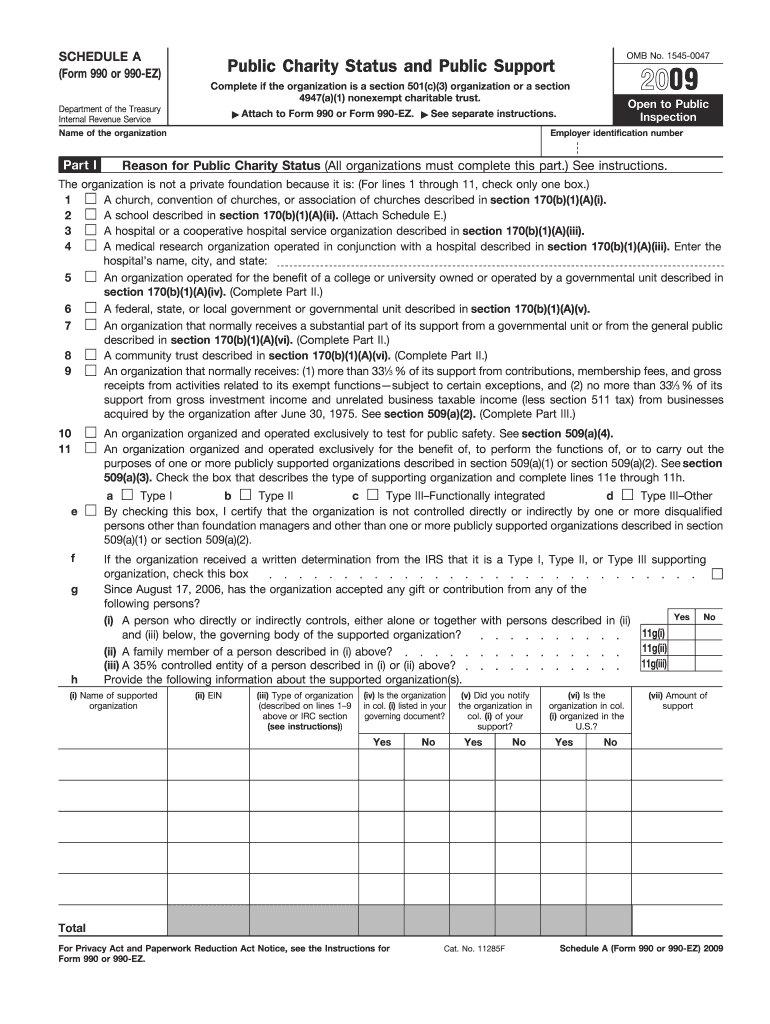







Definition of Form 990 Schedule A
Form 990 Schedule A is a supplemental form required by the Internal Revenue Service (IRS) for organizations that file Form 990 or 990-EZ. Specifically, this form is essential for section 501(c)(3) organizations and nonexempt charitable trusts. The main purpose of Schedule A is to report the public charity status and public support information. It allows these organizations to demonstrate and verify their eligibility for public charity status, as outlined by IRS regulations.
Purpose and Importance
- Public Charity Status: Form 990 Schedule A provides detailed criteria for determining whether an organization qualifies as a public charity. This is crucial because public charities are eligible for tax-deductible contributions and are subjected to a different set of regulations compared to private foundations.
- Public Support Test: The form includes various tests to assess if an organization meets the public support requirements, impacting their tax-exempt status.
Key Elements of 2010 Form 990 Schedule A
Completing Form 990 Schedule A requires an understanding of several key components, each critical for compliance and accurate reporting.
Public Support Calculation
- Aggregate Income: Organizations must calculate and report their public support as a percentage of total support. Income from different sources needs to be categorized and documented.
- Public Support Ratios: These ratios determine if an organization meets the threshold for public support, necessitating careful calculation and documentation.
Documentation Required
- Contributions: It is necessary to provide detailed information about contributions received, including amounts and the identity of contributors, if applicable.
- Expenses and Revenue: Organizations must also report detailed financial information about their expenses and revenue streams to support their claimed public support status.
Steps to Complete the 2010 Form 990 Schedule A
Filing Form 990 Schedule A involves several methodical steps to ensure comprehensive and accurate completion.
- Gather Required Information: Collect financial and operational data, including donations, grants, and other forms of support over the relevant period.
- Determine Correct Sections: Identify the sections of Schedule A that apply to your organization. This will vary based on factors such as the type of organization and sources of income.
- Complete Public Support Test: Accurately fill out the public support calculation to demonstrate compliance with IRS requirements for public charity status.
- Verify and Review: Thoroughly review the completed form for accuracy and completeness to prevent delays or compliance issues.
- Submission: Submit the form as part of the overall submission of Form 990 or Form 990-EZ by the specified deadline.
Who Typically Uses Form 990 Schedule A
This form is essential for specific entities looking to maintain their status and benefits under U.S. tax law.
Eligible Organizations
- 501(c)(3) Organizations: These include hospitals, universities, and many other public charities that rely on donations and grants.
- Nonexempt Charitable Trusts: These trusts are required to fill out Schedule A when they file a Form 990 or 990-EZ.
Practical Scenarios
- Educational Institutions: Universities and schools use Schedule A to report large-scale grant funding, ensuring compliance with public charity requirements.
- Healthcare Facilities: Hospitals, which may receive diverse funding, use this form to delineate sources of income and public support.
IRS Guidelines for Form 990 Schedule A
The IRS provides detailed instructions and regulations governing the completion and submission of Schedule A.
Compliance Regulations
- Filing Requirements: Organizations must meet specific criteria to use Schedule A with their filed Form 990 or 990-EZ.
- Accuracy and Honesty: All data must be verifiable and truthful, aligning with public record regulations for transparency and accountability.
- Publication: Completed forms become part of the public record, emphasizing the need for precise and honest reporting.
Submission Methods
- Electronic Submission: Many organizations choose to e-file, which can streamline the process and improve accuracy.
- Mail: Alternatively, submissions can be made via mail, following IRS guidelines for paper filing.
Penalties for Non-Compliance
Failing to accurately complete and submit Form 990 Schedule A can result in significant penalties.
Consequences
- Financial Penalties: Organizations may face fines for inaccuracies or failure to submit.
- Loss of Exempt Status: Continued non-compliance can result in the loss of tax-exempt status, severely impacting operations.
- Reputation Risks: Inaccurate filings may harm an organization's reputation and credibility with donors and the public.
Mitigation
- Timely Filing: Ensuring timely and accurate submission can prevent penalties and maintain public charity status.
- Regular Audits: Organizations are encouraged to perform internal audits to verify information before submitting.
Software Compatibility for Form 990 Schedule A
Leveraging modern software solutions can simplify the process of preparing and submitting Form 990 Schedule A.
Supported Tools
- Tax Preparation Software: Programs like TurboTax and QuickBooks can assist in organizing information and ensuring compliance with IRS requirements.
- Document Management Systems: Using platforms like DocHub can facilitate the editing and managing of form documents, enhancing efficiency and accuracy.
Integration Examples
- TurboTax: Offers modules specifically designed for nonprofit filings, helping to streamline data entry and ensure compliance.
- QuickBooks: Provides financial tracking capabilities, which are invaluable for accurate reporting on Form 990 Schedule A.
Digital vs. Paper Version of Form 990 Schedule A
The choice between digital and paper filing involves several considerations.
Digital Filing Advantages
- Efficiency: Reduces the time spent on submission, allows for easier corrections, and provides immediate confirmation of receipt.
- Cost-Effectiveness: Electronic filing can reduce costs associated with printing and mailing.
Paper Filing Preferences
- Accessibility: Some organizations, especially smaller ones, may prefer paper filing due to limited access to technology or a preference for tangible records.
Considerations
- Verification Needs: Both methods require accurate record-keeping and adherence to the same standards of accuracy.
By following detailed steps and guidelines, organizations can meet the compliance requirements and ensure the continued benefits associated with their public charity status. Using available resources and software tools aids in navigating the complexities of filing Form 990 Schedule A.




