



Here's how it works



How to use or fill out New York 6PR with our platform

- Click ‘Get Form’ to open the New York 6PR in the editor.
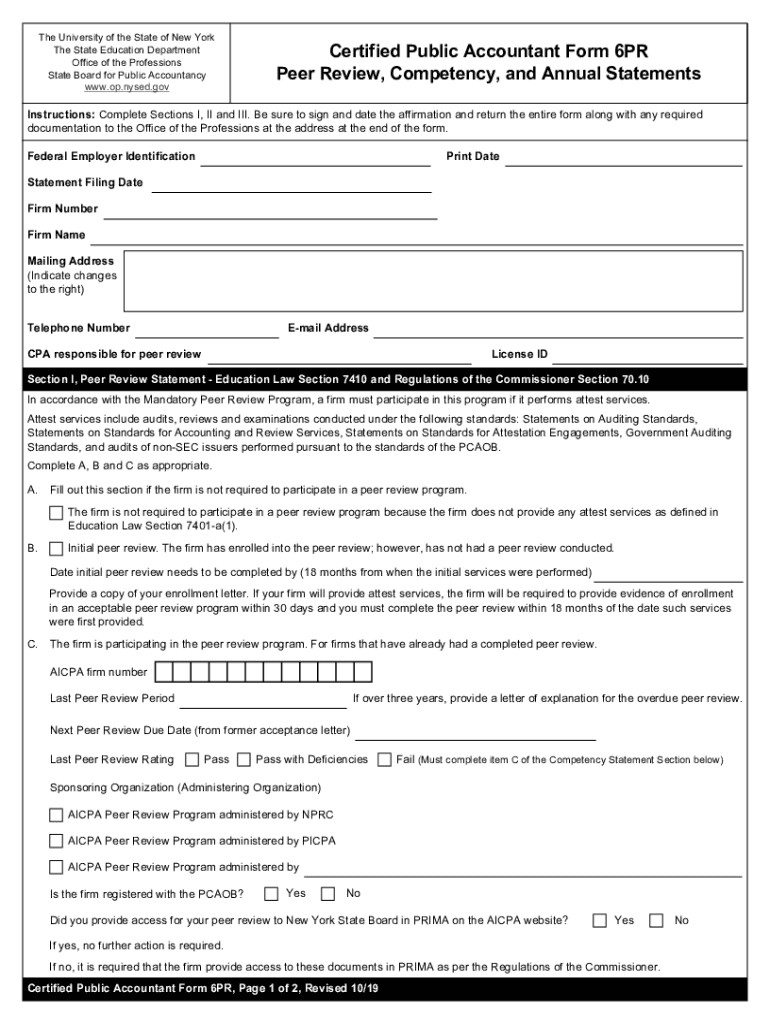
- Begin with Section I, Peer Review Statement. Fill in your firm’s Federal Employer Identification, Firm Number, and contact details. Indicate if your firm is required to participate in a peer review program by selecting A, B, or C based on your firm's services.
- Proceed to Section II, Competency Statement. Answer whether your firm provides attest or compilation services. If yes, complete items B and C regarding competency requirements and experience.
- Move to Section III, Annual Statement. Answer questions about your firm's operations in New York State and any disciplinary actions. Ensure all responses are accurate.
- Finally, sign and date the affirmation at the end of the form before submitting it along with any required documentation.
Start using our platform today for free to streamline your document editing and ensure a smooth completion of the New York 6PR!
It's free
See more new york 6pr versions
Got questions?
Can I sign my new york 6pr with my phone?
Yes, it is possible with DocHub. This secure and compliant online service has a phone-based signing option. Once you log in to your DocHub account and add your new york 6pr to our editor, fill out all required fields and utilize the Sign tool on the top barf. Click on Create your signature and select Phone from the available options. Here, you scan a QR code with your smartphone and draw your signature on your phone display, as you normally do when approving physical papers. If you access DocHub right from your mobile device, you can electronically sign your paperwork by drawing your electronic signature, uploading its photo, or simply with a typed name.
How do you complete new york 6pr on Android?
It is a no-brainer on a computer or via a mobile phone to fill out a new york 6pr with DocHub. All you need to do is open any installed internet browser on your smartphone and proceed to the DocHub site. Once authenticated, add your file and open it in editing mode. Use our toolbar to make your edits and save modifications. Optionally, keep your file in your files or send it to a recipient on the spot.
Which borough is Harlem in?
What is the 6th borough of NYC?
What is the 6th borough of New York City?
Security and compliance
At DocHub, your data security is our priority. We follow HIPAA, SOC2, GDPR, and other standards, so you can work on your documents with confidence.
Learn more