






Definition and Meaning of an Assistant Contract Template
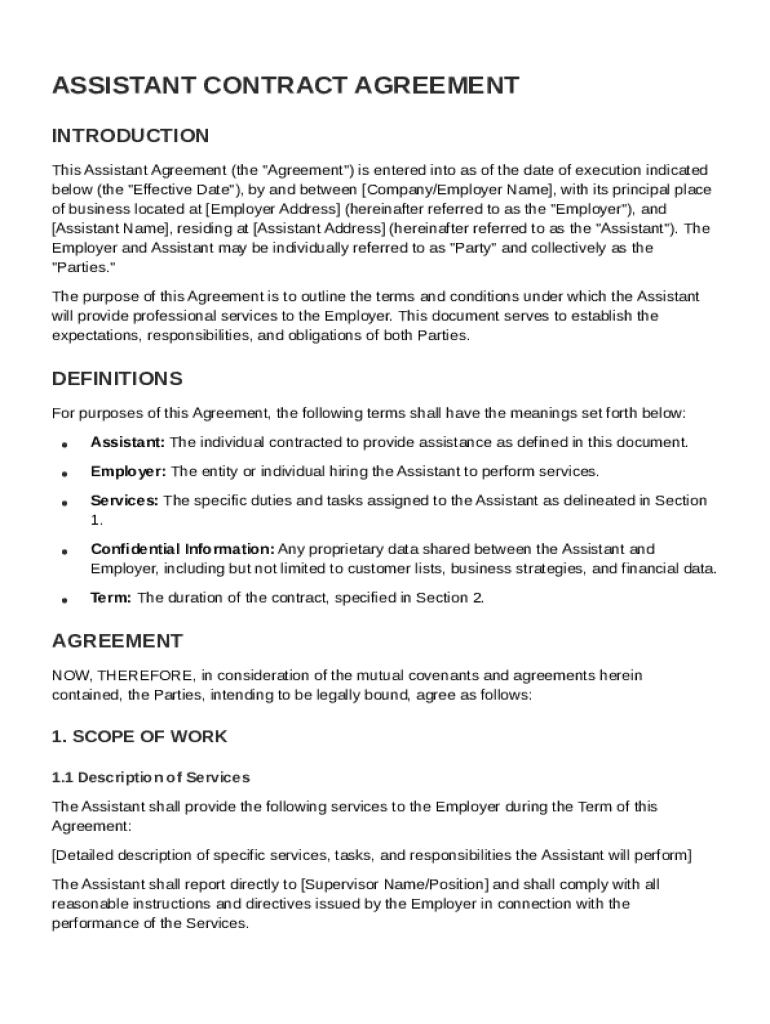
An Assistant Contract Template is a structured legal document used to formalize the terms under which an assistant provides services to an employer. This template includes various sections outlining the scope of services, compensation details, and confidentiality obligations that define the working relationship between the assistant and the employer. By utilizing a predefined template, both parties can ensure clarity and mutual understanding, reducing potential disputes. The document serves as a legal guide, clearly explaining the roles, rights, and responsibilities of each party, ultimately ensuring a clear, professional agreement.
Components Included
- Scope of Work: Defines the duties, responsibilities, and expectations from the assistant.
- Compensation Structure: Outlines payment terms, including salary, bonuses, or any other benefits.
- Confidentiality Obligations: Establishes guidelines for handling sensitive information.
- Termination Clauses: Details the conditions under which the contract can be ended by either party.
Practical Example
Consider a scenario in which a company hires a virtual assistant to manage scheduling and email correspondence. The Assistant Contract Template clearly articulates the tasks the assistant is expected to perform and how compensation will be provided, thereby enabling both the employer and the assistant to work within agreed parameters.
How to Use the Assistant Contract Template
Using the Assistant Contract Template involves understanding its components and tailoring them to suit the specific requirements of both the assistant and the employer. Start by filling out the fundamental details, such as the names of the parties involved, followed by the specific terms.
Steps to Utilize the Template
- Review All Sections: Ensure you understand each section's purpose before starting.
- Customize the Terms: Modify relevant sections, such as duties or payment, to suit the business needs.
- Legal Compliance: Check that all terms comply with applicable laws.
- Review and Edit: Have both parties review and agree to the terms. Seek legal advice if necessary.
Practical Scenario
An entrepreneur might use the Assistant Contract Template to onboard a new personal assistant. By detailing the tasks (e.g., booking travel, managing appointments) and agreeing on weekly payments, both parties have a clear, binding agreement.
Key Elements of the Assistant Contract Template
The Assistant Contract Template is comprised of essential elements that ensure clarity and legality. Each component is designed to protect the interests of both parties involved.
Important Elements
- Parties Involved: Clearly defines the employer and the assistant.
- Job Description: Outlines the assistant's specific duties.
- Work Schedule: Specifies working hours and expectations.
- Payment Terms: Details payment methods and schedules.
- Termination Conditions: Includes criteria for contract termination.
Detailed Analysis
Understanding these elements allows both parties to foresee potential issues and handle them proactively. For example, clear job descriptions help prevent misunderstandings about the assistant’s responsibilities.
Steps to Complete the Assistant Contract Template
Completing the Assistant Contract Template involves a series of steps aimed at ensuring the document accurately reflects the agreement between both parties.
Step-by-Step Guide
- Identify Parties: Clearly list the employer’s and assistant’s names and addresses.
- Define Work Scope: Clearly describe tasks and expectations.
- Agree on Compensation: Detail the payment structure, including any bonuses or benefits.
- Establish Confidentiality Measures: Indicate how confidential information is to be treated.
- Set Termination Terms: Outline the conditions that would terminate the agreement.
- Finalize and Sign: Both parties should thoroughly review the document before signing to confirm mutual agreement.
Scenario Example
A small business hires an executive assistant to streamline operations. Using the template, they specify duties such as data entry and meeting coordination, ensuring these tasks are formally documented and agreed upon.
Legal Use of the Assistant Contract Template in the U.S.
In the U.S., contracts are legal tools that bind parties to their agreed terms. The Assistant Contract Template is crafted to comply with U.S. legal standards by including necessary legal terminology and clauses.
Legal Considerations
- Compliance with State Laws: Ensure the contract aligns with the specific state regulations regarding employment contracts.
- Inclusion of Required Legal Clauses: Such clauses could involve non-disclosure agreements or non-compete agreements where applicable.
- Legal Validity: The template becomes legally binding once both parties consent and sign.
Practical Application
A legal review might be necessary to tailor the template appropriately for different states. This ensures all aspects, such as labor laws and confidentiality obligations, are adequately addressed.
Who Typically Uses the Assistant Contract Template
Typically, the Assistant Contract Template is utilized by employers engaging assistants for professional services. These range from virtual assistants to executive personal assistants.


Typical Users
- Small Businesses: Employ assistants for operational tasks.
- Entrepreneurs: Onboard personal assistants for business and personal tasks.
- Corporations: Utilize it to formalize the hire of administrative assistants.
Scenarios and Examples
For instance, a startup might use this template to hire an office assistant responsible for clerical work, thus formalizing the relationship and ensuring clarity in responsibilities.
State-Specific Rules for the Assistant Contract Template
While the Assistant Contract Template provides a general framework, certain elements must be tailored to comply with state-specific regulations.
Variations by State
- Employment Laws: Vary significantly concerning minimum wage, overtime, and other employee rights.
- Termination Policies: Different states have various rules regarding at-will employment and the notice period.
Practical Example
In California, for example, the state's stricter overtime laws might require specific clauses in the contract to address rest breaks and overtime remuneration appropriately.
Important Terms Related to the Assistant Contract Template
Understanding key terminology within the Assistant Contract Template is essential for both parties to ensure a sound agreement.
Key Terms
- Compensation: Monetary or non-monetary payment terms.
- Confidentiality: Obligations regarding the handling of sensitive information.
- Termination: Conditions under which the employment relationship can be severed.
- Scope of Work: Specific duties and responsibilities assigned to the assistant.
Explanation of Terms
These terms help clarify the working relationship, defining what each party can expect from the agreement. For instance, clear compensation terms help avoid disputes over payment schedules and amounts.
Each section not only provides clarity but ensures that both parties have a comprehensive understanding of their roles and the contractual requirements. By taking the time to thoroughly understand and complete the Assistant Contract Template, both employers and assistants can foster a professional and mutually beneficial working environment.