ssa 1372 form download Preview on Page 1

Ssa 1372 2015 form-2026

Here's how it works

  • 01. Edit your ssa 1372 form download online

    Type text, add images, blackout confidential details, add comments, highlights and more.

  • 02. Sign it in a few clicks

    Draw your signature, type it, upload its image, or use your mobile device as a signature pad.

  • 03. Share your form with others

    Send form ssa 1372 via email, link, or fax. You can also download it, export it or print it out.

How to use or fill out SSA 1372 2015 form with our platform

Form edit decoration
9.5
Ease of Setup
DocHub User Ratings on G2
9.0
Ease of Use
DocHub User Ratings on G2
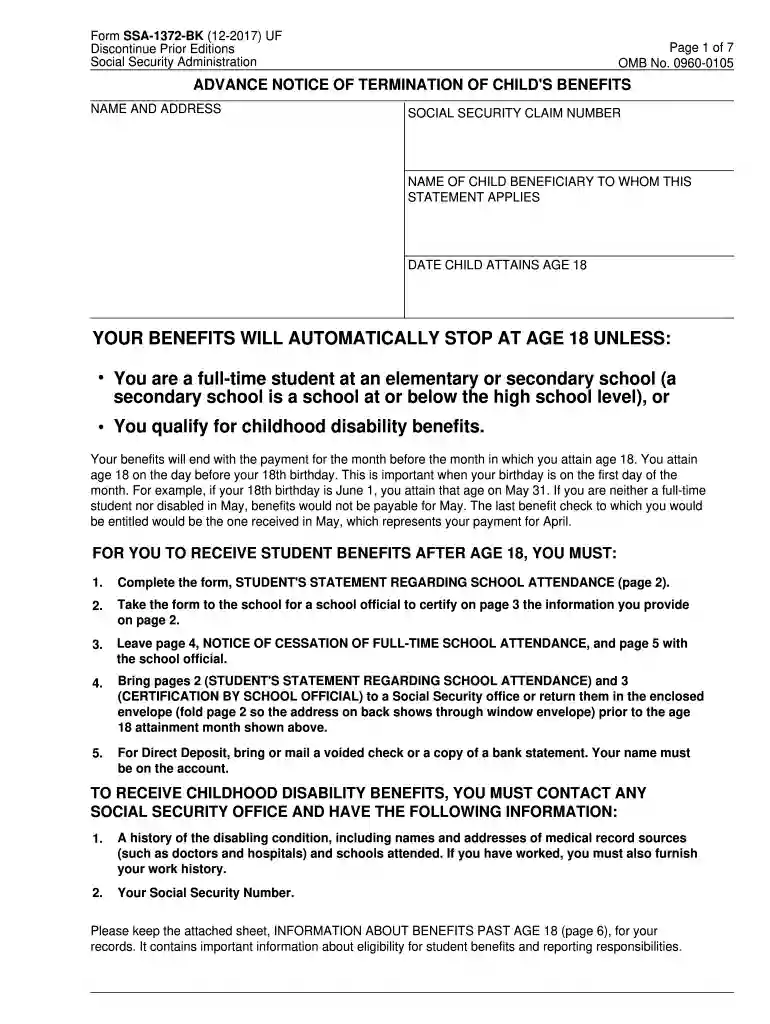
  1. Click ‘Get Form’ to open the SSA 1372 2015 form in the editor.
  2. Begin by filling in your name and address at the top of the form. Ensure that all information is accurate to avoid delays.
  3. Enter the Social Security claim number and the name of the child beneficiary. This information is crucial for processing your benefits.
  4. Indicate the date when the child will turn 18, as this affects benefit eligibility. Remember, benefits stop automatically unless certain conditions are met.
  5. Complete page 2, titled 'Student's Statement Regarding School Attendance.' Answer questions about current school attendance and provide details about your school program.
  6. Have a school official certify your attendance on page 3. This step is essential for maintaining eligibility for student benefits.
  7. Review all entries for accuracy before submitting. Use our platform’s tools to ensure everything is filled out correctly.

Start using our platform today to fill out your SSA 1372 form easily and for free!

See more ssa 1372 form download versions

We've got more versions of the ssa 1372 form download form. Select the right ssa 1372 form download version from the list and start editing it straight away!

VersionsForm popularityFillable & printable
20244.8 Satisfied (46 Votes)
20174.8 Satisfied (117 Votes)
20154.4 Satisfied (138 Votes)
20124.4 Satisfied (586 Votes)
20044 Satisfied (43 Votes)

be ready to get more

Complete this form in 5 minutes or less

Got questions?

We have answers to the most popular questions from our customers. If you can't find an answer to your question, please contact us.

Of course, electronically drawing your signature is appropriate, but only if you use a tool that complies with industry regulations and policies. Consider DocHub, which guarantees eSignature validity under ESIGN and UETA requirements. All you need to eSign your ssa 1372 bk is an account with DocHub and an internet connection. After you open your document in our editor, click Sign and select the Draw tool.

If you edit your ssa 1372 printable form pdf with DocHub, you will not need to look for other software or solutions to eSign it. An electronic signature is part of DocHub’s comprehensive editing toolset, which allows you to implement changes in your form without switching between websites. Just complete your form, double-check the correctness of your information and place your electronic signature at the end to make it submission-ready within minutes.

Benefits stop when your child reaches age 18 unless your child is a student or disabled. Within a family, a child can receive up to half of the parent's full retirement or disability benefit.
1. General information for recording statements on the SSA-795. Use an SSA-795 whenever a signed statement is required or desirable, except when we request some other form or questionnaire or we can readily adapt for the statement.
The SSA-3368: Adult Disability Report helps DDS to obtain a complete picture of the applicant's medical history and treatment. Complete information is essential. Be sure to include all information available to you.

Security and compliance

At DocHub, your data security is our priority. We follow HIPAA, SOC2, GDPR, and other standards, so you can work on your documents with confidence.

People also ask

We estimate that it will take about 3 minutes to read the instructions, gather the facts, and answer the questions. Send only comments relating to our time estimate above to: SSA, 6401 Security Blvd, Baltimore, MD 21235-6401.
About the SSA-455 The Disability Update Report is sent to beneficiaries who Social Security determined have a low probability of medical improvement when a previous full CDR was done.
The Social Security Administration (SSA) needs to determine both that your injuries or conditions are actively preventing you from working and that they'll continue to do so for some time. To determine this, the SSA needs a lot of information from you. One way you provide this information is through Form SSA-3373-BK.
SSA and its affiliated State disability determination services use Form SSA-827, "Authorization to Disclose Information to the Social Security Administration (SSA)" to obtain medical and other information needed to determine whether or not a claimant is disabled.
\u201cAny benefit that's paid after the month of the person's death needs to be refunded,\u201d Sherman said. With Social Security, each payment received represents the previous month's benefits. So if a person dies in August, the check for that month \u2014 which would be paid in September \u2014 would need to be returned if received.

form 1372

POMS: PR 08005.002 - Alaska - 06/05/2015 - Social Security

5 Jun 2015 — She provided an SSA 1372, dated in April 2014, indicating that she was in full-time attendance at Broussard Awaka Way Academy Homeschool.

Learn more
42 U.S. Code § 408 - Penalties - Law.Cornell.Edu

shall be guilty of a felony and upon conviction thereof shall be fined under title 18 or imprisoned for not more than five years, or both, except that in the ...

Learn more
Advance Notice of Termination of Childs Benefits

Your benefits will end with the payment for the month before the month in which you attain age 18. You attain age 18 on the day before your 18th birthday.

Learn more
If you believe that this page should be taken down, please follow our DMCA take down process here