Type text, add images, blackout confidential details, add comments, highlights and more.
02. Sign it in a few clicks
Draw your signature, type it, upload its image, or use your mobile device as a signature pad.
03. Share your form with others
Send north carolina workers permit via email, link, or fax. You can also download it, export it or print it out.
How to use or fill out nc workers permit with our platform
Ease of Setup
DocHub User Ratings on G2
Ease of Use
DocHub User Ratings on G2
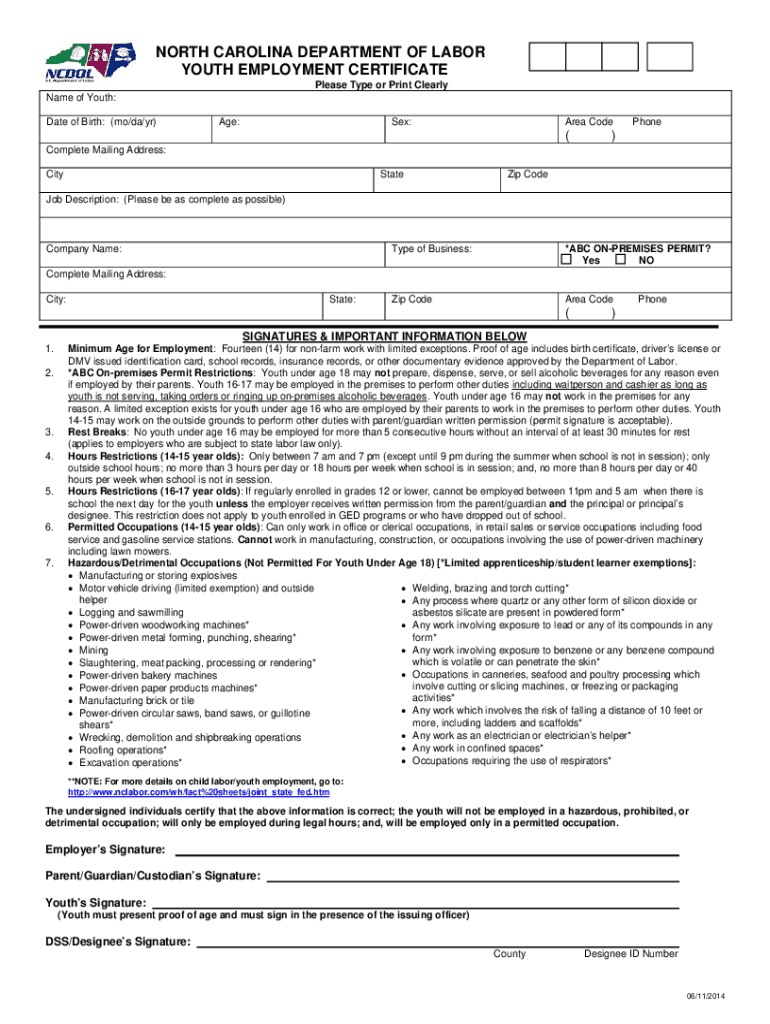
Click ‘Get Form’ to open the nc workers permit in the editor.
Begin by entering the youth's information, including their name, date of birth, and contact details. Ensure accuracy as this information is crucial for validation.
In the job description section, provide a detailed account of the proposed employment. This helps clarify the role and responsibilities expected from the youth.
Next, indicate whether the employer has an ABC on-premises permit. This is essential for businesses that serve alcohol, so select 'Yes' or 'No' accordingly.
Review all entered information in the final screen before printing. Make sure everything is correct to avoid any delays in processing.
Once completed, ensure that all required signatures are obtained from the youth, parent/guardian, and employer to validate the certificate.
Start using our platform today to easily fill out your nc workers permit online for free!
NC youth work permit applicationWorkers permit NC onlineYouth work permit NCNC youth work permit application pdfHow to get a work permit at 15 in north CarolinaWork permit for 14 year old in North CarolinaYouth employment CertificateNorth Carolina Department of Labor
Security and compliance
At DocHub, your data security is our priority. We follow HIPAA, SOC2, GDPR, and other standards, so you can work on your documents with confidence.
Further, no advance permits are required for fills, and while the state can comment on a companys coal ash fill plans, it does not have the power to deny them.Read more
Youth under the age of 18 who work in North Carolina must have a Youth Employment Certificate. You may contact the N.C. Department of Labor Wage and HourRead more
Cookie consent notice
This site uses cookies to enhance site navigation and personalize your experience.
By using this site you agree to our use of cookies as described in our Privacy Notice.
You can modify your selections by visiting our Cookie and Advertising Notice.