Type text, add images, blackout confidential details, add comments, highlights and more.
02. Sign it in a few clicks
Draw your signature, type it, upload its image, or use your mobile device as a signature pad.
03. Share your form with others
Send it via email, link, or fax. You can also download it, export it or print it out.
How to use or fill out Hospice Membership Notice - State of Michigan with our platform
Ease of Setup
DocHub User Ratings on G2
Ease of Use
DocHub User Ratings on G2
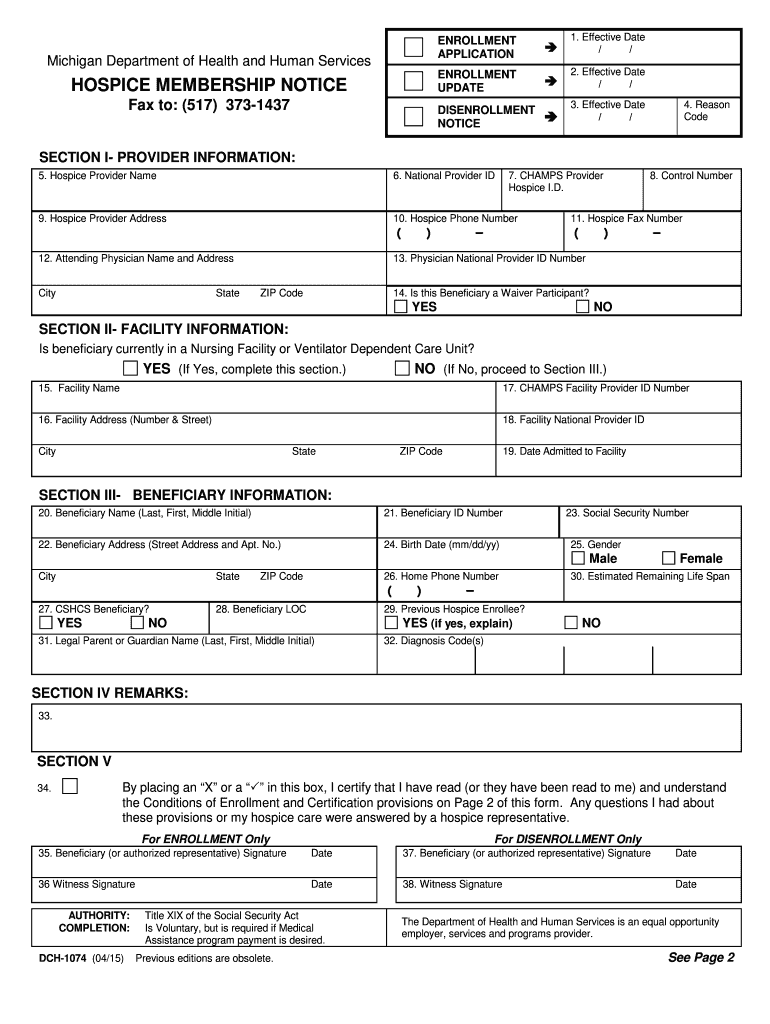
Click ‘Get Form’ to open the Hospice Membership Notice in the editor.
Begin by selecting the purpose of the form at the top right corner: Enrollment Application, Enrollment Update, or Disenrollment Notice. Enter the effective date for your selection.
In Section I, provide detailed information about the hospice provider including name, National Provider ID, address, and contact details.
If applicable, complete Section II with facility information if the beneficiary is currently in a nursing facility. Include facility name and address.
In Section III, fill out beneficiary information such as name, ID number, address, birth date, and gender. Ensure all fields are accurately completed.
Use Section IV for any additional remarks that may clarify beneficiary circumstances or service coordination needs.
Finally, ensure signatures are obtained in Section V from the beneficiary or authorized representative to certify understanding of enrollment conditions.
Start using our platform today to streamline your form completion process for free!
Fill out Hospice Membership Notice - State of Michigan - michigan online It's free
See more Hospice Membership Notice - State of Michigan - michigan versions
We've got more versions of the Hospice Membership Notice - State of Michigan - michigan form. Select the right Hospice Membership Notice - State of Michigan - michigan version from the list and start editing it straight away!
state of michigan hospice regulationsinpatient hospice michiganhospice of michigan lawsuithospice rules and regulationshospice fundinggenesee county hospicehospice house requirementscan hospice patients go to the hospital
Security and compliance
At DocHub, your data security is our priority. We follow HIPAA, SOC2, GDPR, and other standards, so you can work on your documents with confidence.
Jan 29, 2009 Providers are required to submit an Electronic/Paper Transmitter Identification Number. (ETIN) Application and a Certification StatementRead more
Jan 1, 2021 This Plan Document describes your Benefits available under the Plan, as well as, for example, who is eligible for Benefits, when eligibilityRead more
Cookie consent notice
This site uses cookies to enhance site navigation and personalize your experience.
By using this site you agree to our use of cookies as described in our Privacy Notice.
You can modify your selections by visiting our Cookie and Advertising Notice.