




01. Edit your form online
Type text, add images, blackout confidential details, add comments, highlights and more.

Type text, add images, blackout confidential details, add comments, highlights and more.

Draw your signature, type it, upload its image, or use your mobile device as a signature pad.

Send it via email, link, or fax. You can also download it, export it or print it out.
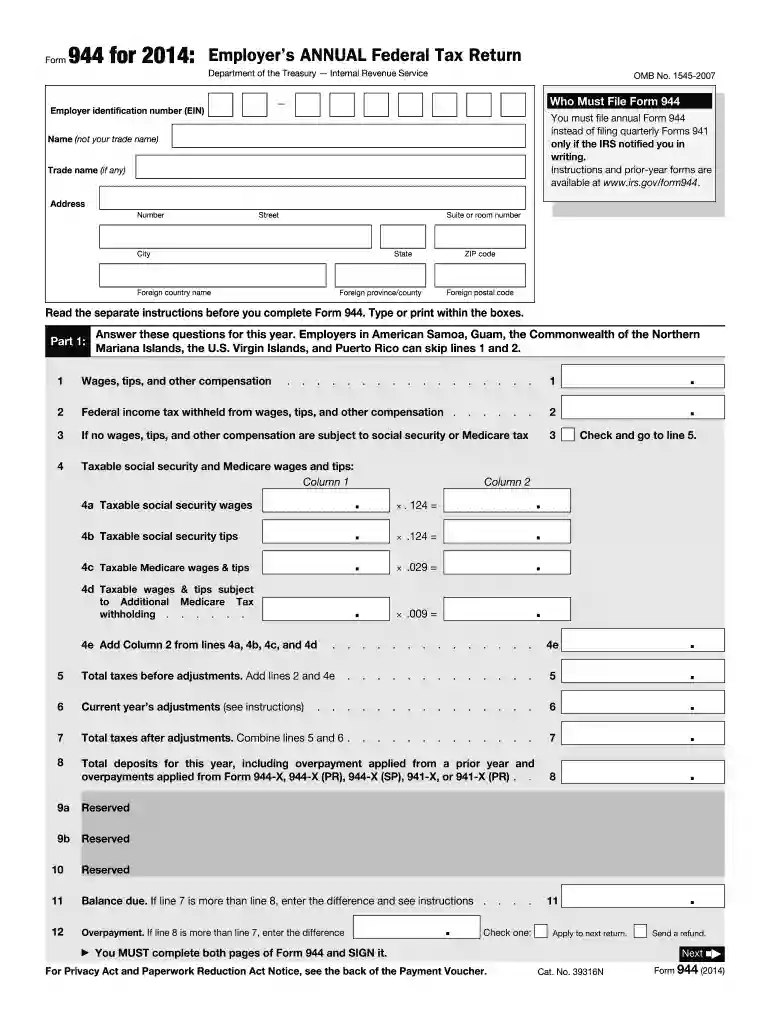
The 2014 Form 944, officially known as the Employer's Annual Federal Tax Return, is a form required by the Internal Revenue Service (IRS) in the United States. It is designed for small employers to report annual payroll taxes. The primary purpose of this form is to report wages, tips, other compensation, and the federal income tax that has been withheld. This form is specifically intended for those employers whose annual payroll tax liability is $1,000 or less.
Gather Necessary Information: Before you start filling out the form, make sure to have all required documents, including employee payroll information, Federal Employer Identification Number (FEIN), and details of federal income tax withheld.
Enter Business Identification Details: Include the legal name of your business, trade name, and FEIN in the top sections of the form to ensure correct identification.
Report Payroll and Tax Withholding: Record the total wages paid, federal income tax withheld, and taxable social security and Medicare wages in their respective sections.
Calculate Tax Liabilities: Use the specified instructions to calculate the payroll tax liability for social security, Medicare, and additional Medicare tax, ensuring all figures are accurate.
Include Any Deposits or Credits: Report any payments made throughout the year or applied credits. This includes overpayments from previous tax years.
Review and Sign the Form: Double-check all information for accuracy. The employer or an authorized representative should sign and date the form for submission.
Not all employers are eligible to use Form 944. It is primarily targeted at small employers whose total annual liability for social security, Medicare, and withheld federal income taxes is $1,000 or less. Employers must receive a notification from the IRS that permits them to file Form 944 instead of Form 941.


Employers need to submit the 2014 Form 944 by January 31, 2015. This deadline can be moved to February 10 if you deposited all taxes when due. Late filing can result in penalties and interest charges. The penalty is generally a certain percentage of the unpaid taxes.
There are multiple ways to submit the 2014 Form 944:
For eligible small employers, Form 944 helps simplify tax filing by reducing the frequency of submitting payroll tax forms. Instead of quarterly filings required by Form 941, Form 944 requires only an annual submission. This reduces administrative workload and helps employers manage time and resources more efficiently.
To avoid processing delays:
The IRS provides comprehensive instructions for completing and submitting Form 944. Key points to remember include who can file, how to handle corrections, and the methods for submitting payments. These guidelines are critical for legal compliance and for avoiding penalties.
Employers can choose between completing Form 944 digitally or on paper. Digital filing through the IRS e-file system offers immediate confirmation and faster processing. Conversely, paper submissions may incur delays, though they remain an option for those without electronic access.
Failing to file Form 944 on time or incorrectly reporting information can lead to financial penalties. Non-compliance can also attract interest charges until the full tax liability is settled. Employers should make every effort to meet deadlines to avoid these repercussions.
While Form 944 is a federal requirement, employers should also be aware of state-specific payroll tax obligations. These can vary and might require additional filings or adjustments based on local regulations. Consulting with a tax professional familiar with both federal and state laws can provide guidance tailored to specific business needs.
Small businesses like a local boutique with a limited payroll might find the annual filing of Form 944 to be advantageous due to simplified processes. However, a growing company should remain alert to when their tax liability exceeds thresholds, requiring a transition to filing Form 941 quarterly.
We've got more versions of the 2014 form 944 form. Select the right 2014 form 944 version from the list and start editing it straight away!
| Versions | Form popularity | Fillable & printable |
|---|---|---|
| 2025 | 4.8 Satisfied (21 Votes) | |
| 2024 | 4.5 Satisfied (25 Votes) | |
| 2023 | 4.8 Satisfied (27 Votes) | |
| 2022 | 4.9 Satisfied (44 Votes) | |
| 2021 | 4.8 Satisfied (111 Votes) | |
| 2020 | 4.3 Satisfied (134 Votes) | |
| 2019 | 4.4 Satisfied (248 Votes) | |
| 2018 | 4.4 Satisfied (103 Votes) | |
| 2017 | 4.3 Satisfied (106 Votes) | |
| 2016 | 4.4 Satisfied (422 Votes) | |
| 2015 | 4 Satisfied (58 Votes) | |
| 2014 | 4.1 Satisfied (59 Votes) | |
| 2013 | 4.4 Satisfied (31 Votes) | |
| 2012 | 4.3 Satisfied (44 Votes) | |
| 2011 | 4 Satisfied (43 Votes) |
At DocHub, your data security is our priority. We follow HIPAA, SOC2, GDPR, and other standards, so you can work on your documents with confidence.
Who Must File Form 944. You must file annual Form 944 instead of filing quarterly Forms 941 only if the IRS notified you in writing.Read more
Defining the reasonableness standard of duty to search. Generally. Agencies have a duty to liberally construe FOIA requests to ensure responsive records areRead more
If such wages are included on Form 941, Form 943, or Form 944, the employer must also include Federal unemployment tax for the employee(s) on Form 940, Read more


