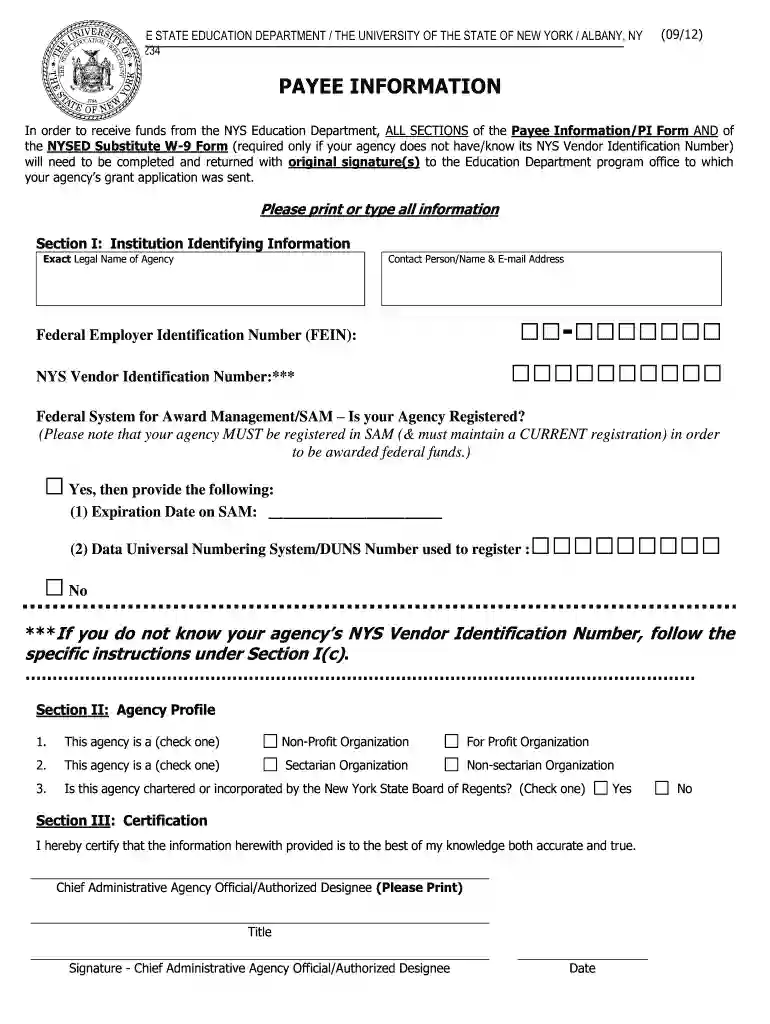
payee information portal Preview on Page 1

Payee information form 2026

Here's how it works

  • 01. Edit your payee information portal online

    Type text, add images, blackout confidential details, add comments, highlights and more.

  • 02. Sign it in a few clicks

    Draw your signature, type it, upload its image, or use your mobile device as a signature pad.

  • 03. Share your form with others

    Send payee information portal nyc via email, link, or fax. You can also download it, export it or print it out.

How to use or fill out payee information form with our platform

Form edit decoration
9.5
Ease of Setup
DocHub User Ratings on G2
9.0
Ease of Use
DocHub User Ratings on G2
  1. Click ‘Get Form’ to open the Payee Information Form in the editor.
  2. In Section I, provide your agency's exact legal name, contact person's name, and email address. Enter your Federal Employer Identification Number (FEIN) and NYS Vendor Identification Number if known.
  3. Indicate whether your agency is registered in the Federal System for Award Management (SAM). If yes, include the expiration date and DUNS number. If no, follow the instructions to obtain a vendor identification number.
  4. Move to Section II and select your agency type by checking the appropriate box. Ensure you answer all questions accurately.
  5. In Section III, certify that the information provided is accurate by printing your name, title, signing, and dating the form.

Start filling out your Payee Information Form online for free today!

See more payee information portal versions

We've got more versions of the payee information portal form. Select the right payee information portal version from the list and start editing it straight away!

VersionsForm popularityFillable & printable
20124.8 Satisfied (238 Votes)

be ready to get more

Complete this form in 5 minutes or less

Got questions?

We have answers to the most popular questions from our customers. If you can't find an answer to your question, please contact us.

What Is a Payee? A payee is a party in an exchange of goods or services who receives payment. The payee is paid by cash, check, or another transfer medium by a payer.
Generally, the payee is the person to whom you make the payment, regardless of whether that person is the beneficial owner of the income. However, there are situations in which the payee is a person other than the one to whom you actually make a payment.
The payee is the person who receives money from the payor, usually the one who is selling a product or providing services. People, businesses, and the government can all be payees. The payee is paid in cash, check, or other forms of payment, such as PayPal.
For online payments, youll provide the payees name and account details when setting up an electronic funds transfer. This payee information is used by the bank to determine where to send the money. For the system to work, a payee must have an active bank account with up-to-date details provided to the payer.
The payer is the one making a payment, and the payee is the one receiving the payment.

Security and compliance

At DocHub, your data security is our priority. We follow HIPAA, SOC2, GDPR, and other standards, so you can work on your documents with confidence.

People also ask

A completed Payee Data Record, STD. 204, is required for payments to all non-governmental entities and will be kept on file at each State agency. Since each State agency with which you do business must have a separate STD. 204 on file, it is possible for a payee to receive this form from various State agencies.
A payee simply refers to anyone who receives funds from a payer. The payment can take many forms, whether its a bank transfer, cheque, cash, or sent from a mobile app. In return for submitting payment to the payee, the payer receives their goods and services in return.

form agency

Payee Information Form (PIF)

Download the Payee Information Form (PIF).pdf Accounting and Financial Management (AFM) home University of Texas at Austin Accounting and Financial ManagementRead more

Learn more
Using Open Collective as a Fiscally Sponsored Project

Fill out payee information, including financial information such as: Currency type (typically USD); Location of bank (Country only, typically US); Full nameRead more

Learn more
PBGC Form 701 - Payee Information Form

INSTRUCTIONS: You must complete this form to continue receiving pension payments. If you have questions, call our Customer Contact Center at 1-800-400-7242.Read more

Learn more
If you believe that this page should be taken down, please follow our DMCA take down process here