






Definition & Meaning
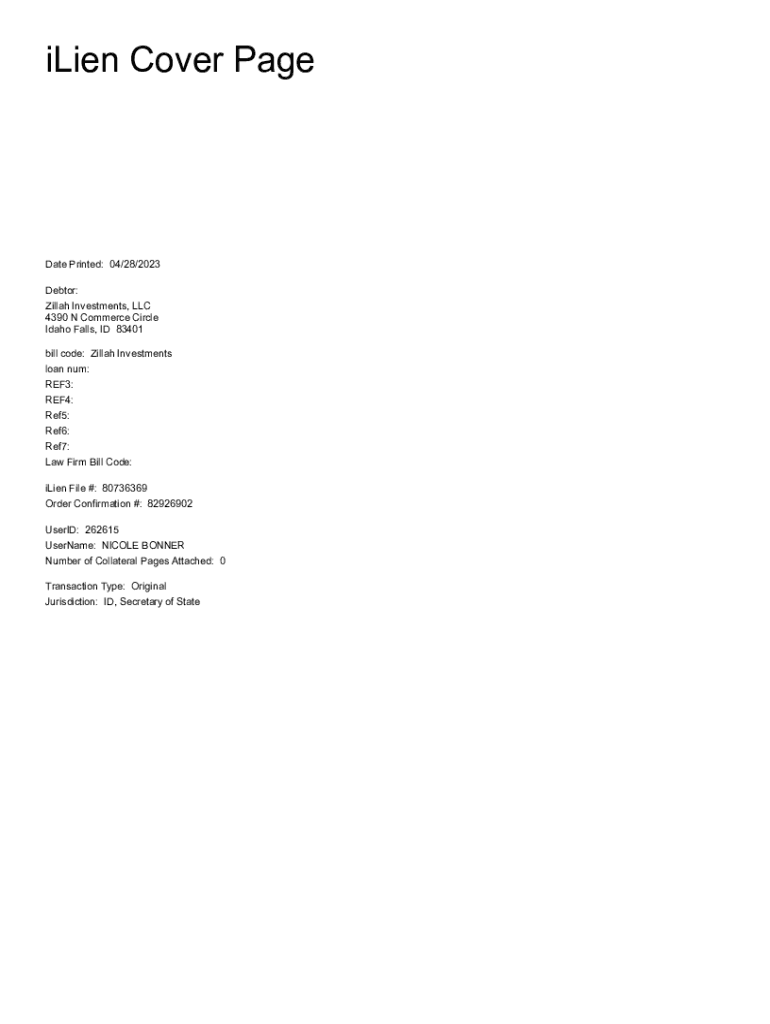
The iLien Cover Page - UCC Filing PDF - Lien Solutions serves as a crucial component in documenting and managing various types of liens, particularly those related to the Uniform Commercial Code (UCC). This cover page is essential for ensuring the correct filing and processing of UCC-related documents, facilitating the protection of a creditor's interest in the collateral provided by a debtor. It holds significant importance for legal and financial proceedings, helping streamline and organize lien documentation.
How to Use the iLien Cover Page - UCC Filing PDF - Lien Solutions
To effectively utilize the iLien Cover Page, start by understanding its purpose in the UCC filing process. The cover page is primarily used to accompany various UCC forms, ensuring that all pertinent information is accurately captured and easy to identify. It typically includes key identifiers such as the debtor's name, the secured party, and relevant reference numbers. Follow these steps:
- Gather all necessary information, including debtor and creditor details.
- Complete the cover page with precise information.
- Include any specific instructions or references needed for efficient processing.
- Attach the cover page to the main UCC filing documents.
- Ensure that all accompanying documentation and payments are correctly included.
Steps to Complete the iLien Cover Page - UCC Filing PDF - Lien Solutions
Completing the iLien Cover Page involves a series of detailed steps to ensure accuracy and compliance with filing requirements. Here's a comprehensive guide:
-
Prepare Required Information:
- Gather the debtor’s full legal name and address.
- Collect the secured party's information, including name and contact details.
-
Fill Out the Cover Page:
- Enter the filing date on the designated space.
- Include a bill code or reference number if applicable for tracking.
-
Verify Legal Connections:
- Make sure each party's identifiers are verified against official records.
- Add any legal references such as law firm details if required.
-
Review for Completeness:
- Double-check all entered information for spelling and accuracy.
- Ensure all fields are completed as per guidelines.
-
Attach to UCC Filing:
- Append the completed cover page to the UCC filing packet.
- Include any supporting documents necessary for processing.
Who Typically Uses the iLien Cover Page - UCC Filing PDF - Lien Solutions
The iLien Cover Page is primarily used by legal and financial professionals involved in the management of UCC filings. This includes:
- Law Firms: Attorneys managing cases of secured transactions often rely on these documents to ensure proper lien processing.
- Financial Institutions: Banks and credit unions use the cover page as part of ensuring their security interest in collateral is legally recognized.
- Businesses: Corporations needing to secure loans or extend credit based on collateral use these forms to ensure compliance and protect their interests.


Key Elements of the iLien Cover Page - UCC Filing PDF - Lien Solutions
The iLien Cover Page includes several pivotal elements designed to ensure thorough documentation:
- Debtor Information: Comprehensive details including the debtor's name and address ensure the correct identification of the party responsible for the obligation.
- Secured Party Information: Details of the entity that holds an interest in the lien, including reference numbers for internal tracking.
- Filing Date: Essential for maintaining records and adhering to any applicable deadlines.
- Reference Codes: Used for tracking purposes within the legal and financial systems processing the lien.
State-Specific Rules for the iLien Cover Page - UCC Filing PDF - Lien Solutions
When completing the iLien Cover Page, be mindful of state-specific rules that influence UCC filings:
- Varying Requirements: Some states might have additional requirements or specific formats for UCC filings.
- Filing Locations: Different jurisdictions may mandate particular offices or online platforms for submission.
- Fee Structures: Filing fees can vary significantly by state, impacting budget considerations for processing liens.
Penalties for Non-Compliance
Failure to comply with proper completion and filing of the iLien Cover Page can lead to severe penalties, such as:
- Rejection of Filings: Incorrect or incomplete cover pages may result in filing rejection, which can delay the process and legal protection.
- Financial Penalties: Certain jurisdictions may impose fines for improper documentation or late submissions.
- Legal Risks: Failure to properly secure a lien could leave creditors vulnerable in cases of debtor default.
Versions or Alternatives to the iLien Cover Page - UCC Filing PDF - Lien Solutions
In addition to the traditional iLien Cover Page, there are potential alternatives and updated versions to consider:
- Digital Versions: Many filing offices accept digital submissions, which can streamline the process.
- Alternative Services: Some third-party services offer integrated filing solutions that may bundle cover pages with all required documentation.
- Proprietary Solutions: Firms may develop their own cover page templates aligned with iLien standards for internal consistency and efficiency.
This comprehensive approach ensures that readers understand every relevant aspect of using the iLien Cover Page - UCC Filing PDF - Lien Solutions, providing full detail for those involved in lien management and UCC filings.