




01. Edit your form online
Type text, add images, blackout confidential details, add comments, highlights and more.

Type text, add images, blackout confidential details, add comments, highlights and more.

Draw your signature, type it, upload its image, or use your mobile device as a signature pad.

Send it via email, link, or fax. You can also download it, export it or print it out.
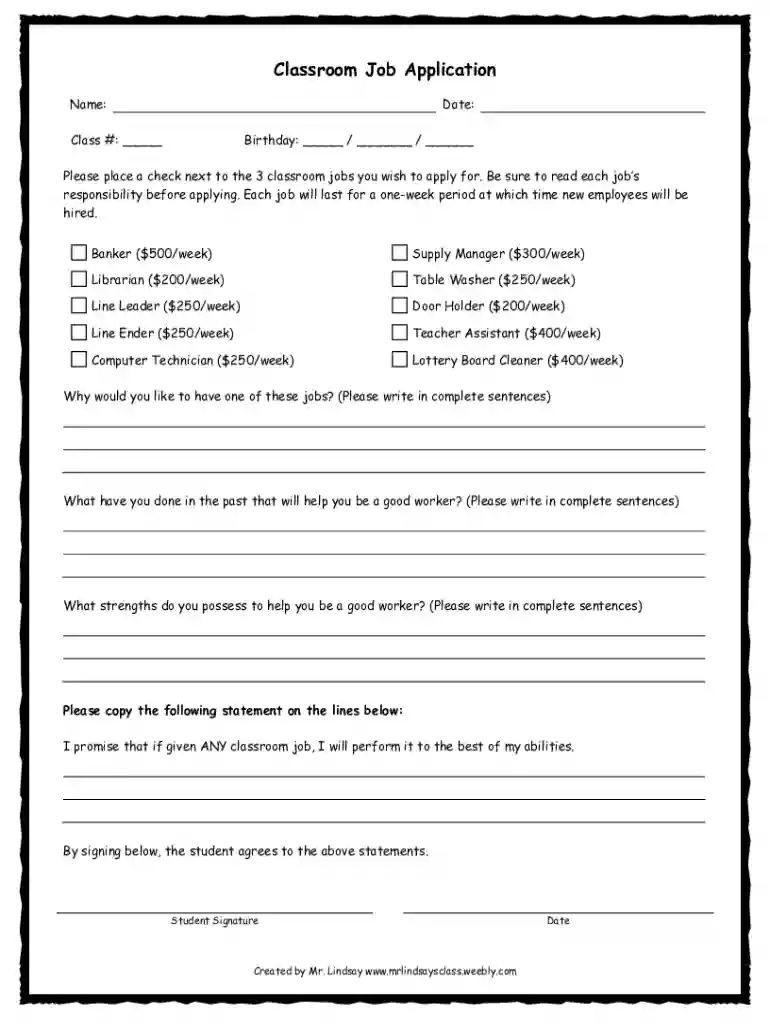
The "Free and Editable Classroom Job Application" is a versatile form designed to manage classroom responsibilities efficiently. Its primary purpose is to facilitate an organized approach for students to apply for various roles within a classroom setting, such as line leader, clean-up crew, or tech assistant. This form is essential for promoting a sense of responsibility among students and helps teachers distribute tasks fairly. By being both free and editable, it allows educators to customize the form according to their specific classroom needs, ensuring it is adaptable to any learning environment.
The application consists of several key components that are crucial for its effective use:
Student Information Section: This part typically includes fields for the student's name, date, class number, and birthday. It provides essential information that helps teachers identify and sort applications easily.
Job Preferences: Here, students are asked to mark their job preferences, usually three, from a predetermined list of classroom jobs. This encourages students to consider their interests and strengths when choosing roles.
Job Descriptions: Next to the list of roles, brief descriptions are provided to clarify each job's responsibilities. Understanding these duties is vital for students to make informed decisions about their applications.
Using the classroom job application correctly is essential for achieving its intended benefits:
Customization: Teachers should first edit the form to reflect the specific jobs available in their classroom. This ensures relevance and clarity for students.
Distribution: Make the form available to students either via digital platforms or printed copies. Each student should have access to fill out their application.
Guidance Sessions: Allocate time to explain how to fill out the form and discuss the importance of each role. This can also be an opportunity for students to ask questions about jobs that interest them.
Submission and Review: Collect the completed forms by a specific deadline and review them to assign roles based on availability and student preferences.
Completing the application requires careful attention to detail. Here is a step-by-step guide:
Enter Personal Information: Fill in your name, date, class number, and birthday in the designated fields.
Select Job Preferences: Review the list of available jobs and place a checkmark next to your top three choices. Ensure you understand each role's responsibilities before selecting.
Read Job Descriptions: Read through the job descriptions provided for each role to ensure your choices align with your abilities and interests.
Submit Application: Hand in your completed form to your teacher by the specified deadline.
This form is specifically designed for use in educational settings. The primary users are:
Students: They fill out the application to express interest in various classroom roles. This process aids in teaching responsibility and teamwork.
Teachers: They use this form to manage and allocate classroom jobs efficiently, balancing student preferences with classroom needs.
Administrators: In some cases, school administrators might use these forms to oversee student involvement in classroom activities.


While this form is used primarily within educational settings, it must comply with specific guidelines:
Privacy Laws: Ensure that any personal information collected from students is stored securely and not shared without consent, adhering to laws like FERPA (Family Educational Rights and Privacy Act).
Non-Discrimination Policies: The allocation of roles must not discriminate based on race, gender, or any other protected class, aligning with educational equity guidelines.
To illustrate the form's application, consider these scenarios:
Elementary School Classroom: Students apply for roles such as paper distributor or line leader. The teacher uses the forms to assign tasks, promoting an organized environment.
Middle School Science Lab: In a more specialized setting, students might apply for roles such as lab assistant or equipment manager. This helps maintain lab order and introduces students to responsibility in a scientific context.
Drama Club Production: Students express interest in technical roles backstage. The form helps organize volunteers effectively, ensuring a smooth production process.
The form's utility is enhanced by its compatibility with various digital platforms:
DocHub Integration: Users can edit the form directly within DocHub, allowing seamless incorporation of DocHub’s tools for additions and annotations.
Google Workspace: Given its integration with Google Drive and Gmail, users can easily share and collaborate on the form with colleagues, enhancing its accessibility and ease of use in the classroom.
By leveraging these tools, educators can efficiently distribute and manage classroom responsibilities, ensuring a well-organized and effective educational environment.
At DocHub, your data security is our priority. We follow HIPAA, SOC2, GDPR, and other standards, so you can work on your documents with confidence.




The Observatory seeks volunteer Contributing Editors, Proofreaders, Contributing Researchers, and Guides Reference Summaries Writers to join our team.Read more
I am writing to express my deep interest in the open elementary-level teaching position in your school district.Read more
Complete all information within this application in its entirety. Type or print in ink. All information provided will be a public record and will beRead more


