







Definition and Meaning
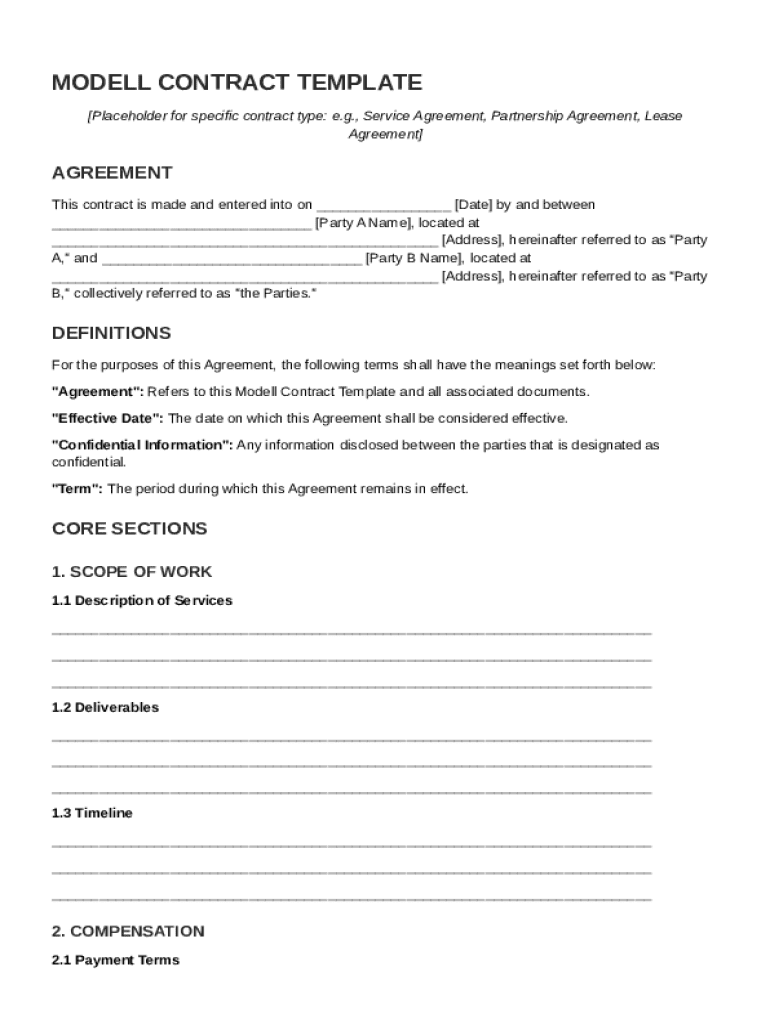
A "Modell Contract Template" is a standardized framework used to create legal agreements between two parties, often referred to as Party A and Party B. This template includes essential sections such as definitions, scope of work, compensation, responsibilities, term and termination, confidentiality, indemnity and liability, governing law, dispute resolution, and miscellaneous provisions. The purpose of the template is to streamline the contract creation process by providing a well-structured document that can be customized with specific details relevant to individual agreements.
Nuances and Variations
- Scope of Work: This section details the specific services or products Party A is to provide Party B. The scope can range from general descriptions to detailed lists of tasks and deliverables.
- Compensation: Describes how Party B will compensate Party A for their services or products. This could include payment schedules, amounts, and any conditions related to payment.
- Termination: Outlines conditions under which either party can terminate the contract. Common reasons include breach of terms or mutual agreement.
How to Use the Modell Contract Template
Using a Modell Contract Template involves a systematic approach to ensure that all parts of the agreement are clearly defined and tailored to meet the needs of both parties. Here’s a step-by-step guide to maximizing its utility.
Step-by-Step Instructions
- Identify Parties: Begin by accurately naming and detailing the involved parties, including their addresses and roles within the contract.
- Fill in Specific Details: Customize sections like scope of work and compensation to reflect the particular agreement.
- Review Definitions: Clearly define any terms that may have multiple interpretations to ensure mutual understanding.
- Set Responsibilities: Clearly assign duties and expectations for each party to prevent ambiguity and potential conflict.
- Finalize and Sign: After reviewing all terms, both parties should sign the document, making it legally binding.
Key Elements of the Modell Contract Template
Every Modell Contract Template includes several core components that ensure the agreement is comprehensive and enforceable.
Core Components
- Definitions: Provides clarity on specific terms used throughout the contract.
- Responsibilities: Outlines the duties each party is expected to perform.
- Confidentiality Agreement: Ensures sensitive information remains private.
- Dispute Resolution: Provides methods for resolving conflicts, typically including mediation or arbitration clauses.
Practical Examples
- Service Contracts: Details the nature of services provided, timelines, and compensation.
- Partnership Agreements: Specifies roles and profit-sharing ratios in a business partnership.
Who Typically Uses the Modell Contract Template
The Modell Contract Template is a versatile tool that is used by a variety of entities across different sectors.

Common Users
- Small Businesses: For formalizing agreements with vendors and clients.
- Freelancers: To outline scope and terms with clients in diverse industries.
- Corporations: For internal agreements and partnerships with other firms.

Examples of Use Cases
- Consultants: Drafting agreements with clients for specific projects.
- Creative Agencies: Establishing terms for production and design services.
Legal Use of the Modell Contract Template
Legal enforceability is a critical aspect when using a Modell Contract Template. Each section should align with applicable laws to ensure the contract is valid.
Compliance and Enforcement
- Governing Law: Specifies which jurisdiction’s laws will govern the contract.
- Indemnity and Liability: Limits one party's legal exposure in case of breach or negligence.
State-Specific Considerations
- Ensure that the contract adheres to state-specific regulations and requirements, which might vary for certain industries or contract types.
Important Terms Related to the Modell Contract Template
Understanding key terms associated with contract templates is vital for effective use and comprehension.
Glossary of Terms
- Confidentiality: This clause ensures that shared information remains private and restricted.
- Indemnity: Protects one party from legal liability or financial loss.
- Force Majeure: Addresses how events beyond control impact the obligations of the parties.
Steps to Complete the Modell Contract Template
Completing a Modell Contract Template efficiently involves several clear steps to ensure all necessary information is included and properly structured.
Completion Process
- Customize Template: Use relevant sections pertinent to the specific agreement type.
- Detail Specific Obligations: Describe duties, timelines, and deliverables in clear terms.
- Confirm Legal Compliance: Ensure all terms comply with laws applicable in relevant jurisdictions.
- Proofread and Finalize: Check for errors or omissions before finalizing.
Finalization Scenarios
- Collaborative Editing: Multiple parties can work together to refine and complete the document.
- Legal Review: Often advisable, especially for complex agreements, to have a legal professional review the document for accuracy and enforceability.
Software Compatibility and Integration
Understanding how the Modell Contract Template integrates with software can significantly enhance functionality and ease of use.
Compatible Platforms
- Document Management Systems: Can be used within platforms like Google Workspace, allowing for easy editing and sharing.
- DocHub Features: Allows seamless import and export of contract templates, as well as options for digitally signing and annotating documents.
Examples of Software Integration
- Utilize cloud storage services for document management and sharing capabilities, facilitating collaboration and ensuring the latest version is always accessible.




