






Key Elements of the Voice Over Work Agreement Template
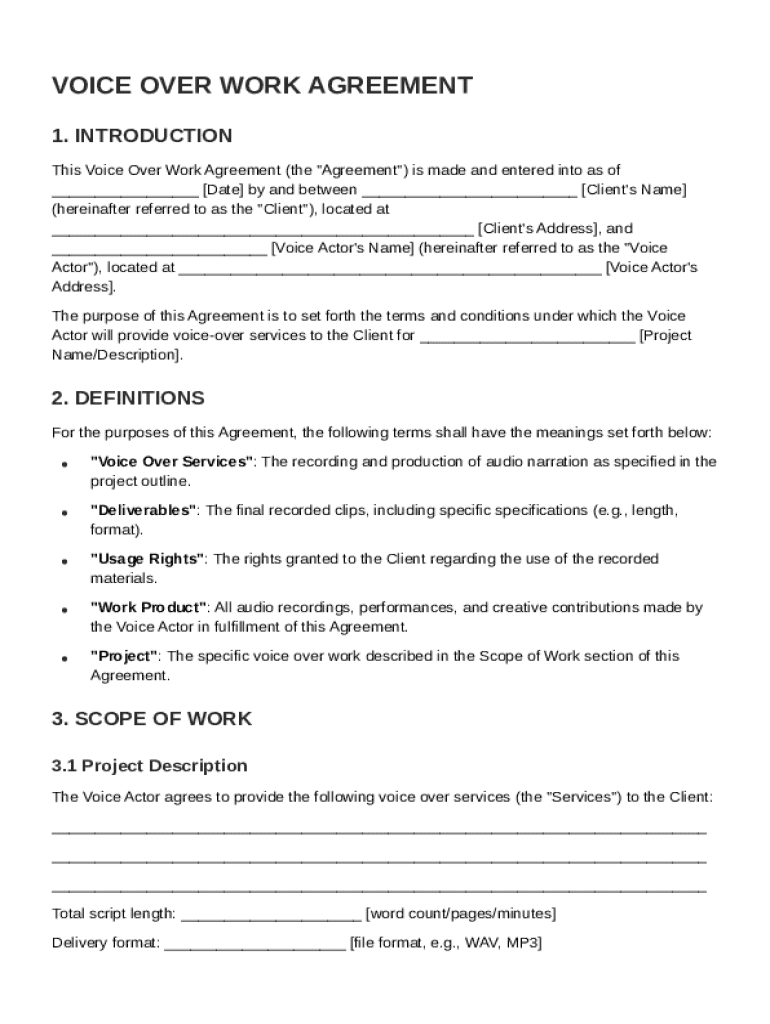
The Voice Over Work Agreement Template is a critical document that establishes the contractual relationship between a client and a voice actor. It outlines the terms and conditions that govern the provision of voice-over services. Understanding these key elements ensures clarity and protection for both parties involved.
-
Project Scope: This section details the specific services the voice actor will provide, including any deliverables such as audio files or recordings. Defining the project scope is essential for managing expectations and ensuring all tasks are clearly outlined.
-
Compensation: This element covers the payment terms, including the rate of pay, payment schedule, and any deposit requirements. Specifying compensation terms helps in avoiding disputes and ensures both parties agree on financial matters upfront.
-
Rights and Ownership: It is crucial to define the intellectual property rights associated with the voice-over work. This includes usage rights, ownership of recordings, and any licensing agreements. Typically, the client acquires rights to use the material, but agreements may vary based on the project's nature.
-
Confidentiality Obligations: Protecting sensitive information is essential in many voice-over projects. This segment of the agreement ensures that both parties commit to maintaining confidentiality regarding any proprietary or confidential information exchanged.
-
Revision Policies: Clarifying the number of revisions allowed and the process for requesting changes can streamline project management. This section should detail any additional costs for revisions beyond the initially agreed terms.
-
Liability and Indemnification: Liability clauses define the responsibilities of each party in case of legal disputes or claims. Indemnification provisions protect against potential lawsuits that could arise from the use of the voice-over work.
How to Use the Voice Over Work Agreement Template
Using the Voice Over Work Agreement Template effectively requires an understanding of its structure and customization options. Here is a step-by-step approach to navigating this template:
-
Review the Template: Before making any modifications, read through the entire template to understand its provisions and layout. This will provide a clearer picture of what needs to be customized.
-
Customize Sections: Adjust sections to fit the specific needs of the project and relationship. This includes filling in both parties' names, defining the project scope, and specifying any unique terms or conditions.
-
Incorporate Specific Terms: If there are any particular clauses relevant to the project, such as multi-media rights or specific confidentiality requirements, integrate these into the agreement.
-
Seek Legal Advice: Consulting with a legal professional ensures the document conforms to applicable laws and that both parties are adequately protected.
-
Finalize the Document: Once all customizations are complete, review the document for accuracy and completeness before proceeding to signatures.
Steps to Complete the Voice Over Work Agreement Template
Completing the Voice Over Work Agreement Template involves several critical steps that ensure the document is legally binding and covers all necessary aspects. Here's how to do it:
-
Fill Out Party Information: Input the contact details of both the client and the voice actor, including names, phone numbers, and addresses.
-
Set Project Parameters: Define the specifics of the project such as the type of voice-over work, deadlines, and submission formats.
-
Outline Payment Terms: Clearly state the payment method, total compensation, and timeline for disbursements. Ensure all financial agreements are explicit and agreed upon.
-
Define Rights and Ownership: Specify how the final product can be used and whether the client retains exclusive rights or if the voice actor can use excerpts for self-promotion.
-
Include Legal Provisions: Add any necessary legal protections such as indemnity clauses, applicable laws, and dispute resolution methods.
-
Sign and Execute: Ensure both parties review and understand the document in full before signing. Each party should retain a copy for their records.
Legal Use of the Voice Over Work Agreement Template
The legal use of the Voice Over Work Agreement Template involves ensuring that the document complies with relevant laws and standards, making it enforceable in a court of law.
-
Compliance with Contract Law: The agreement must meet all the elements of a contract, including offer, acceptance, consideration, and mutual intent to enter into an agreement.
-
Adherence to Industry Standards: Ensure the template reflects standard practices within the voice-over industry, particularly regarding compensation, usage rights, and confidentiality.
-
Jurisdictional Requirements: The agreement should specify which state’s laws govern it, adapting specific clauses to ensure consistency with local legal requirements.
-
Electronic Signatures: The use of electronic signatures is increasingly common for executing agreements. Ensure signatures comply with the ESIGN Act for enforceability.
Who Typically Uses the Voice Over Work Agreement Template
A variety of professionals use the Voice Over Work Agreement Template to formalize their business relationships. Understanding the common users helps tailor the template to meet industry-specific needs.
-
Voice Actors: Individuals providing voice-over services for commercials, audiobooks, or animation rely on these agreements to protect their rights and ensure fair compensation.
-
Content Creators and Agencies: Businesses producing multimedia content use these templates to secure voice services and clarify intellectual property arrangements.
-
Marketing and Advertising Firms: Agencies engaged in promotional activities utilize these contracts to specify the scope and deliverables for voice work integral to their campaigns.
-
Independent Consultants: Freelancers and small business owners find these agreements essential in establishing clear professional relationships with clients.


Important Terms Related to the Voice Over Work Agreement Template
Understanding the terminology used in the Voice Over Work Agreement Template is vital for accurate interpretation and application of the agreement.
-
Deliverables: Refers to the final products or services promised to the client, such as audio files, scripts, or recordings.
-
Revision Policy: Guidelines governing the alteration or improvement of the work upon client request, often specifying the number of revisions included in the initial agreement.
-
Usage Rights: The terms define how the client can use the completed voice-over work, including limitations on distribution and reproduction.
-
Exclusivity: A clause that determines whether the client holds exclusive usage rights or if the voice actor can offer similar services to competitors.
Examples of Using the Voice Over Work Agreement Template
Examples help illustrate how different industries might apply the Voice Over Work Agreement Template.
-
Audiobook Narration: A voice actor and publisher outline the narration scope, delivery timeframe, and royalty payments, ensuring both creative and financial clarity.
-
Commercial Advertisement: A marketing agency contracts a voice artist to record a series of radio ads, specifying revisions for script changes and engagement metrics for performance-based incentives.
-
Corporate Training Programs: A corporation hires a voice actor to produce training module audio scripts, with a focus on revision policies as new content is developed.
State-by-State Differences
While the Voice Over Work Agreement Template serves as a general guideline, variations by state law can influence its implementation.
-
Contractual Enforceability: Certain states may have unique rules regarding what constitutes a legally binding contract, particularly in the digital space.
-
Intellectual Property Laws: States may differ in their treatment of intellectual property, impacting rights and ownership clauses within the agreement.
-
Tax Implications: Terms around compensation could be affected by state tax codes, requiring adjustments in payment structuring or declaration.
-
Employment Classification: Some states have specific criteria for distinguishing between independent contractors and employees, which may affect how the agreement is framed.