






Definition & Meaning
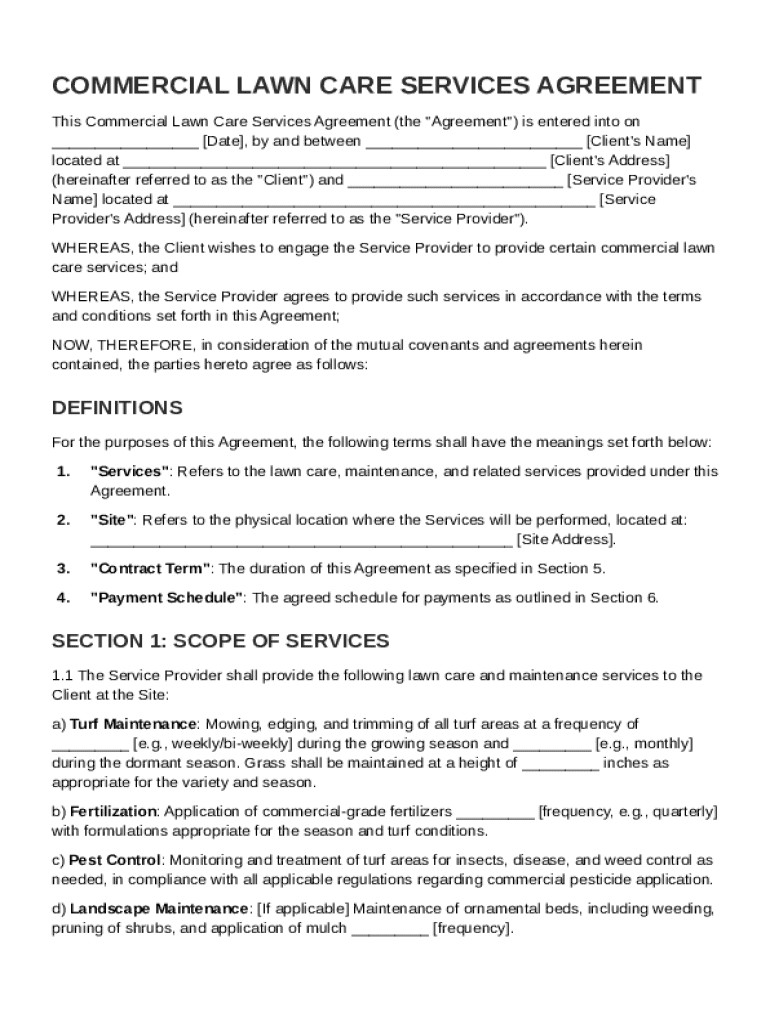
A Commercial Lawn Care Contract Template is a standardized document used by lawn care service providers to outline and formalize the arrangement with their clients. It establishes the framework for the services to be provided, payment terms, performance expectations, and responsibilities of both the client and the service provider. This template ensures all parties have a clear understanding of their obligations and the terms under which the lawn care services will be delivered. By using a standardized template, businesses can ensure consistency and legal compliance in their contracts.
Key Elements of the Commercial Lawn Care Contract Template
The template encompasses several crucial sections that are necessary for creating a comprehensive agreement:
- Scope of Services: Clearly defines the specific lawn care tasks the provider will perform, such as mowing, fertilizing, or seasonal cleanups.
- Responsibilities of Parties: Specifies the duties of both the client and the service provider, including timely payments, maintaining access to the lawn, and cleanliness.
- Performance Standards: Outlines the quality and frequency of the services to be delivered, providing benchmarks for service quality.
- Term and Termination: Details the duration of the contract and conditions under which it may be terminated.
- Payment Terms: Provides information on the pricing structure, payment schedule, and accepted payment methods.
- Insurance Requirements: Indicates any liability or worker's compensation insurance needed for the service provider.
- Dispute Resolution: Offers procedures for resolving conflicts or misunderstandings that may arise during the contract term.
- Miscellaneous Provisions: Includes clauses on confidentiality, assignment, and other legal considerations.
Legal Use of the Commercial Lawn Care Contract Template
In the U.S., a properly executed commercial lawn care contract is legally binding and enforceable. The template serves as an official record of the agreement and can be pivotal in legal disputes. Compliance with state laws and local regulations is essential when drafting any contract to ensure enforceability. Utilizing a well-structured template simplifies this process and reduces the risk of missing critical legal requirements or inadvertently including unenforceable clauses.
Steps to Complete the Commercial Lawn Care Contract Template
- Gather Information: Collect details about the parties involved, specific services required, and any unique considerations for the property.
- Customize the Template: Adapt the standard template to include personalized terms and conditions that suit the particular agreement.
- Review Legal Requirements: Ensure the contract complies with state-specific legal standards and contains all necessary disclosures.
- Define All Terms Clearly: Use precise language to eliminate ambiguity, especially for service descriptions and legal clauses.
- Sign and Date the Document: Both parties should review, sign, and date the contract to signify agreement and formalize the arrangement.
- Distribute Copies: Provide each party with a copy of the signed agreement for their records.
How to Obtain the Commercial Lawn Care Contract Template
Obtaining a commercial lawn care contract template can be done through several avenues:
- Online Templates: Platforms like DocHub offer downloadable and customizable templates for a variety of contracts, including lawn care agreements.
- Legal Service Providers: Some companies specialize in contract creation and may provide industry-specific templates.
- DIY Tools: Word processing software often includes templates that can be modified for lawn care purposes.
- Professional Associations: Industry groups may provide templates for their members.
Important Terms Related to the Commercial Lawn Care Contract Template
Understanding the terminology within the contract is vital for all parties involved:
- Client: The party receiving lawn care services.
- Service Provider: The entity or individual performing the lawn care tasks.
- Indemnification: A provision for protection against potential losses or damages.
- Non-performance: Describes failure to execute duties as specified in the contract.
- Force Majeure: Clauses addressing unforeseen events like natural disasters that may impede service delivery.
Examples of Using the Commercial Lawn Care Contract Template
- Small Business Use: A local lawn care company employs a contract template to standardize its agreements, ensuring high levels of service consistency for numerous clients.
- Corporate Partnerships: A large commercial property manager uses contracts for multiple locations to maintain the appearance of office parks and shopping centers.
- Individual Contractors: Independent lawn care professionals depend on templates to present professional and legally sound contracts to their clients.
Software Compatibility with DocHub
DocHub supports various file formats necessary for managing commercial lawn care agreements, which includes compatibility with:
- PDF Files: Standard for formal documents and ensures formatting is preserved across devices.
- DOC & DOCX: For collaboration options and ease of editing using common word processing applications.
- Cloud Storage Integrations: Sync with Google Drive, Dropbox, allowing easy access to contracts anywhere.
- Real-time Editing: Ensures that all changes are visible to all parties immediately, ideal for finalizing details efficiently.
Software Compatibility with Google Workspace
DocHub is integrated seamlessly with Google Workspace, providing significant benefits for users:
- Google Drive: Import and export documents directly, facilitating straightforward sharing with clients.
- Gmail: Launch editing directly from email attachments, streamlining communication and updates.
- Collaborative Editing: Multiple users can make real-time modifications to documents simultaneously, enhancing teamwork.