Type text, add images, blackout confidential details, add comments, highlights and more.
02. Sign it in a few clicks
Draw your signature, type it, upload its image, or use your mobile device as a signature pad.
03. Share your form with others
Send how to get a resale certificate in nj via email, link, or fax. You can also download it, export it or print it out.
How to use or fill out nj resale certificate online with DocHub
Ease of Setup
DocHub User Ratings on G2
Ease of Use
DocHub User Ratings on G2
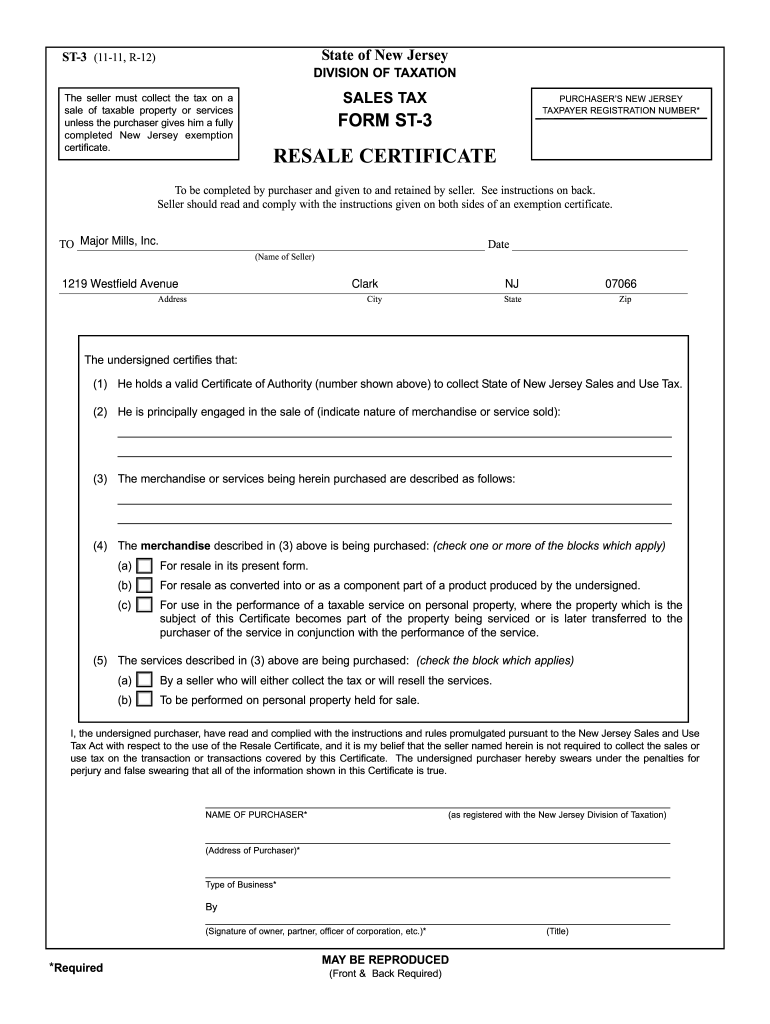
Click ‘Get Form’ to open the nj resale certificate in our editor.
Begin by entering the purchaser's New Jersey Taxpayer Registration Number in the designated field. This is essential for validating your tax-exempt status.
Fill in the seller's name and address, ensuring accuracy as this information is crucial for record-keeping.
In the section regarding the nature of merchandise or services sold, provide a clear description of what you are purchasing. This helps clarify the purpose of your exemption.
Check the appropriate boxes that apply to your purchase, indicating whether items are for resale in their current form or as part of a product you will produce.
Complete the purchaser's name, address, type of business, and ensure you sign where indicated. Your signature confirms that all provided information is accurate.
Start filling out your nj resale certificate online for free today with our platform!
Fill out nj resale certificate online online It's free
Web a sales tax exemption certificate can be used by businesses (or in some cases, individuals) who are making purchases that are exempt from the new jersey
The purchaser must provide the following information for the exemption certificate to be considered fully completed: Name and address;. New Jersey taxpayerRead more
Many are also certified through the Toyota Certification. Program, which involves a series of rigorous written examinations. Feel free to ask any ToyotaRead more
Cookie consent notice
This site uses cookies to enhance site navigation and personalize your experience.
By using this site you agree to our use of cookies as described in our Privacy Notice.
You can modify your selections by visiting our Cookie and Advertising Notice.