






Understanding the 2013 Form 1041
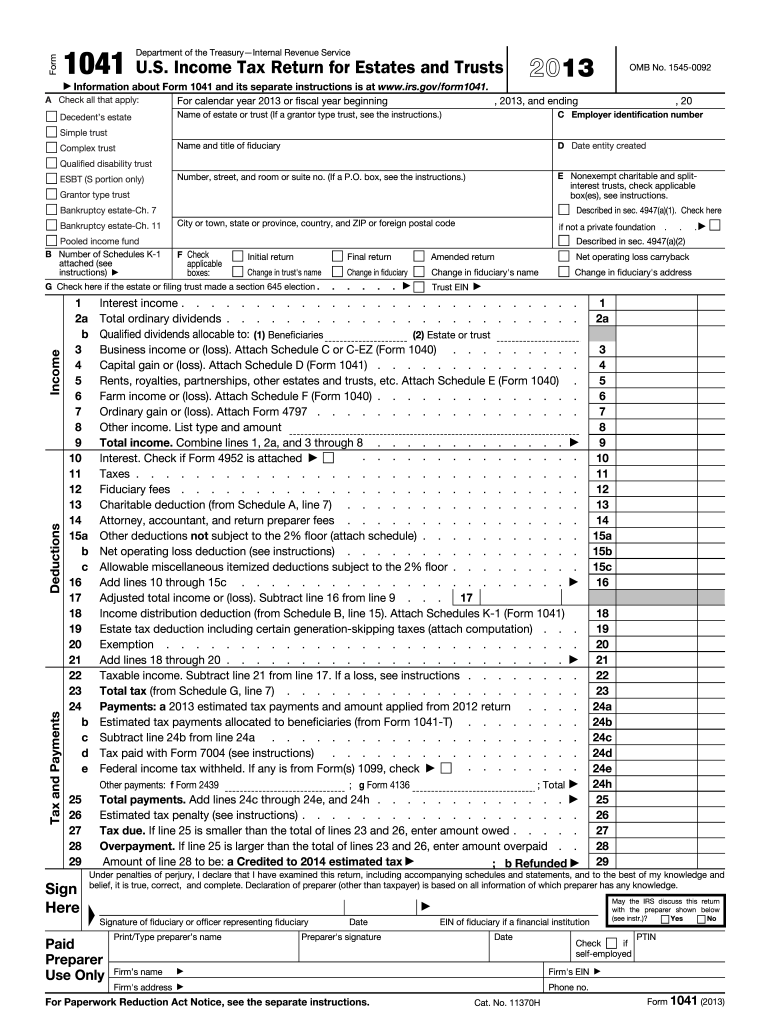
The 2013 Form 1041, officially known as the U.S. Income Tax Return for Estates and Trusts, is a critical document used by fiduciaries to report the financial activities and tax obligations of estates and trusts. This form is issued by the Internal Revenue Service (IRS) and involves detailing income sources, calculating deductions, and determining tax liabilities for the respective estate or trust. Understanding its primary purpose helps in accurate tax filing.
Key Elements of the 2013 Form 1041
Several components are crucial to the 2013 Form 1041:
- Identification Section: Requires details about the estate or trust, such as name, address, Employer Identification Number (EIN), and the type of entity.
- Income Reporting: Fiduciaries must report various income sources including interest, dividends, and business income.
- Deductions and Credits: Specifies eligible deductions like investment interest and charitable contributions, which reduce taxable income.
- Tax Calculation: Involves calculating the total tax owed after accounting for deductions and credits.
- Schedules: Includes multiple schedules for various financial activities, such as Schedule A for Charitable Deduction or Schedule B for Income Distribution Deduction.
To utilize the form effectively, understanding these core sections is essential.
Steps to Complete the 2013 Form 1041
- Gather Required Documents: Before filling out the form, compile all necessary documents like financial statements, previous tax returns, and supporting paperwork for income and deductions.
- Complete the Identification Section: Fill in the basic details of the estate or trust, ensuring accuracy.
- Report Income Accurately: Enter all applicable income sources, using accompanying schedules where necessary.
- Apply Deductions and Credits: Document all allowable deductions and credits to lower the estate or trust's taxable income.
- Calculate Taxes: Use the form's instructions to compute the total tax obligation.
- Review and Submit: Ensure all entries are accurate; then sign and date the form. Depending on preference, submit via mail or electronically if applicable.
Important IRS Guidelines
The IRS provides several guidelines to aid in accurately completing Form 1041:
- Filing Instructions: The IRS outlines detailed instructions for each section of Form 1041 to prevent common errors.
- Amendments: If there are errors discovered post-filing, IRS procedures detail how to amend a submitted return.
- Fiduciary Responsibility: Emphasizes the fiduciary's duty to report truthfully and accurately on behalf of the estate or trust.
Following these guidelines ensures compliance with federal tax regulations.
Filing Deadlines and Important Dates
The deadline for filing the 2013 Form 1041 was largely standardized:
- Annual Filing Date: Typically due by the 15th day of the fourth month following the close of the entity's tax year, often April 15 for calendar year filers.
- Extensions: Fiduciaries could request a six-month extension if unable to meet the original deadline, requiring the submission of Form 7004.
Remember to account for these dates to avoid penalties and interest on late submissions.
Who Typically Uses the 2013 Form 1041
Form 1041 is primarily utilized by fiduciaries overseeing estates or trusts:
- Estates: Used when an individual has passed away, and their estate continues to generate income.
- Trusts: Used for various trust types that receive income, requiring fiduciaries to report financial activities.
Understanding who should file provides clarity on the form's practical applications.


Software Compatibility for Form 1041
Completing and filing Form 1041 can be facilitated by various software solutions:
- TurboTax and QuickBooks: Both are widely used for personal and business tax preparation, providing features specifically designed to handle estates and trusts.
- Specialized Tax Software: Platforms dedicated to estate and trust tax filings can provide comprehensive solutions for Form 1041.
Ensuring software compatibility simplifies the completion and submission process.
Penalties for Non-Compliance
Non-compliance with Form 1041 regulations can result in penalties:
- Late Filing Penalties: Involves monetary fines if the form is not filed by the due date or an approved extension date.
- Underpayment Penalties: Occurs when taxes are underestimated and underpaid, requiring fiduciaries to pay interest on the unpaid amount.
Being aware of potential penalties emphasizes the importance of accurate and timely filing.
Examples of Using the 2013 Form 1041
Consider the following practical examples of when Form 1041 is used:
- Estate from an Individual: An individual who passes away has investments generating dividends; the estate must report these on Form 1041.
- Charitable Trust: A trust set up primarily for charitable purposes must report its financial activities, including income and donations, using this form.
These examples provide real-world context for the use of Form 1041 by various entities.