






Definition and Meaning of the 2016 Form 1041
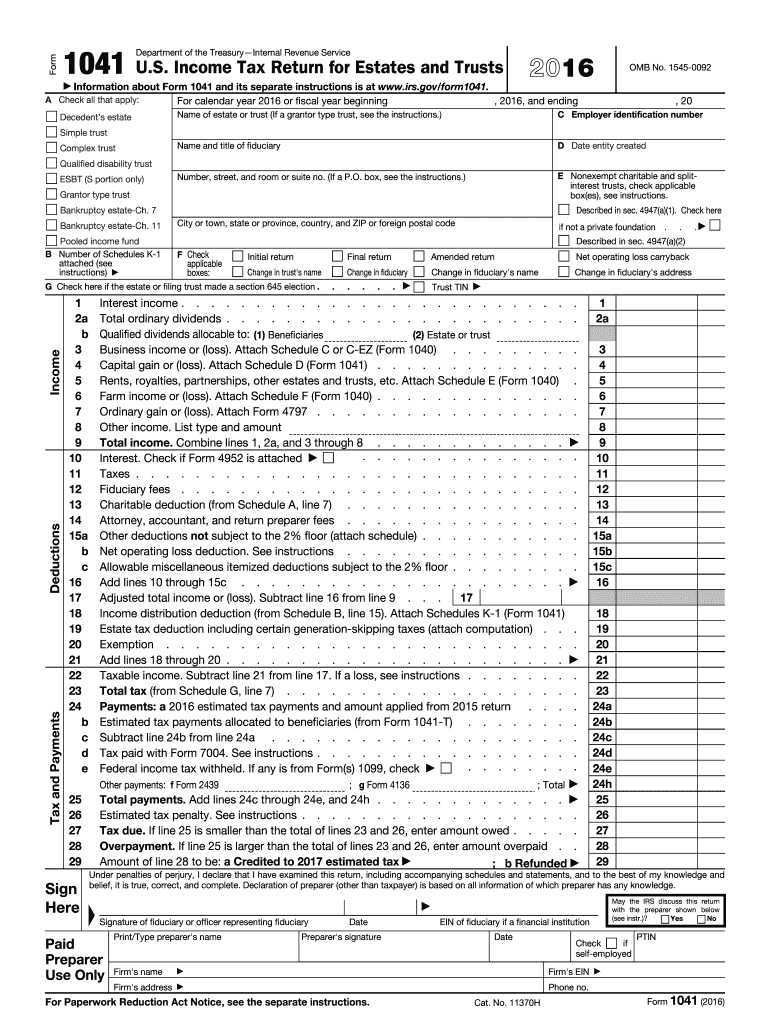
The 2016 Form 1041, also known as the U.S. Income Tax Return for Estates and Trusts, is a document used by fiduciaries to report the income, deductions, and tax liabilities pertaining to estates and trusts. Issued by the Internal Revenue Service (IRS), this form aims to provide a structured format for accounting for the financial activities within these entities during the 2016 fiscal year. It includes sections for detailing income sources, calculating deductions, and determining overall tax obligations. Understanding the intricacies of Form 1041 is crucial for fiduciaries responsible for managing and reporting the financials of estates or trusts.
Steps to Complete the 2016 Form 1041
-
Gather Required Documents: Before filling out the form, it's essential to collect all necessary financial documents, including statements of income, receipts for deductions, and any previous tax returns. This preparation ensures accurate reporting.
-
Identify the Estate or Trust: Fill in the basic information about the estate or trust, such as its name, the fiduciary's name, and the Employer Identification Number (EIN).
-
Report Income: Input all types of income received by the estate or trust during the tax year. This could include dividends, interest, rents, and any other relevant earnings.
-
Calculate Deductions: Identify any allowable deductions, like administrative expenses or charitable contributions, and enter these amounts into the relevant sections.
-
Determine Tax Liability: Use the provided schedules to calculate the tax liabilities for the estate or trust, taking into consideration any applicable credits.
-
Review and Submit: Double-check all entered data for accuracy. Once verified, submit the completed form to the IRS by the designated deadline.
Key Elements of the 2016 Form 1041
-
Income Reporting: This section encompasses various types of income that must be reported, such as dividends, interest, and capital gains.
-
Deduction Categories: The form provides detailed categories for deductions, including administrative expenses, charitable contributions, and distribution deductions.
-
Schedules and Attachments: Additional schedules may be necessary to complete when certain income types or deductions apply, such as Schedule D for capital gains and losses.
-
Tax Computation: This area involves calculating the actual tax liability, which requires understanding the applicable tax rates and any credits or exemptions.
IRS Guidelines for the 2016 Form 1041
The IRS provides specific guidelines detailing how the 2016 Form 1041 should be completed and filed. These guidelines include rules for comprehensive income reporting, the calculation of allowable deductions, and precise instructions for tax computation. Additionally, there are directions for using supplementary schedules that must accompany the main form to achieve full compliance. Fiduciaries must adhere to these guidelines to ensure accuracy and avoid discrepancies that might lead to penalties or audits.
Filing Deadlines and Important Dates
The deadline for filing Form 1041 is typically April 15th of the year following the tax year. There is an option to request an extension using Form 7004, which, if approved, extends the filing deadline by an additional six months. It's crucial to meet these deadlines to avoid penalties. Timely submission ensures compliance with federal tax obligations and minimizes any potential interest or penalties accruing on unpaid taxes.
Who Typically Uses the 2016 Form 1041
The primary users of the 2016 Form 1041 are fiduciaries who manage estates and trusts. This includes executors managing a decedent's estate and trustees overseeing various types of trusts, such as testamentary trusts or living trusts established under a will. These individuals are responsible for accurately reporting financial transactions carried out by the estate or trust and ensuring that taxes are properly calculated and paid.


Important Terms Related to the 2016 Form 1041
-
Fiduciary: A person or organization that acts on behalf of another person or persons to manage assets. In the context of Form 1041, this role involves managing the financial transactions of an estate or trust.
-
Estate: All the money and property owned by a particular person, particularly at death.
-
Trust: A fiduciary relationship in which one party, known as a trustor, gives another party, the trustee, the right to hold title to property or assets for a third party, the beneficiary.
-
Beneficiary: A person or entity entitled to receive the benefit of any trust arrangement.
Legal Use and Compliance for the 2016 Form 1041
Legal compliance is paramount when filing the 2016 Form 1041. Fiduciaries must ensure that all information provided is accurate and truthful, as any discrepancies can result in audits or penalties from the IRS. The ESIGN Act supports the use of electronic filings, allowing for electronic signatures to be legally binding, which facilitates compliance and streamlines the submission process. Documentation should be retained for a designated period as proof of compliance in case of future inquiries or audits.
Software Compatibility and Digital Filing
Using tax software like TurboTax or QuickBooks can simplify the process of completing Form 1041. Such tools often provide step-by-step instructions that help users fill out the form accurately, ensuring all necessary schedules and attachments are included. These programs also offer compatibility with digital versions of the form, allowing for streamlined electronic filing with the IRS. This digital approach aids in reducing errors and facilitates quicker processing times.