






Definition and Purpose of the Mil-100
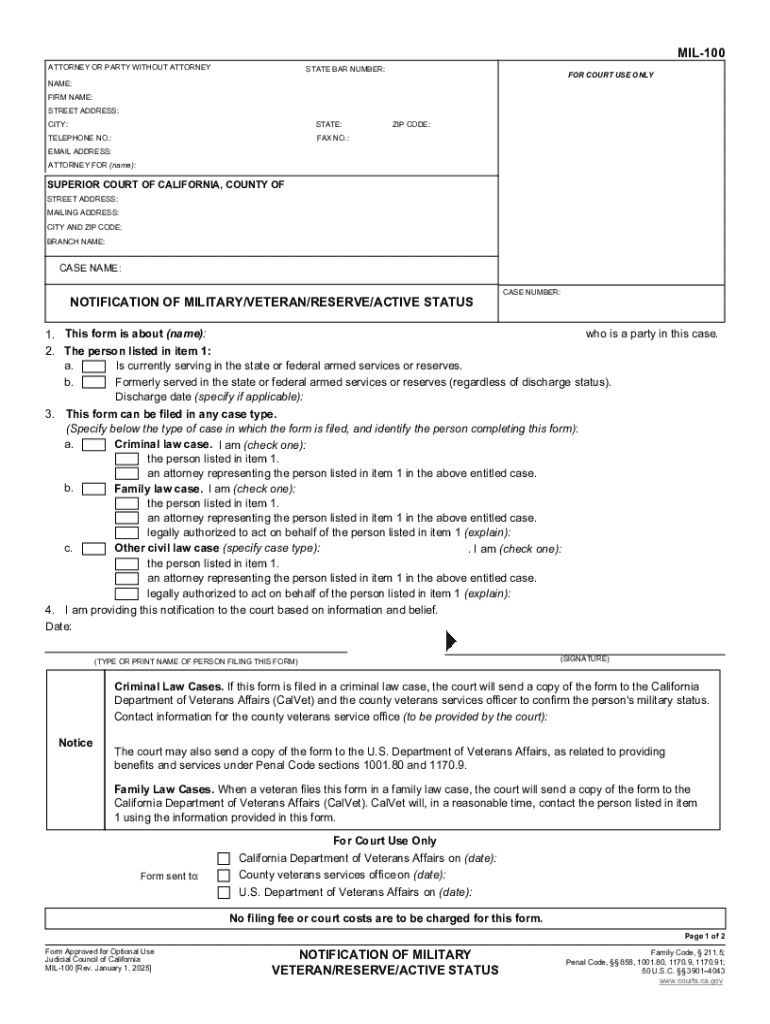
The MIL-100 is an official notification form designed for individuals involved in legal proceedings who are current or former members of the state or federal armed services or reserves. It serves as a means to inform the court about a party's military status. This notification is crucial because it ensures that military members and veterans receive the rights and protections afforded to them, which may impact the handling of their cases under California law. The form is applicable in diverse legal scenarios, including criminal cases, family law matters, and other civil proceedings where understanding the military service status could influence the outcome or proceedings.
Key Elements of the Mil-100
Several essential components comprise the MIL-100 form to cater to its primary objective:
- Personal Identification: Name, address, contact information, and other personal details for verification.
- Military Details: Branch of service, rank, service number, and current status (active, reserve, or veteran).
- Case Information: Docket or case number, court details, and legal representation if applicable.
- Military Leave and Deployment Status: Indications of any current deployment or active military duties that may affect court appearance or deadlines.
- Certification and Signature: The form requires the signature of the person submitting it, attesting to the accuracy of the information provided.
Understanding these elements ensures that the form properly communicates the necessary information to the court, paving the way for ensuring that military members are accorded the correct legal considerations.
Steps to Complete the Mil-100
Filling out the MIL-100 involves a series of steps that each contribute to the form's comprehensiveness and accuracy:
- Gather Personal and Military Information: Assemble all pertinent identification and military service records.
- Authenticate Details: Verify that all data related to military service, such as service number and rank, is accurate.
- Complete Form Sections: Fill out the form, providing information in all required fields. Pay special attention to areas concerning military deployment or leave status.
- Review and Verify: Double-check the form for any errors or omissions. Ensure that all personal details and case numbers match official records.
- Sign and Date: Officially certify the document with a signature and date.
- Submit to Court: Follow the specific instructions for document submission, which may vary depending on the jurisdiction or court directives.
Each of these steps is vital for the correct completion and acceptance of the form by legal authorities.
How to Obtain the Mil-100
The MIL-100 form can be accessed through several channels, depending on jurisdiction and individual needs:
- Online Access: Many jurisdictions provide downloadable versions of the form on their court websites.
- Court Clerk Offices: Obtain a physical copy by visiting local court clerk offices. Make sure to call ahead to confirm hours and availability.
- Legal Assistance Centers: For those who need extra help, legal aid centers or veteran support organizations may provide copies and assistance with completion.
- Military Legal Advisors: Military installations often have legal advisors who can provide the form and guidance on its use.
Understanding where to acquire this form is crucial for timely filing and ensuring compliance with court requirements.
Who Typically Uses the Mil-100
The MIL-100 is primarily used by:
- Current Service Members: Individuals currently serving in any branch of the U.S. military who are parties to a legal case.
- Veterans: Former service members involved in legal matters.
- Reserved Corps Members: Individuals in reserve status who have been called to duty or whose status may impact legal proceedings.
- Legal Representatives: Lawyers or legal advisors representing military personnel or veterans may also use this form as part of their documentation strategy.
These users leverage the MIL-100 to communicate their military status, which the courts can then factor into their legal proceedings.


Legal Use of the Mil-100
Legal applications of the MIL-100 are expansive:
- Rights & Protections: Ensures military personnel have their unique service-related rights upheld in legal settings.
- Stay of Proceedings: Can be used to request a postponement if active duty or deployment affects the individual's ability to participate in legal proceedings.
- Adjustments in Custody: In family law, military status disclosures could impact custody agreements or child support rulings.
- Consideration in Sentencing: Courts may consider military service history when making determinations on sentencing or penalties.
Filing the MIL-100 correctly ensures that the military member's service status is duly considered in legal processes, providing a framework for fair treatment under state laws.
State-Specific Rules and Considerations
Different states may have unique requirements or considerations related to the filing and interpretation of the MIL-100:
- Variations in Legal Protections: Some states may afford specific additional legal protections to military personnel, which can impact how the form is used or the additional documentation required.
- Submission Protocols: Procedures could vary, including where and how the form must be submitted (e.g., electronically or in person).
- Notification Requirements: Additional notices might be required to inform other involved parties of the filing, depending on state mandates.
Understanding state-specific rules is vital to ensure compliance and the benefit of any legal protections under state law.
Penalties for Non-Compliance
Failure to appropriately complete or file the MIL-100 can have significant legal repercussions:
- Legal Disadvantages: Without the form, military members might not be eligible for certain considerations, potentially leading to unfavorable legal outcomes.
- Potential Penalties: Missing submission deadlines or improperly completing the form could lead to penalties, including fines or judge-ordered sanctions.
- Rights Waiver: Non-compliance may result in the waiver of certain military-related legal rights, such as stays of proceedings.
It is crucial for active and former military members to adhere to the correct procedures to protect their legal interests actively.