






Definition and Meaning
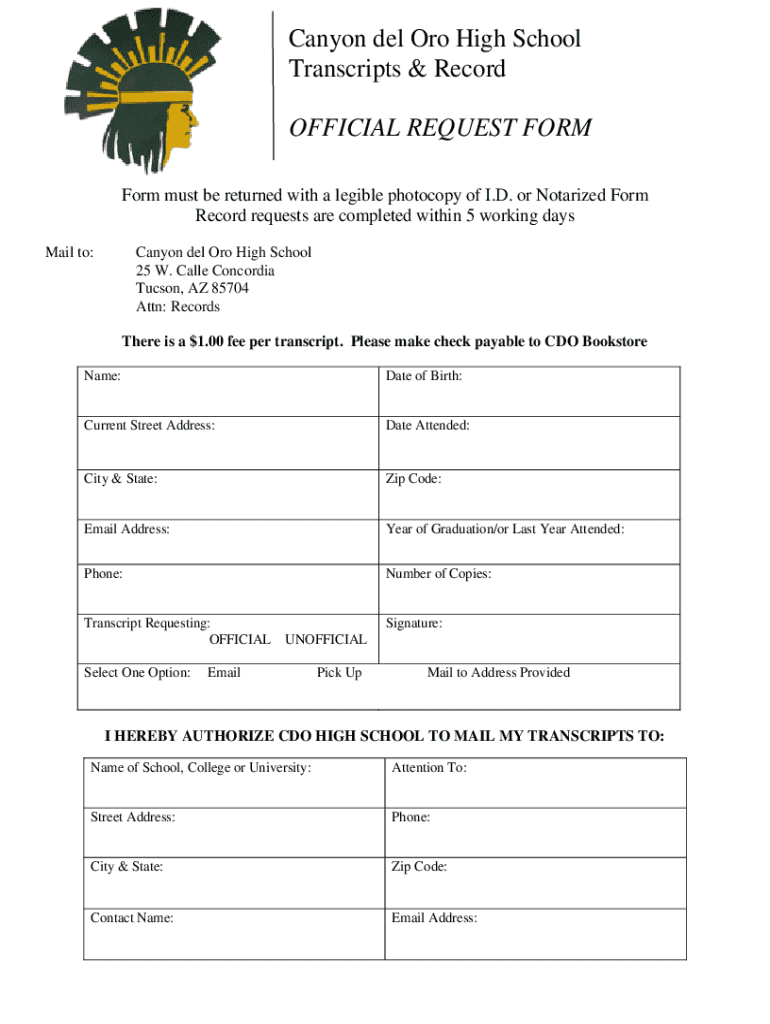
The "Fillable Online Canyon Del Oro High School Transcript" form is an official document used by students and alumni to request transcripts from Canyon Del Oro High School. These transcripts are comprehensive records of academic performance during a student's high school education and are often required for college applications, job applications, or other educational pursuits. The form allows individuals to request certified copies of their transcripts in an efficient and standardized manner, ensuring that all necessary information is included for processing.
Steps to Complete the Fillable Online Canyon Del Oro High School Transcript
-
Access the Form: Locate the form on the official website or through a document management platform like DocHub.
-
Personal Information: Fill in your personal details, including your full name, date of birth, and student ID number, to match your records with school data accurately.
-
Recipient Details: Indicate where the transcripts should be sent, whether directly to a school, employer, or personal address. Include full mailing details for accuracy.
-
Payment Information: Provide information on the method of payment for any processing or mailing fees associated with your request.
-
Submit the Form: Choose an appropriate submission method, which can be online, via mail, or in-person, depending on your preference and the availability of options.
-
Confirmation and Processing Time: After submission, you should receive a confirmation of receipt. Transcripts are typically processed within five working days.
Who Typically Uses the Fillable Online Canyon Del Oro High School Transcript
The primary users of this form are current students and alumni of Canyon Del Oro High School. They request transcripts for:
- College Applications: Most colleges and universities require official high school transcripts as part of their admissions process.
- Scholarship Applications: Scholarships often necessitate academic records to validate the applicant's academic standing.
- Job Applications: Certain employers may request a high school transcript to verify educational qualifications.
- Transfer Students: Students transferring to another high school may need to present their academic history.


How to Obtain the Fillable Online Canyon Del Oro High School Transcript
-
Online Access: Download the form from the school’s website or reputable platforms like DocHub.
-
School Office: Visit the school’s administrative office to pick up a paper version of the form.
-
Email Request: Some schools accept email requests for the form, providing a convenient option for remote students.
Ensure that you have all required details before beginning the request process to streamline your transcript acquisition.
Key Elements of the Fillable Online Canyon Del Oro High School Transcript
- Student Identification: Includes essential identifiers like full name, student ID number, and date of birth.
- Contact Information: Ensures the school can reach you if there are issues with the request.
- Transcript Destinations: Specifies where the transcripts should be sent, with space for multiple addresses if needed.
- Authorization: Confirms that the requestor approves the release of their academic records.
- Payment Section: Provides methods for covering any associated fees, usually including checks, money orders, or online payment options.
Legal Use of the Fillable Online Canyon Del Oro High School Transcript
Transcripts are critical legal documents that serve official purposes, such as:
- Verification of Education: Essential for applications that require proof of graduated or attended education.
- Record Keeping: Students need to maintain their own records for future educational and professional needs.
- Legal Compliance: Schools are legally obligated to provide transcripts as requested under educational right laws like FERPA in the U.S.
State-Specific Rules for the Fillable Online Canyon Del Oro High School Transcript
While standardized across many schools, some states may have specific regulations:
- Processing Fees: Some states mandate that public schools provide transcripts for free or at a reduced cost.
- Electronic Access: States may differ in how they recognize electronic versus paper transcripts.
- Academic Records Privacy: States may have varied interpretations of federal privacy laws affecting who can access transcripts.
Digital vs. Paper Version
- Digital Access: Offers convenience and speed, allowing for online submission and faster processing.
- Paper Copies: Used for official submissions to institutions that require a physical copy or do not accept digital formats.
- Hybrid Solutions: Some institutions provide digital forms but require physical signatures before accepting the request.
Digital options increasingly offer the advantage of being time-efficient and integrating with existing document workflows, making them the preferred choice for many users.