Type text, add images, blackout confidential details, add comments, highlights and more.
02. Sign it in a few clicks
Draw your signature, type it, upload its image, or use your mobile device as a signature pad.
03. Share your form with others
Send va form 21 22 via email, link, or fax. You can also download it, export it or print it out.
How to use or fill out VA Form 21-22 with our platform
Ease of Setup
DocHub User Ratings on G2
Ease of Use
DocHub User Ratings on G2
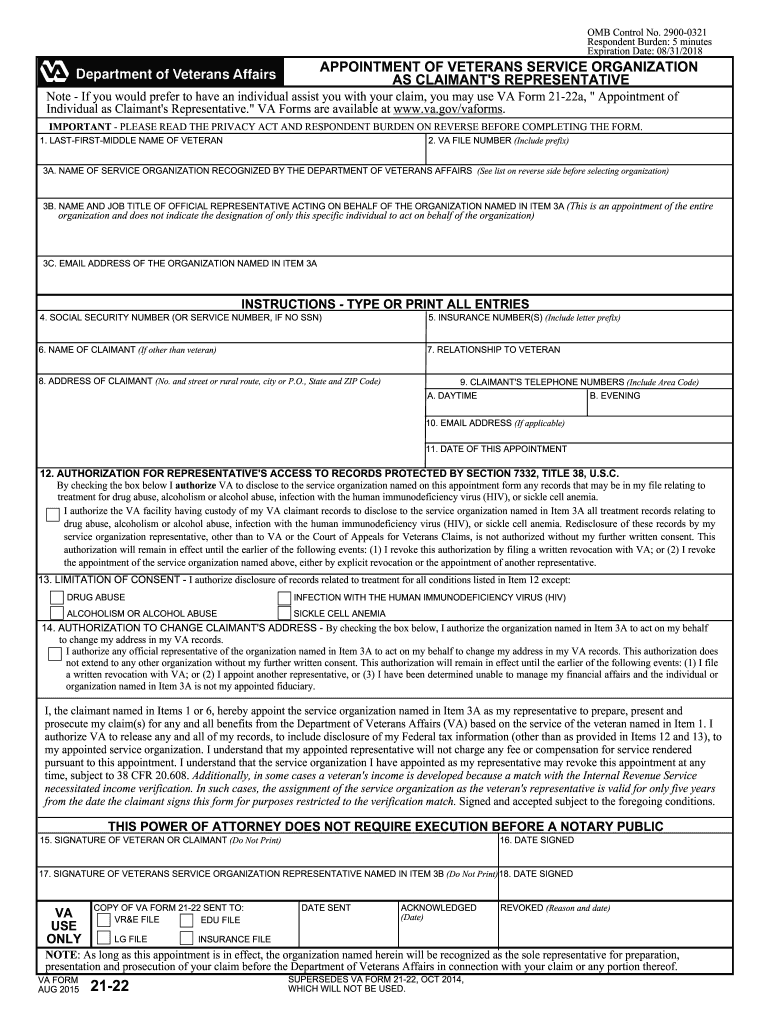
Click ‘Get Form’ to open VA Form 21-22 in the editor.
Begin by entering the veteran's last, first, and middle name in the designated fields. Ensure accuracy as this information is crucial for identification.
Input the VA file number, which helps link your form to existing records. If you do not have a file number, leave this blank.
Select the service organization recognized by the Department of Veterans Affairs from the list provided. Fill in their name and job title of the official representative acting on behalf of that organization.
Complete sections for social security number, insurance numbers, and claimant details if applicable. Make sure all entries are typed or printed clearly.
Review and check any necessary authorizations regarding access to records and address changes before signing at the bottom of the form.
Start using our platform today to fill out your VA Form 21-22 online for free!
VA Form 21-22 pdfVA Form 21-0966VA Form 21-22 fillableVA Form 21-22 onlineVA Form 21-22a appointment of INDIVIDUAL AS CLAIMANTS representativeVA Form 21-0845VA Form 21-22a instructionsVA form 21 22 or 21 22a
Security and compliance
At DocHub, your data security is our priority. We follow HIPAA, SOC2, GDPR, and other standards, so you can work on your documents with confidence.
VA Form 21-22, Appointment of Veterans Service Organization as Claimants Representative. VA Form 21-22A, Appointment of Individual as Claimants Representative.Read more
We recommend you use the list to confirm and validate VA accreditation before signing any contract or appointing someone to represent you on your VA benefitsRead more
Employment Information in Connection with Claim for
INSTRUCTIONS: The veteran named in Item 3 has filed a claim for veterans disability benefits and has stated that he/she was recently employed by you.Read more
Cookie consent notice
This site uses cookies to enhance site navigation and personalize your experience.
By using this site you agree to our use of cookies as described in our Privacy Notice.
You can modify your selections by visiting our Cookie and Advertising Notice.