




01. Edit your claim bag online
Type text, add images, blackout confidential details, add comments, highlights and more.

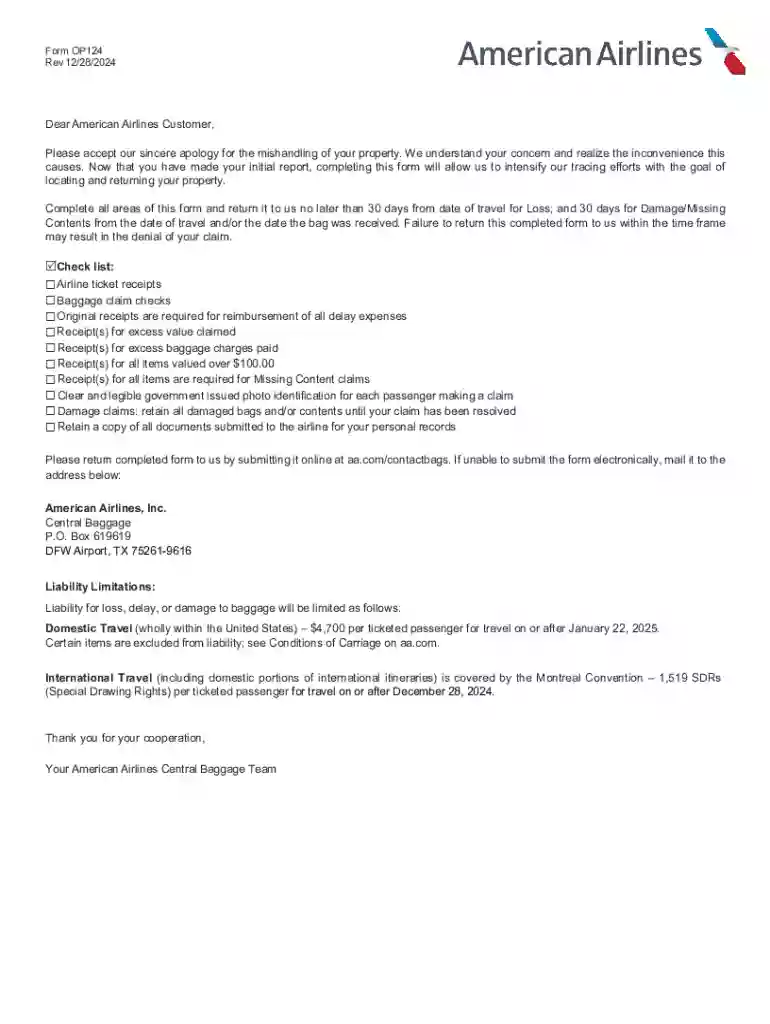
Type text, add images, blackout confidential details, add comments, highlights and more.

Draw your signature, type it, upload its image, or use your mobile device as a signature pad.

Send it via email, link, or fax. You can also download it, export it or print it out.
Form OP124 is a claim form used by American Airlines to address issues related to lost, damaged, or missing baggage. The form serves as a formal request for compensation and is vital for initiating the claims process. Customers utilize the form to provide detailed information about the incident, allowing American Airlines to assess and process the claim efficiently. The form includes fields for personal data, travel details, and specifics about the baggage in question. By documenting the issue comprehensively, this form facilitates a transparent resolution process between the airline and their customers.
Using Form OP124 involves a methodical process to ensure all necessary information is provided accurately. Begin by obtaining the form from American Airlines’ customer service or website. Fill in each section carefully, ensuring that personal details such as full name, contact information, and flight number are correct. Describe the baggage issue clearly, including details of the lost or damaged items. Attach supporting documents, such as your ticket and baggage claim tags, to strengthen your case. Review the completed form to verify all information is correct before submission. Retaining a copy for your own records is advisable.
To access Form OP124, customers should visit the American Airlines website, where the form is available for download. Alternatively, you can request a physical copy from an American Airlines customer service desk at the airport. If electronic submission is preferred, ensure you have a reliable internet connection to download and complete the form digitally. For assistance, contacting American Airlines customer support can provide further guidance on acquiring the form efficiently.
Completing Form OP124 involves several key steps to ensure all required information is captured:
The use of Form OP124 is essential for customers seeking compensation for baggage-related issues. By formally documenting the incident, the form provides American Airlines with the information needed to investigate and process the claim. This formal process can lead to a fair resolution, potentially offering compensation for lost or damaged items. Additionally, the form serves as a record that the issue was officially reported, which can be crucial for further actions if necessary. Using this form ensures that your claim is handled professionally and efficiently.
Form OP124 is primarily used by travelers who experience baggage problems during their flights with American Airlines. Frequent flyers, business travelers, and vacationers alike may find themselves needing this form if their checked baggage is lost, delayed, or damaged. Families traveling with multiple bags may also need to use Form OP124 should any issues with their baggage arise. The form serves as a tool for consumers to communicate effectively with the airline about their concerns, seeking restitution or compensation where applicable.
Understanding the terminology related to Form OP124 is crucial for accurately completing the form. Key terms include:
Form OP124 comprises several critical sections that collect information pertinent to resolving baggage claims. Key elements include:
These elements collectively ensure that all essential details are captured to facilitate a smooth claims process.
We've got more versions of the claim bag form. Select the right claim bag version from the list and start editing it straight away!
At DocHub, your data security is our priority. We follow HIPAA, SOC2, GDPR, and other standards, so you can work on your documents with confidence.



Create powerful online forms with pre-fill, AI, and multi-step workflow features. Try our easy-to-use online form builder with enterprise-level
Mar 3, 2025 This page lists the USCIS forms that are currently available to file online. To learn about the benefits of filing a form using our secure online system, visit


