




01. Edit your form online
Type text, add images, blackout confidential details, add comments, highlights and more.

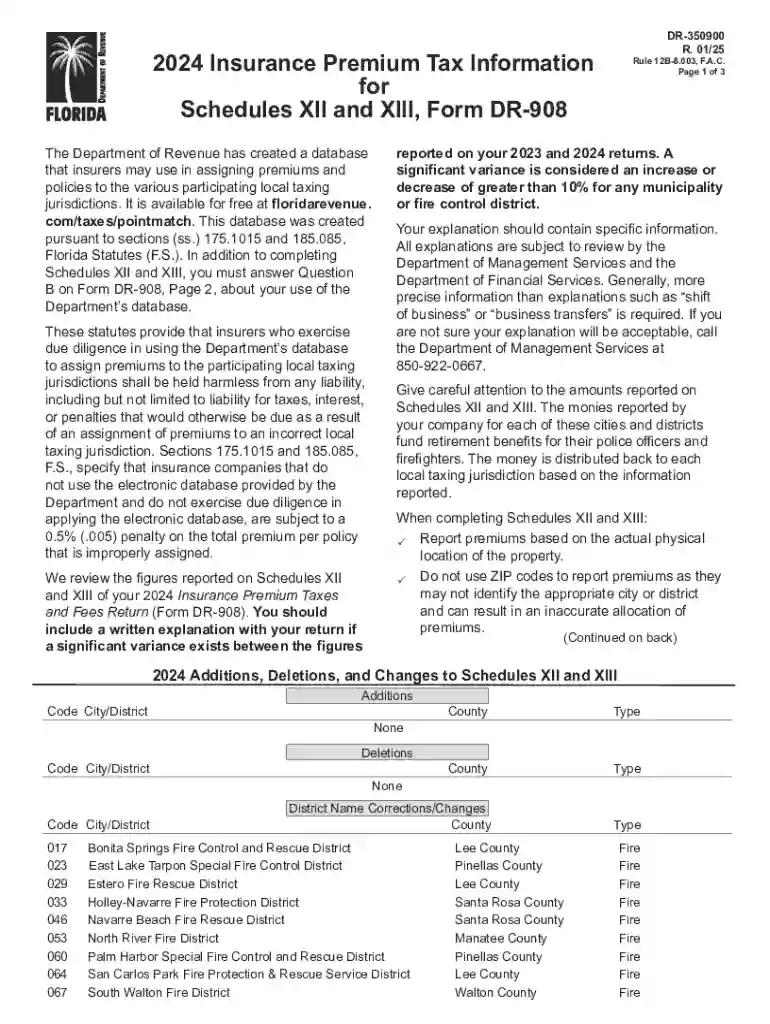
Type text, add images, blackout confidential details, add comments, highlights and more.

Draw your signature, type it, upload its image, or use your mobile device as a signature pad.

Send it via email, link, or fax. You can also download it, export it or print it out.
Filling out a form online refers to the process of inputting required information into a digital document that can be accessed through a web-based platform or application. Unlike traditional paper forms, online forms streamline data collection by enabling users to complete tasks digitally, which enhances accuracy and efficiency. These electronic forms are used for a wide range of applications, including personal, legal, financial, and business purposes. By converting traditional forms into digital formats, individuals and businesses benefit from reduced paperwork, improved data management, and faster processing times.
Using forms online involves understanding specific features and functionalities that simplify the process. Modern online form platforms often provide intuitive interfaces with interactive elements like dropdown menus, checkboxes, and text fields, which guide users through filling out the necessary information. When using an online form, it is crucial to ensure that all mandatory fields marked with an asterisk (*) are completed to proceed to the next step. Users should also review the form for any errors before submission, as digital forms often include validation checks that prevent the entry of incorrect information, improving accuracy.
To obtain forms online, users can access dedicated platforms or websites that host a variety of digital forms. Many government agencies, businesses, and educational institutions provide downloadable forms directly from their official websites. Users should navigate to the form section of a website, usually labeled "Forms" or "Resources," where they can search for the specific document they need. After locating the appropriate form, users can either fill it out directly within the web browser or download it for offline completion. For ease of access, many platforms offer search tools that use keywords to quickly locate specific forms.
Online forms offer numerous advantages over traditional paper-based methods. They provide enhanced convenience by allowing users to access and complete forms from anywhere with an internet connection. This flexibility is particularly advantageous for remote workers or individuals with limited access to physical offices. Additionally, online forms often include automated data validation features that minimize errors such as typos or incomplete fields, ensuring a higher level of data integrity. Furthermore, the use of online forms is environmentally friendly, as it significantly reduces paper consumption and waste.
Various segments of the population and sectors of the economy utilize online forms. They are commonly used by businesses for client intake forms, invoice submissions, and employee feedback. Educational institutions rely on them for student registrations, application processes, and evaluations. Government agencies often use online forms for tax submissions, license applications, and other citizen services. Nonprofit organizations can leverage online forms to manage volunteer registrations and collect donations. Essentially, anyone seeking a streamlined way to collect and process information can benefit from utilizing online forms.
Online forms must adhere to legal standards that protect user data and ensure compliance with applicable regulations. Many platforms incorporate security measures such as end-to-end encryption, secure socket layers (SSL), and authentication protocols to protect the information submitted online. When using forms that collect sensitive information, such as Social Security numbers or financial data, it's crucial to verify that the platform complies with relevant laws such as the Electronic Signatures in Global and National Commerce Act (ESIGN Act) or the General Data Protection Regulation (GDPR) for international interactions. These regulations mandate specific data protection requirements to safeguard personal information.
Online forms typically integrate several key elements to enhance functionality and user experience. Common features include:
These elements collectively improve the accessibility and usability of online forms, promoting a user-friendly experience.
We've got more versions of the Florida Insurance Premium Tax Information form. Select the right Florida Insurance Premium Tax Information version from the list and start editing it straight away!
At DocHub, your data security is our priority. We follow HIPAA, SOC2, GDPR, and other standards, so you can work on your documents with confidence.


A tax at the rate of 1.75 percent of the gross amount of receipts for insurance premiums and assessments shall be applied to the following types of policies:
There shall be allowed a credit against the net tax imposed by this section equal to 15 percent of the amount paid by an insurer in salaries to employeesRead more


