




01. Edit your form online
Type text, add images, blackout confidential details, add comments, highlights and more.

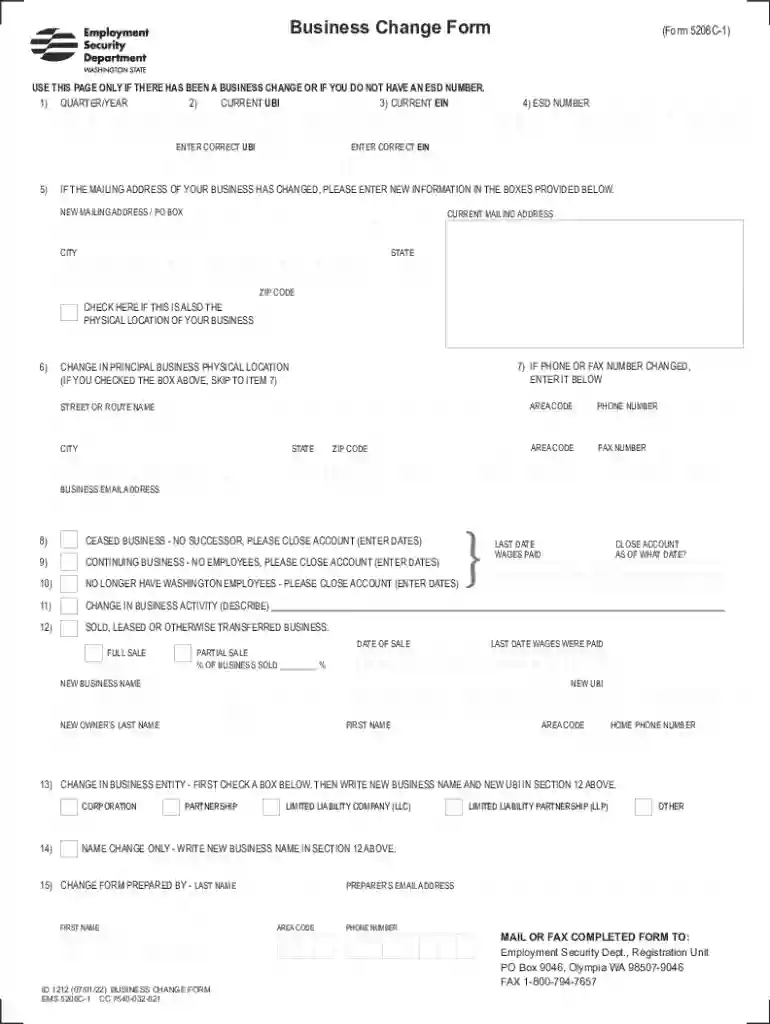
Type text, add images, blackout confidential details, add comments, highlights and more.

Draw your signature, type it, upload its image, or use your mobile device as a signature pad.

Send it via email, link, or fax. You can also download it, export it or print it out.
The Business Change Form 5208C-1 is used to notify the Employment Security Department in the state of Washington about changes in business data. This includes major updates like modifications to mailing addresses, phone numbers, business activities, or ownership alterations. The form holds essential segments for recording current and revised business identifiers, such as the Unified Business Identifier (UBI) and Employer Identification Number (EIN). It is vital for maintaining current records with the Department, ensuring ongoing compliance with state regulations.
To effectively utilize the Business Change Form 5208C-1 online, first familiarize yourself with the specific sections pertinent to your business updates. Upon accessing the form through an online platform like DocHub, select each field corresponding to the information that requires updating. Ensure all applicable fields are filled accurately before submitting the form for processing. This ensures that your business records are updated efficiently, reflecting the most current information.
When updating business information on Form 5208C-1, specific documents may be required to verify changes. These include:
These documents ensure that the updates are substantiated and accurate.
The form consists of several critical segments, each designed to capture specific information about business changes:
Each section is crucial for maintaining accurate, regulatory-compliant business records.
Completing and submitting Form 5208C-1 is a legal requirement to keep your business information up-to-date with the Employment Security Department in Washington. Failure to submit accurate changes can lead to penalties or compliance issues. By accurately reporting changes such as new addresses or shifts in business activities, businesses remain in legal good standing, benefiting from up-to-date records with the state.
The application of Form 5208C-1 is governed by Washington State regulations, which mandate the reporting of business changes to the Employment Security Department. State-specific requirements include:
Being aware of these rules helps ensure compliance and avoids legal complications.
Failure to submit Form 5208C-1 when business changes occur can result in several penalties:
It is essential to ensure timely and accurate submission of this form to avoid these consequences.
While all businesses must report changes using Form 5208C-1, certain business types frequently utilize this form, including:
These businesses, due to dynamic operations, gain significantly from keeping their records with the state current through this form.
We've got more versions of the Business Change Form 5208c 1 - Fill Online, Printable form. Select the right Business Change Form 5208c 1 - Fill Online, Printable version from the list and start editing it straight away!
At DocHub, your data security is our priority. We follow HIPAA, SOC2, GDPR, and other standards, so you can work on your documents with confidence.



