Vs 170 2025

Get Form
vs 170 Preview on Page 1

Here's how it works

01. Edit your vs 170 online
Type text, add images, blackout confidential details, add comments, highlights and more.

02. Sign it in a few clicks
Draw your signature, type it, upload its image, or use your mobile device as a signature pad.

03. Share your form with others
Send vs170 form via email, link, or fax. You can also download it, export it or print it out.

How to use or fill out vs 170 with our platform

Form edit decoration
9.5
Ease of Setup
DocHub User Ratings on G2
9.0
Ease of Use
DocHub User Ratings on G2
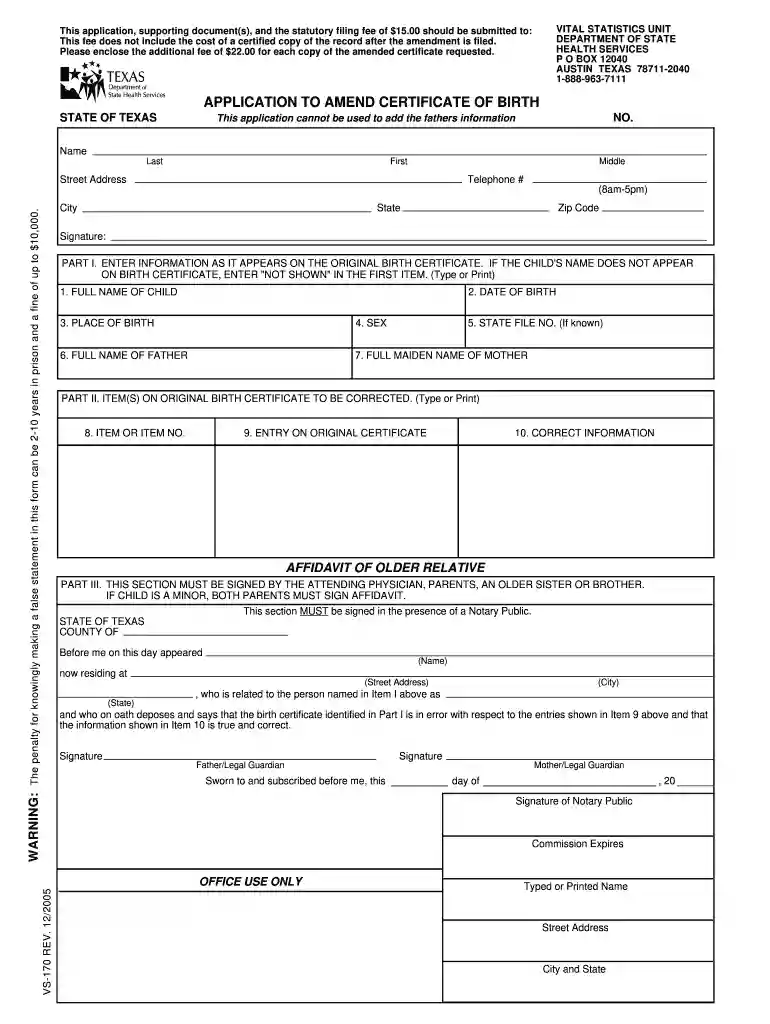
  1. Click ‘Get Form’ to open the vs 170 application in the editor.
  2. Begin by entering your personal information in the designated fields, including your full name, street address, and telephone number. Ensure accuracy as this information is crucial for processing.
  3. In Part I, input the child's details exactly as they appear on the original birth certificate. If the child's name is not listed, write 'NOT SHOWN' in the first item.
  4. Proceed to Part II to specify which items on the original birth certificate need correction. Clearly indicate the incorrect entry and provide the correct information.
  5. For Part III, ensure that an older relative or legal guardian signs the affidavit section in front of a Notary Public. This step is essential for validation.
  6. Review all entries for completeness and accuracy before submitting your application along with any required fees and supporting documents.

Start using our platform today to streamline your document editing and form completion process for free!

See more vs 170 versions

We've got more versions of the vs 170 form. Select the right vs 170 version from the list and start editing it straight away!
Versions Form popularity Fillable & printable
2021 4.8 Satisfied (47 Votes)
2019 4.4 Satisfied (231 Votes)
2005 4.3 Satisfied (271 Votes)
be ready to get more

Complete this form in 5 minutes or less

Get form

Got questions?

We have answers to the most popular questions from our customers. If you can't find an answer to your question, please contact us.
Contact us

Electronic document approval demands a software solution that complies with data protection and eSignature regulations. DocHub is an excellent tool for that, because it fulfills all the aforementioned requirements. Whatever method you prefer to sign your vs 170 form in DocHub, your eSignature will be legally binding and court-admissible.

If you use Chrome, there are two straightforward ways to modify your form vs 170 online. First, go to the DocHub site, add your file, and modify it using our toolbar. You can also install our Chrome extension and modify any document by dragging and dropping it in your browser tab.

The VS-166 - Application for a New Birth Certificate based on Parentage form is used to add, remove, or replace information regarding the parents listed on the original birth certificate. Click on the link to find the form on the Texas Department of State Health Services website.
Key Takeaways. Texas is a community property state, which means that the presumption is, that each spouse receives half of the assets and liabilities.
What is vs165 form? An Austin Form, or Form VS-165, is required by the Texas Department of State Health Service Vital Statistics. It must be reported through the clerk of the court to the State Vital Statistics Unit. The Austin Form is needed for all: Divorces, Annulments (with or without children), and.

People also ask

These 11 x 14 personalized certificates have a specially designed and engraved border and are printed on heirloom-quality paper with background security features and a gold embossed seal.
Form VS-170, or Application to Amend Certificate of Birth, was designed in the State of Texas and last revised in 2005. It is mostly used to add information to the item left blank in a certificate of birth, or to correct a mistake in spelling, if names have the same sound, or for any other changes in this document.
A Texas uncontested divorce is the quickest and cheapest way to end a valid marriage in the state. This type of divorce, also known as an agreed divorce, occurs when both spouses agree on all issues such as property division, debts, and child custody.

vs 170 español