




Here's how it works

01. Edit your 48 declaration form online
Type text, add images, blackout confidential details, add comments, highlights and more.

02. Sign it in a few clicks
Draw your signature, type it, upload its image, or use your mobile device as a signature pad.

03. Share your form with others
Send form de 48 via email, link, or fax. You can also download it, export it or print it out.
How to use or fill out edd ca siteassetsfilesPower of Attorney Declaration - Employment Development Department

- Click ‘Get Form’ to open it in the editor.
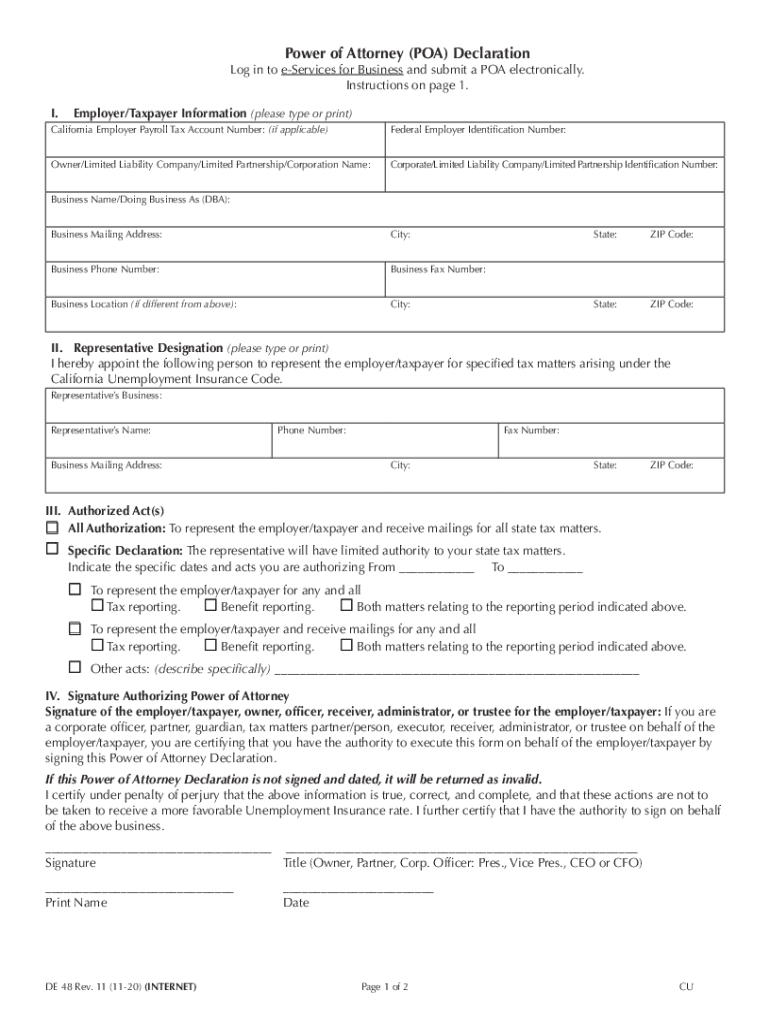
- Begin with Section I: Employer/Taxpayer Information. Enter your California employer payroll tax account number, federal employer identification number, and business details including name, mailing address, and contact numbers.
- Proceed to Section II: Representative Designation. Fill in the representative’s business name, contact information, and address to designate them as your authorized agent.
- In Section III: Authorized Act(s), choose between 'All Authorization' for full representation or 'Specific Declaration' for limited authority. Specify the dates if applicable.
- Finally, complete Section IV: Signature Authorizing Power of Attorney. Ensure that the appropriate individual signs and dates the form within 30 days of submission.
Start using our platform today to easily fill out and submit your Power of Attorney Declaration for free!
Fill out edd ca siteassetsfilesPower of Attorney Declaration - Employment Development Department online
It's free
It's free
See more edd ca siteassetsfilesPower of Attorney Declaration - Employment Development Department versions
We've got more versions of the edd ca siteassetsfilesPower of Attorney Declaration - Employment Development Department form. Select the right edd ca siteassetsfilesPower of Attorney Declaration - Employment Development Department version from the list and start editing it straight away!
Got questions?
We have answers to the most popular questions from our customers. If you can't find an answer to your question, please contact us.
Contact us
How do I send my identity verification to EDD?
You must provide your Social Security number, take a selfie (a photo of yourself), and upload a photo of your ID to verify your identity. If we need more information to verify your identity, you will need to join a video call with ID.me.
What are two documents that you may be asked to provide for verification?
How to verify Visit the EDD website and select Benefits Login in the upper-right corner. Log in to myEDD or select Create Account to register. From myEDD Home, select UI Online. From UI Online, select File a New Claim. When you docHub the Verify Your Identity page, select Verify with ID.me.
How do I submit documents to EDD?
Documents you need Examples: Primary document: Drivers license, passport, or other government-issued photo. Secondary document: Social Security card, utility bill, or vehicle registration.
What letter does EDD send to employers?
Notice of Unemployment Insurance Claim Filed (DE 1101CZ) This notice is sent to the last employer when a claim for unemployment benefits is filed. It includes the reason the individual said they were no longer working.
What is the EDD Form DE 2088?
The Notice of Contribution Rates and Statement of UI Reserve Account (DE 2088) informs you of your Unemployment Insurance (UI) and Employment Training Tax (ETT) contribution rates for the period shown on your DE 2088, as well as the website where the State Disability Insurance (SDI) rate can be found.
Security and compliance
At DocHub, your data security is our priority. We follow HIPAA, SOC2, GDPR, and other standards, so you can work on your documents with confidence.
Learn more


People also ask
What is the employment development department in CA?
Description. The Employment Development Department (EDD) is one of the largest state departments with employees at hundreds of service locations throughout the state. For more than 70 years, we have connected millions of job seekers and employers in an effort to build the economy of the Golden State.
How do I send verification documents to EDD?
To upload documents that verify your address: Select the unique link in your email. Create an account using your myEDD email address and EDD Customer Account Number. Upload at least one of the acceptable documents listed below.


