Gold's gym membership cancellation form 2026

Get Form
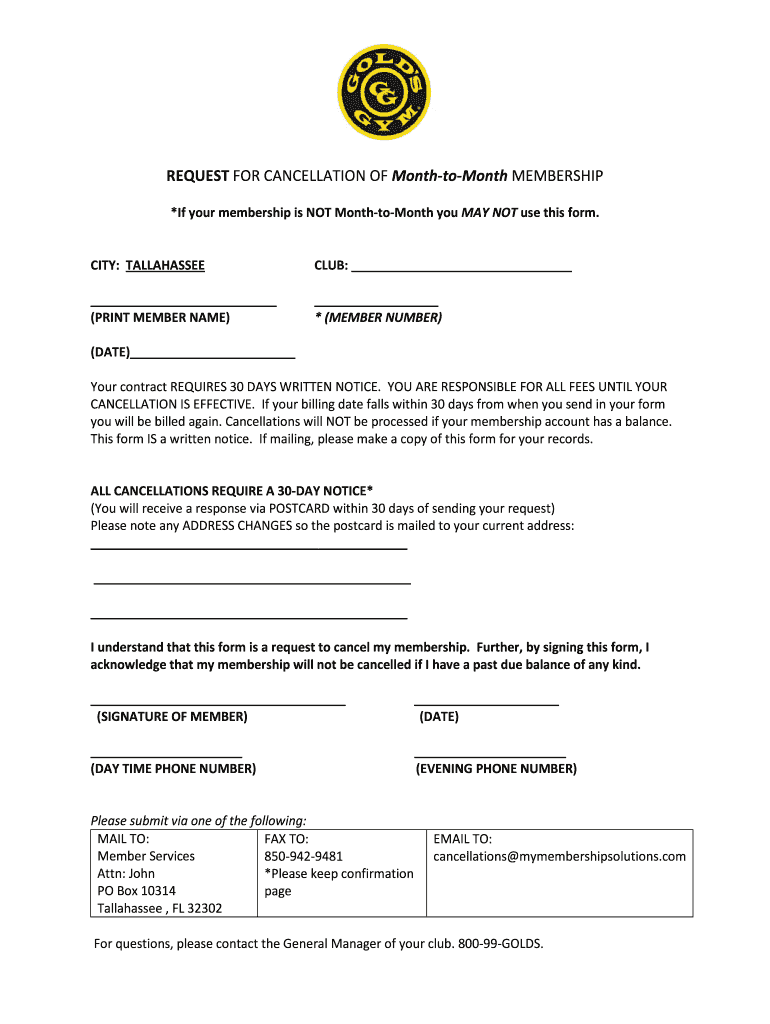
cancel gold's gym membership Preview on Page 1

Here's how it works

01. Edit your cancel gold's gym membership online
Type text, add images, blackout confidential details, add comments, highlights and more.
02. Sign it in a few clicks
Draw your signature, type it, upload its image, or use your mobile device as a signature pad.
03. Share your form with others
Send golds gym cancelation via email, link, or fax. You can also download it, export it or print it out.

How to use or fill out gold's gym membership cancellation form with our platform

Form edit decoration
9.5
Ease of Setup
DocHub User Ratings on G2
9.0
Ease of Use
DocHub User Ratings on G2
  1. Click ‘Get Form’ to open the gold's gym membership cancellation form in the editor.
  2. Begin by filling in the 'CITY' and 'CLUB' sections with your relevant information. Ensure accuracy to avoid any processing delays.
  3. Print your name clearly in the designated area, followed by your member number. This identification is crucial for processing your request.
  4. Enter the date you are submitting this cancellation request. Remember, a 30-day written notice is required for effective cancellation.
  5. If applicable, note any address changes to ensure you receive confirmation via postcard at your current address.
  6. Sign and date the form at the bottom. Your signature confirms that you understand the terms of cancellation, including any outstanding balances.
  7. Finally, submit your completed form via mail, fax, or email as indicated on the document. Keep a copy for your records.

Start using our platform today to easily complete and submit your gold's gym membership cancellation form for free!

be ready to get more

Complete this form in 5 minutes or less

Get form

Got questions?

We have answers to the most popular questions from our customers. If you can't find an answer to your question, please contact us.
Contact us

Many software solutions are available on the market for document editing and signing. DocHub is one of the most in-demand online solutions that comply with all data protection and compliance standards and guarantees your eSigned paperwork is legally enforceable. All you need to give it a try is to sign up for an account, add your how to cancel gold's gym membership, fill out the requested details, and click Sign. Generate your eSignature by typing, drawing it, uploading its image to your document, or scanning a unique QR code.

You can find and edit your gold's gym cancel membership online with the help of DocHub. Its simple but feature-rich design enables you to begin effective work right after you sign up your account. Create your account and add your document, then our user interface will guide you through our stress-free form completion experience.

Your gym should let you cancel your contract if you've had a change in circumstances that means you can't afford the monthly payments. It would have to be something significant, eg you've lost your job or suddenly found yourself in a lot of debt. You'll need evidence to prove this to your gym.
You have to submit "official" proof from your doctor, boss, or submit proof of your new address by showing a lease or bill in your name. Most people don't take the gym contract they sign as seriously as they should.
Gold's Gym requires at least a 30-day notice for canceling any membership. You'll have to continue to pay until that period passes. They usually do not offer prorated refunds if you cancel early on.

Security and compliance

At DocHub, your data security is our priority. We follow HIPAA, SOC2, GDPR, and other standards, so you can work on your documents with confidence.

Learn more

People also ask

If you fail to pay your membership fees, your gym can send your account to collections, which is a major negative mark on your credit report. A gym membership is just like any other recurring bill. The method you used to pay the bill does not matter.
Attorney, David Reischer, Esq. tells Men's Health that "Gym club contracts are drafted in such a way as to not allow a person to quit without suffering a penalty. They are legally binding agreements that can only be breached when the terms of the contract are unconscionable or otherwise specifically prohibited by law."
How can I cancel my membership? You must cancel 30 days prior to your billing date. Cancellations must be done by email or in person.
Can I freeze my membership? A: We are offering a freeze for up to 90 days at no charge. Q: Will I be billed for a full month's dues since all the gym is not open? A: Yes, we will continue our regular billing schedule.
Small businesses that have entered contracts with the gym also have some provisions. If the individual sends a cancellation notice within three days of making the contract, the person will have to pay either 10% of their annual dues or $25.

how to cancel gold's gym membership online