




01. Edit your guam grt exemption codes online
Type text, add images, blackout confidential details, add comments, highlights and more.

Type text, add images, blackout confidential details, add comments, highlights and more.

Draw your signature, type it, upload its image, or use your mobile device as a signature pad.

Send w 2gu 2024 via email, link, or fax. You can also download it, export it or print it out.
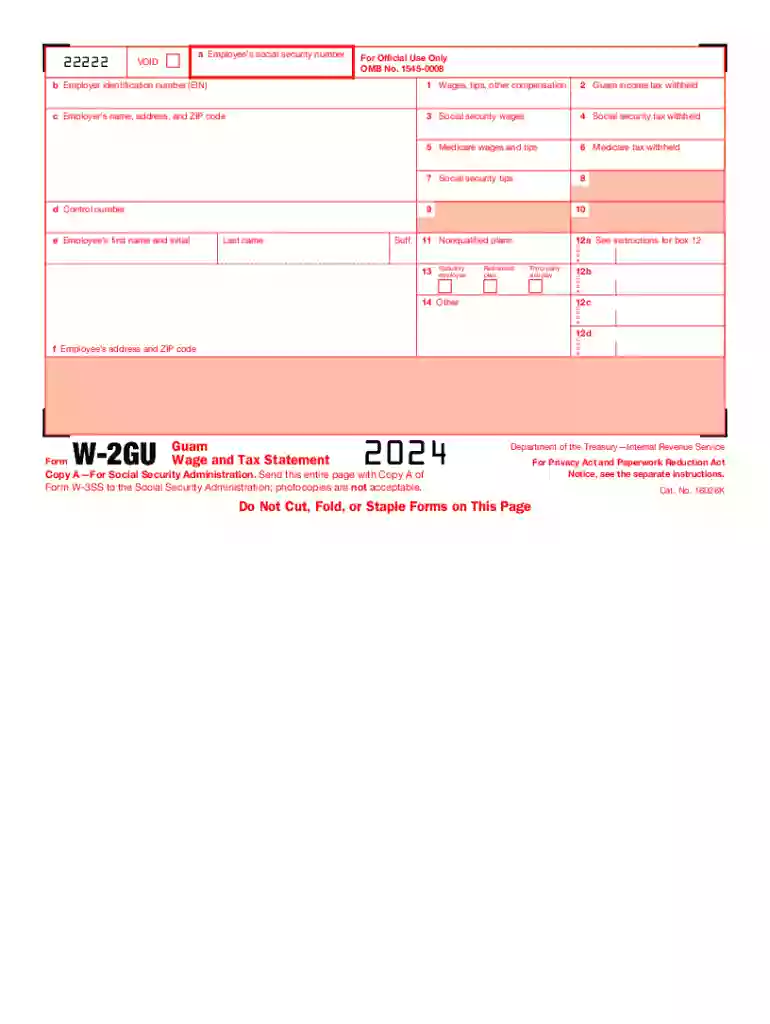
The 2024 Form W-2GU, commonly referred to as the Guam Wage and Tax Statement, serves as a critical document for employers and employees in Guam for reporting earnings and tax withholdings. This form is akin to the standard W-2 used in the United States but specifically caters to the unique tax structure applicable to Guam. It contains detailed information about an employee's annual earnings and taxes withheld, which both the employee and employer use for state tax filing and compliance.
Employers must provide this form to all employees by the designated deadline, ensuring each copy is filled accurately with the employee's wage and tax information from the previous year. Employees, in turn, use the W-2GU to complete their tax returns. The form includes various boxes for wages, tips, federal and territorial income tax withheld, Social Security tax information, and other specific deductions. Accuracy in using the data from W-2GU is critical for both personal tax filings and potential audits.
Employers in Guam can procure the Form W-2GU from the IRS or an approved scannable format provider, ensuring they have the latest version applicable for 2024. Employees receive their copies from their employer, usually in physical format, unless both parties agree on a digital alternative. Obtaining and using the correct form version is critical for compliance with the IRS and Guam-specific tax regulations.
The W-2GU form is predominantly used by Guam-based employers and employees. Employers must issue this form to report employee earnings and taxes. Employees use it to file their local and federal tax returns accurately. This form caters to various employee statuses, including full-time, part-time, and temporary workers, across all business sectors operating within Guam.


Employers are required by law to issue Form W-2GU, capturing all taxable earnings and associated withholdings. The legal implications for employers and employees are significant, as accurate reporting impacts tax assessments and compliance. Failure to issue or complete the form accurately can result in penalties from the IRS or local tax authorities.
The IRS provides specific instructions for accurately completing and submitting the Form W-2GU. Employers must adhere to guidelines concerning the calculation of taxable income, reporting timelines, and submission formats to remain compliant. These guidelines are devised to ensure uniformity in tax reporting across jurisdictions.
Employers must issue Form W-2GU to employees by January 31, following the tax year it represents. Submissions to the Social Security Administration and other tax bodies must also adhere to specified deadlines to avoid penalties. Understanding these timeframes is crucial for both compliance and employee satisfaction.
Employers and employees must pay close attention to these deadlines to ensure timely and accurate tax reporting.
We've got more versions of the guam grt exemption codes form. Select the right guam grt exemption codes version from the list and start editing it straight away!
| Versions | Form popularity | Fillable & printable |
|---|---|---|
| 2024 | 4.4 Satisfied (30 Votes) | |
| 2023 | 4.8 Satisfied (38 Votes) | |
| 2022 | 4.9 Satisfied (29 Votes) | |
| 2021 | 4.8 Satisfied (176 Votes) | |
| 2020 | 4 Satisfied (54 Votes) | |
| 2019 | 4.2 Satisfied (53 Votes) | |
| 2018 | 4.3 Satisfied (109 Votes) | |
| 2017 | 4.1 Satisfied (51 Votes) | |
| 2016 | 4.4 Satisfied (336 Votes) | |
| 2015 | 4 Satisfied (20 Votes) | |
| 2014 | 4 Satisfied (44 Votes) | |
| 2013 | 4 Satisfied (37 Votes) | |
| 2012 | 4 Satisfied (48 Votes) | |
| 2011 | 4 Satisfied (30 Votes) |
At DocHub, your data security is our priority. We follow HIPAA, SOC2, GDPR, and other standards, so you can work on your documents with confidence.


