Type text, add images, blackout confidential details, add comments, highlights and more.
02. Sign it in a few clicks
Draw your signature, type it, upload its image, or use your mobile device as a signature pad.
03. Share your form with others
Send form 8a divorce via email, link, or fax. You can also download it, export it or print it out.
How to use or fill out form 8a divorce with our platform
Ease of Setup
DocHub User Ratings on G2
Ease of Use
DocHub User Ratings on G2
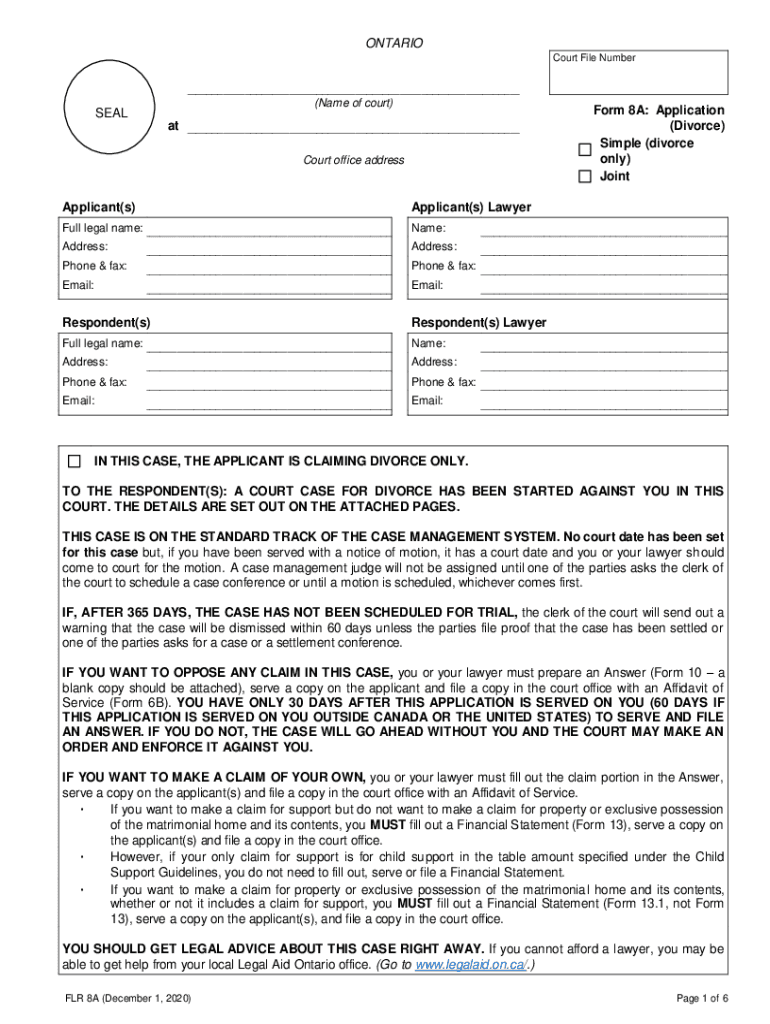
Click ‘Get Form’ to open the form 8a divorce in the editor.
Begin by filling in the Court File Number and the name of the court at the top of the form. This information is crucial for identifying your case.
In the Applicant(s) section, provide full legal names, addresses, phone numbers, and emails for both applicants and their lawyers if applicable.
Complete the Family History section by entering personal details such as age, birthdate, and residency for both parties. Ensure accuracy as this information is vital for your application.
List all children involved in this case in the designated section, including their full legal names, ages, and current living arrangements.
In the Claims section, check all applicable claims you are making under relevant laws. If only seeking a divorce, ensure to check that option specifically.
Finally, review all entered information for completeness before signing. Use our platform’s features to save your progress or make edits easily.
Start using our platform today to fill out your form 8a divorce online for free!
Printable form 8a divorceForm 8A Application Divorce PDF downloadHow to fill out form 8a divorceForm 8a divorce templateHow to fill out Form 8A divorce OntarioForm 8a divorce onlineForm 8A pdfForm 8A Small Claims Court
Security and compliance
At DocHub, your data security is our priority. We follow HIPAA, SOC2, GDPR, and other standards, so you can work on your documents with confidence.
Schedule. 8812. Form used to calculate your child tax credits, to report advance child tax credit payments you received, and to figure any additional tax owedRead more
Jan 30, 2018 A separation or divorce occurred during the ownership of the home. See Separated or divorced taxpayers. The death of a spouse occurred duringRead more
Cookie consent notice
This site uses cookies to enhance site navigation and personalize your experience.
By using this site you agree to our use of cookies as described in our Privacy Notice.
You can modify your selections by visiting our Cookie and Advertising Notice.