DISCLOSURE STATEMENT August 28, 2018 - NC-2026

Get Form
DISCLOSURE STATEMENT August 28, 2018 - NC Preview on Page 1

Here's how it works

01. Edit your form online
Type text, add images, blackout confidential details, add comments, highlights and more.

02. Sign it in a few clicks
Draw your signature, type it, upload its image, or use your mobile device as a signature pad.

03. Share your form with others
Send it via email, link, or fax. You can also download it, export it or print it out.

How to use or fill out DISCLOSURE STATEMENT August 28, 2018 - NC with our platform

Form edit decoration
9.5
Ease of Setup
DocHub User Ratings on G2
9.0
Ease of Use
DocHub User Ratings on G2
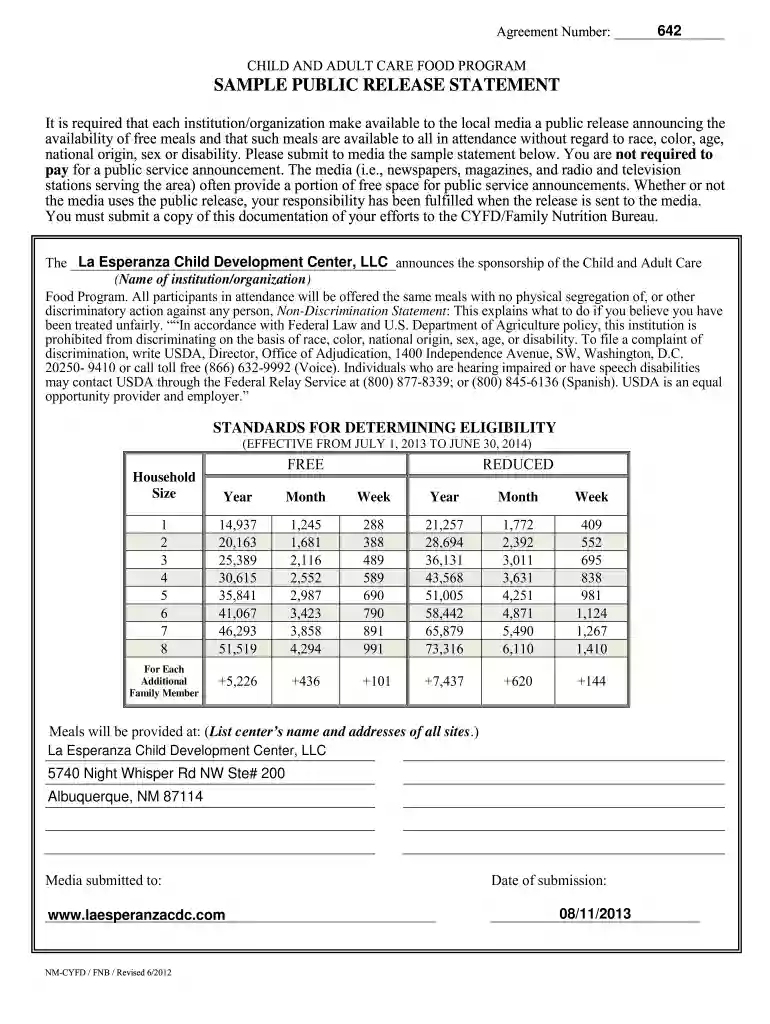
  1. Click ‘Get Form’ to open the DISCLOSURE STATEMENT in the editor.
  2. Begin by entering the Agreement Number in the designated field at the top of the form. This is essential for tracking and reference.
  3. In the section labeled 'Name of institution/organization', input the name of your organization, ensuring it matches official records.
  4. Fill out the eligibility standards table by entering household sizes and corresponding income levels for both free and reduced meal categories. Make sure to double-check these figures for accuracy.
  5. List all meal provision sites under 'Meals will be provided at'. Include complete addresses to ensure clarity for participants.
  6. Document your media submission date in the appropriate field, confirming that you have fulfilled your obligation to notify local media about meal availability.

Start using our platform today to streamline your document editing and form completion process for free!

See more DISCLOSURE STATEMENT August 28, 2018 - NC versions

We've got more versions of the DISCLOSURE STATEMENT August 28, 2018 - NC form. Select the right DISCLOSURE STATEMENT August 28, 2018 - NC version from the list and start editing it straight away!
Versions Form popularity Fillable & printable
2019 4.8 Satisfied (81 Votes)
2016 4.5 Satisfied (48 Votes)
2015 4.4 Satisfied (439 Votes)
2013 4.2 Satisfied (46 Votes)
2012 4.3 Satisfied (29 Votes)
2012 4.8 Satisfied (21 Votes)
be ready to get more

Complete this form in 5 minutes or less

Get form

Got questions?

We have answers to the most popular questions from our customers. If you can't find an answer to your question, please contact us.
Contact us

Yes, you can utilize DocHub for signing any business and private documentation, including your DISCLOSURE STATEMENT August 28, 2018 - NC. All eSignatures you create with our service are legally binding and court-admissible, as DocHub complies with standards required by ESIGN and UETA. Save your completed paperwork with a detailed Audit Trail if needed.

You may quickly complete, modify, and even eSign your DISCLOSURE STATEMENT August 28, 2018 - NC utilizing DocHub. Create a new account and begin your free trial. After that, you may add the file with the form and simply make all the necessary edits. No need to print on paper or use a third-party application to sign it, as you can place your electronic signature on your document quicker through DocHub.

This can result in docHub financial penalties, including the buyers right to rescind the purchase contract and receive a full refund of their earnest money deposit. In some cases, sellers may even face criminal charges for willful non-disclosure.
North Carolina is unique in that it follows a caveat emptor (buyer beware) approach but still requires sellers to provide disclosures unless the buyer and seller mutually agree to waive them in writing.
California, Connecticut, Florida, Georgia, Kansas, New York, Utah, and Virginia all require commercial financers to provide certain disclosures to borrowers as part of the transactionall of which would be applicable to small business purpose non-real estate secured loans.

Security and compliance

At DocHub, your data security is our priority. We follow HIPAA, SOC2, GDPR, and other standards, so you can work on your documents with confidence.

Learn more
ccpa2
pci-dss
gdpr-compliance
hipaa
soc-compliance
be ready to get more

Complete this form in 5 minutes or less

Get form

People also ask

The Residential Property Disclosure Act, codified as North Carolina G.S. 47E, requires the seller of residential real estate (one to four dwelling units) to complete a formknown formally as the Residential Property and Owners Association Disclosure Statementdisclosing conditions and defects with the property.
Definition meaning. A vehicle damage disclosure statement is a legal document that provides information about any docHub damage a motor vehicle has sustained. This statement is often required by law in certain states during transactions such as sales or transfers of ownership.

Related links