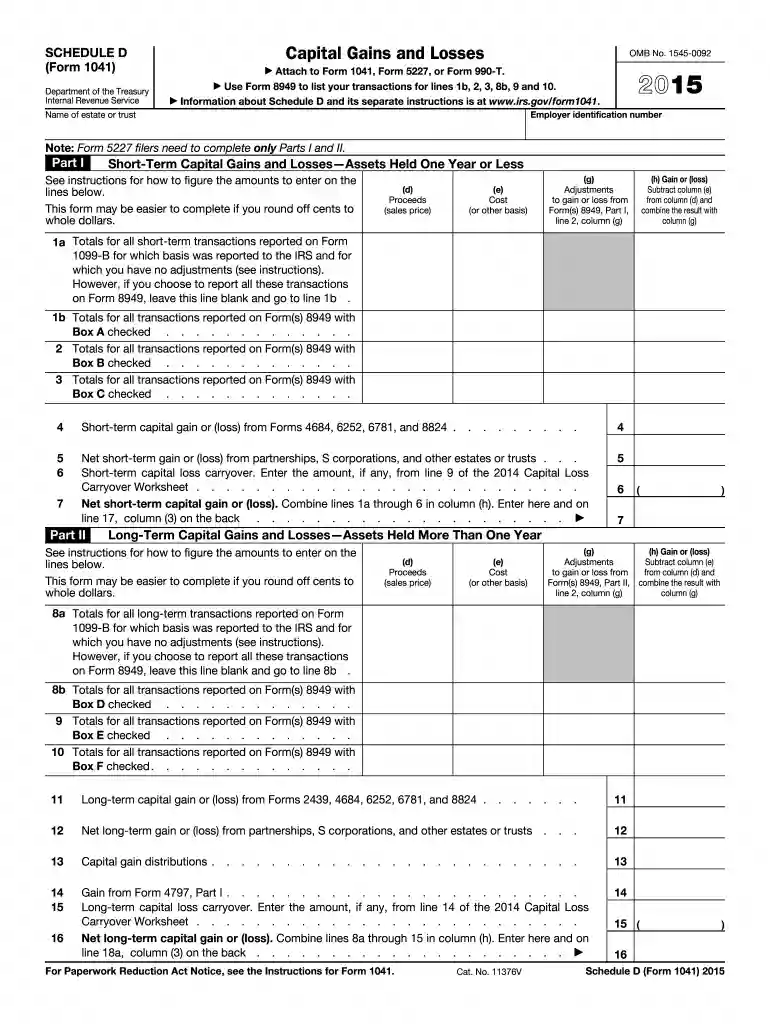
2015 d form Preview on Page 1

2015 d form-2026

Here's how it works

  • 01. Edit your form online

    Type text, add images, blackout confidential details, add comments, highlights and more.

  • 02. Sign it in a few clicks

    Draw your signature, type it, upload its image, or use your mobile device as a signature pad.

  • 03. Share your form with others

    Send it via email, link, or fax. You can also download it, export it or print it out.

Definition and Purpose of the 2015 Schedule D Form

The 2015 Schedule D (Form 1041) is a tax document primarily used by estates and trusts to report their capital gains and losses for the year 2015. It serves as a detailed record, summarizing transactions involving both short-term and long-term capital assets. This form is integral for calculating the net gain or loss that affects the overall taxable income of an estate or trust.

Important Components of the Schedule D Form

  • Short-Term and Long-Term Capital Gains: The form categorizes gains and losses into short-term (assets held for one year or less) and long-term (assets held for more than one year) sections. Each category requires specific transaction details.
  • Transaction Details Required: Include acquisition and sale dates, proceeds from each transaction, and the cost basis of assets sold. Adjustments such as depreciation or improvements should be listed.
  • Net Gain or Loss Calculation: After listing all transactions, the form provides sections to calculate the total short-term and long-term gains or losses, which are then combined to determine the overall net outcome.

How to Obtain and Access the 2015 Schedule D Form

Accessing the 2015 Schedule D form can be done through several methods:

  1. Online Resources: Most commonly available through the IRS website, where it can be downloaded and printed.
  2. Tax Software: Platforms like TurboTax, QuickBooks, or other tax software often include this form within their package, allowing users to fill it out digitally.
  3. Professional Tax Services: Consulting a tax professional or accountant may provide access to this form, while also offering guidance in its completion.

Digital Versus Paper Formats

  • Paper Format: Traditional paper submission requires individuals to manually fill out the form and mail it.
  • Digital Submission: Using tax software can streamline the process, facilitating direct electronic submissions to the IRS, often enhancing accuracy and convenience.

Steps to Complete the 2015 Schedule D Form

Filling out the Schedule D form requires meticulous attention to detail:

  1. Gather Necessary Documents: Compile all relevant statements detailing capital transactions, such as brokerage and sale reports.
  2. Accurately Record Transactions: Enter each transaction in the appropriate section (short-term or long-term).
  3. Calculate Adjustments: Any necessary adjustments, like the exclusion of sales from specific small business stocks, should be computed.
  4. Summarize Gains and Losses: Total the calculated gains or losses for both categories and determine the net result.
  5. Verify Information: Double-check all entries for accuracy before submitting.

Who Typically Uses the 2015 Schedule D Form

The Schedule D form is primarily utilized by estates and trusts but can also be relevant for individuals and businesses involved in significant capital transactions. Entities that manage investments or receive benefits from investments often complete this form to ensure proper taxation.


decoration imageratings of Dochub

Applicable Scenarios

  • Estates and Trusts: To report capital gains from assets within the estate.
  • Investment Accounts: For taxpayers with significant investments, detailing profits or losses from selling stocks, bonds, or other assets.
  • Real Estate Sales: When properties or real estate investments are sold, requiring accurate reporting of capital improvements and sale proceeds.

Legal Guidelines and Usage Rules for the 2015 Schedule D Form

Comprehending the legal aspects of the Schedule D form is crucial for compliance:

  • IRS Compliance: Accurate filing in accordance with IRS regulations ensures that estates and trusts report their financial activities properly to avoid penalties.
  • Confidential Information: Handling sensitive information, such as Social Security numbers and asset values, requires adherence to privacy and security standards.

Penalties for Non-Compliance

Failure to accurately file the Schedule D form can lead to penalties, such as fines or interest on underpaid taxes. Ensuring correct submission and understanding disclosure requirements mitigates this risk.

Examples and Real-World Use Cases of the 2015 Schedule D Form

Practical examples of Schedule D usage enhance comprehension:

  • Estate Liquidation: When liquidating an estate's assets, the form reports the sale proceeds and capital gains, guiding tax liability adjustments.
  • Portfolio Management: Regular buying and selling of stocks entail documentation through the form for accurate year-end reporting.
  • Inheritance Events: If inherited investments are sold, completing Schedule D allows for accurate conveyance of capital gains taxes owed.

Key Takeaways and Quick Facts

  • The 2015 Schedule D form is central for reporting capital gains and losses to the IRS.
  • Proper documentation and attention to detail are crucial to avoid penalties.
  • Accessing this form through digital means can enhance accuracy and ease.
  • Understanding legal obligations linked to form submission is essential for compliance.
  • Utility for various entities, from individuals to estates and trusts, in reporting taxable financial outcomes.

By providing comprehensive coverage and following these guidelines, the 2015 Schedule D form ensures adherence to IRS regulations and aids in accurate tax filing for entities with capital asset transactions.

See more 2015 d form versions

We've got more versions of the 2015 d form form. Select the right 2015 d form version from the list and start editing it straight away!

VersionsForm popularityFillable & printable
20254.3 Satisfied (38 Votes)
20244.2 Satisfied (44 Votes)
20234.1 Satisfied (48 Votes)
20224.2 Satisfied (34 Votes)
20214.8 Satisfied (77 Votes)
20204.3 Satisfied (213 Votes)
20194.3 Satisfied (135 Votes)
20184.2 Satisfied (67 Votes)
20174 Satisfied (52 Votes)
20164.4 Satisfied (494 Votes)
20154 Satisfied (55 Votes)
20144.4 Satisfied (33 Votes)
20134.3 Satisfied (69 Votes)
20124 Satisfied (46 Votes)
20114 Satisfied (47 Votes)

be ready to get more

Complete this form in 5 minutes or less

Security and compliance

At DocHub, your data security is our priority. We follow HIPAA, SOC2, GDPR, and other standards, so you can work on your documents with confidence.

Related links

2015 Form 1040 (Schedule D)

Complete the Qualified Dividends and Capital Gain Tax Worksheet in the instructions for Form 1040, line 44 (or in the instructions for Form 1040NR, line 42). DoRead more

Learn more
Project Description | UnivLyon1-INSALyon - iGEM 2024

It is designed to protect crops and households from harmful insects while fully respecting the environment by trapping pests. BIO Snare is an innovative trap inRead more

Learn more
If you believe that this page should be taken down, please follow our DMCA take down process here