Type text, add images, blackout confidential details, add comments, highlights and more.
02. Sign it in a few clicks
Draw your signature, type it, upload its image, or use your mobile device as a signature pad.
03. Share your form with others
Send it via email, link, or fax. You can also download it, export it or print it out.
How to use or fill out fe6 with our platform
Ease of Setup
DocHub User Ratings on G2
Ease of Use
DocHub User Ratings on G2
Click ‘Get Form’ to open the fe6 document in the editor.
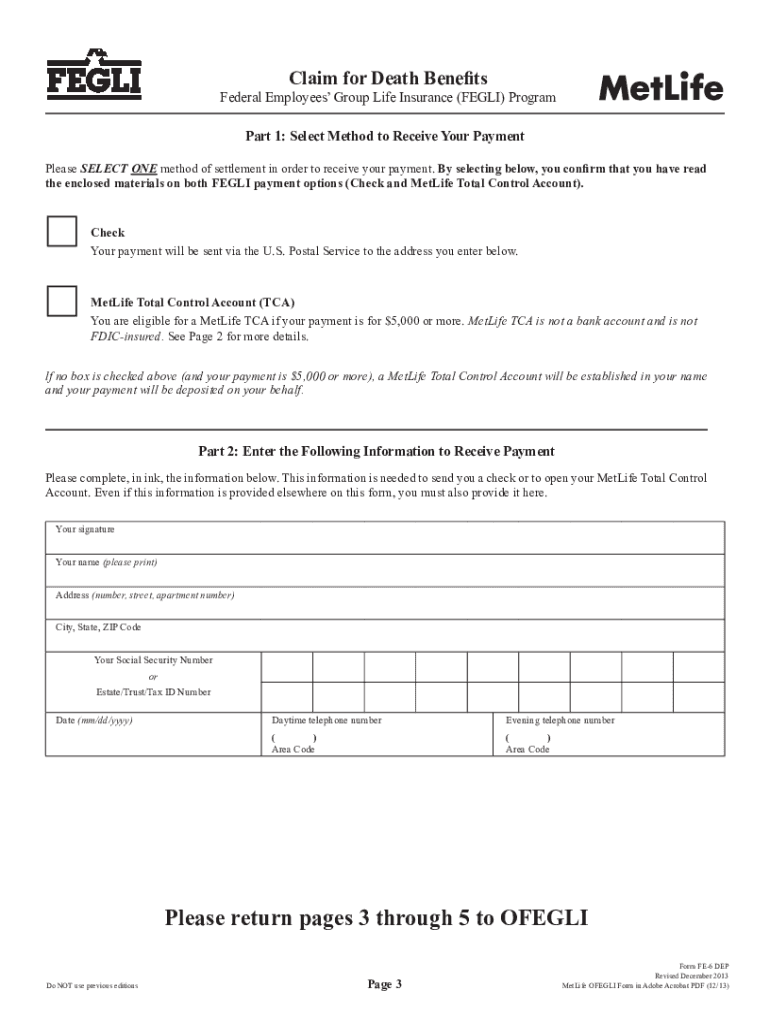
Begin with Part A, entering your personal information such as your name, date of birth, and Social Security Number. Ensure all details are typed or printed legibly.
Proceed to Part B to provide information about the deceased family member. Fill in their full name, date of birth, and date of death accurately.
If applicable, complete items related to your relationship with the deceased, including marriage details if claiming for a spouse.
In Part C, certify your information by signing and providing your contact details. Make sure to review the payment options available for claims over $5,000.
Finally, submit the completed form along with a certified copy of the death certificate through our platform for processing.
Start using our platform today to streamline your form completion process for free!
Molecular spin frustration in mixed-chelate Fe5 and Fe6 oxo
by AP Singh 2020 Cited by 9 There are a large number of Fe6 complexes in the literature, with a variety of topologies such as chair, twisted boat, parallel tri- angles, planar, octahedral,Read more
The law states that FEGLI benefits will be paid in the following manner: If the deceased did not assign ownership and there is no valid court order on fileRead more
Cookie consent notice
This site uses cookies to enhance site navigation and personalize your experience.
By using this site you agree to our use of cookies as described in our Privacy Notice.
You can modify your selections by visiting our Cookie and Advertising Notice.