Bill of Sale Consignment Form (Yellow Slip) - California 2026

Get Form
Bill of Sale Consignment Form (Yellow Slip) - California Preview on Page 1

Here's how it works

01. Edit your form online
Type text, add images, blackout confidential details, add comments, highlights and more.

02. Sign it in a few clicks
Draw your signature, type it, upload its image, or use your mobile device as a signature pad.

03. Share your form with others
Send it via email, link, or fax. You can also download it, export it or print it out.

How to use or fill out Bill of Sale Consignment Form (Yellow Slip) - California with DocHub

Form edit decoration
9.5
Ease of Setup
DocHub User Ratings on G2
9.0
Ease of Use
DocHub User Ratings on G2
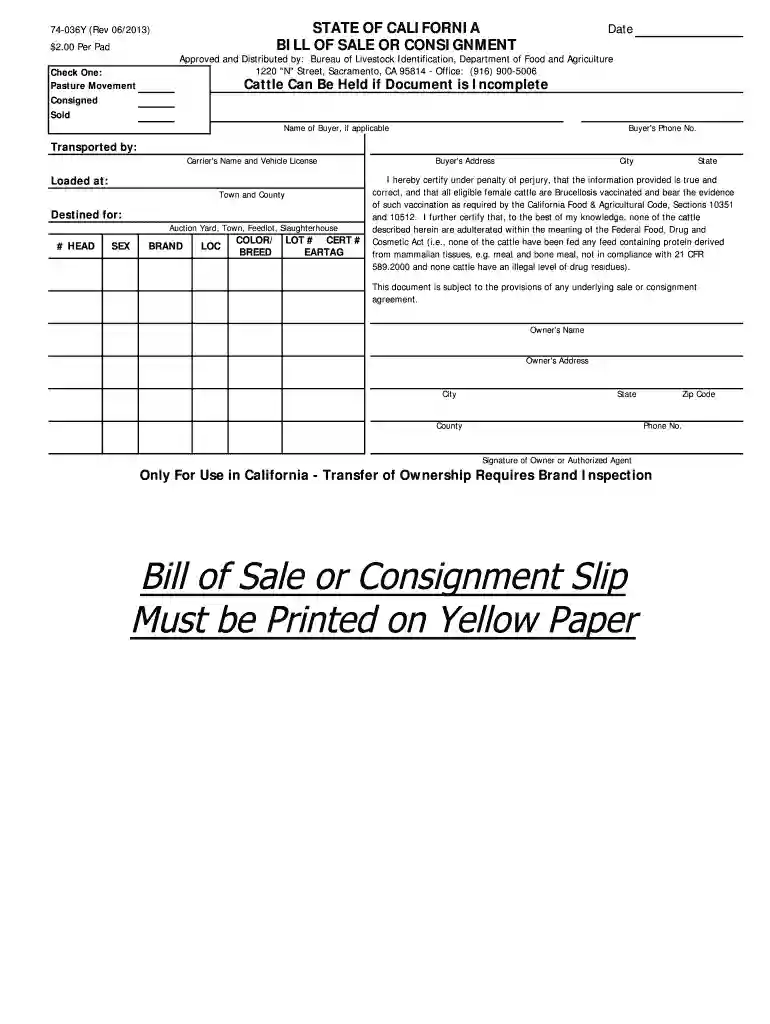
  1. Click ‘Get Form’ to open the Bill of Sale Consignment Form in our editor.
  2. Select whether the transaction is for Pasture Movement, Consigned, or Sold by checking the appropriate box at the top of the form.
  3. Enter the date of the transaction in the designated field to ensure proper record-keeping.
  4. Fill in the buyer's name and phone number if applicable, along with their address details including city, state, and zip code.
  5. Provide information about transportation by entering the carrier's name and vehicle license plate number.
  6. Indicate where the cattle were loaded by specifying the town and county, as well as where they are destined (e.g., auction yard or feedlot).
  7. Complete each cattle entry by filling out details such as head count, sex, brand, location, color/breed, lot number, certification number, and ear tag.
  8. Finally, certify that all information is accurate by signing as the owner or authorized agent at the bottom of the form.

Start using our platform today to easily complete your Bill of Sale Consignment Form for free!

See more Bill of Sale Consignment Form (Yellow Slip) - California versions

We've got more versions of the Bill of Sale Consignment Form (Yellow Slip) - California form. Select the right Bill of Sale Consignment Form (Yellow Slip) - California version from the list and start editing it straight away!
Versions Form popularity Fillable & printable
2021 4.7 Satisfied (29 Votes)
2015 4.1 Satisfied (65 Votes)
2013 4.3 Satisfied (42 Votes)
2012 4.5 Satisfied (65 Votes)
be ready to get more

Complete this form in 5 minutes or less

Get form

Got questions?

We have answers to the most popular questions from our customers. If you can't find an answer to your question, please contact us.
Contact us
In California, a handwritten bill of sale should ideally include seller and buyer addresses and vehicle mileage to support the transaction but is not strictly required for legality.
Can I create my own California vehicle bill of sale? Yes, you can create your own bill of sale using a template or an online form. However, its essential you include all required information and that both parties sign the document.
Can a bill of sale be handwritten? While it is common to present a bill of sale in a digital format, you can also create a handwritten bill of sale. Whats most important is to include all of the pertinent details in the bill of sale in order to protect both parties.
There are a couple of ways you can get your hands on a bill of sale in California: Pick one up at your local DMV office by requesting a printed copy of the form. Visit the California DMVs website and download a bill of sale.

Security and compliance

At DocHub, your data security is our priority. We follow HIPAA, SOC2, GDPR, and other standards, so you can work on your documents with confidence.

Learn more
ccpa2
pci-dss
gdpr-compliance
hipaa
soc-compliance