







Definition & Meaning
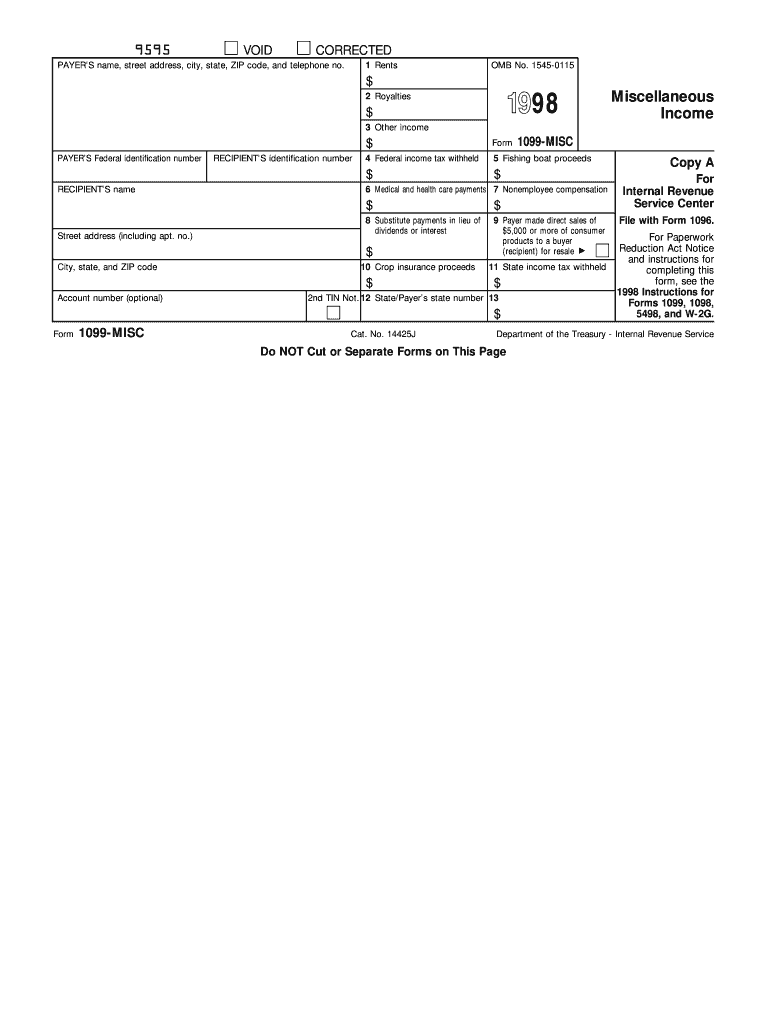
The 1998 IRS Form 1099-MISC is a tax form used in the United States to report various types of income that are not categorized as wages, salaries, or tips. This form is typically issued by the payer of the income, such as businesses or individuals, to the income recipient, and submitted to the IRS. Types of income reported on the form include rents, royalties, and nonemployee compensation. Properly completing and submitting this form is crucial for compliance with IRS requirements and avoiding potential penalties for both the payer and the recipient.
How to Use the 1998 IRS Form
To use the 1998 IRS Form 1099-MISC, both the recipient and payer must understand its structure and sections. The payer completes the form by entering information such as the payer's name, address, and taxpayer identification number (TIN), as well as the recipient's details. Next, specific income types and amounts are reported in designated boxes on the form. Recipients should meticulously review the provided information to ensure accuracy. This IRS form aids in reconciling income reports between the recipient's tax return and the IRS database.
Steps to Complete the 1998 IRS Form
- Gather Information: Collect all necessary details, including TINs, addresses, and business names for both parties involved.
- Fill Out Payer Information: Enter the payer's name, address, and TIN in the respective sections.
- Fill Out Recipient Information: Provide the recipient's details, including their name, address, and TIN.
- Report Income: Enter different types of income such as rents, royalties, and nonemployee compensation in the appropriate boxes.
- Check for Accuracy: Properly review the filled-out form for any inaccuracies or missing information.
- Submit Copies: Send Copy A to the IRS, Copy B to the income recipient, and retain Copy C for the payer's records.
Key Elements of the 1998 IRS Form
- Payer's Details: Includes the name, address, and TIN of the entity that issued the form.
- Recipient's Details: Contains the recipient's name, address, and TIN.
- Income Categories: Boxes on the form dedicated to specific types of income, such as rents (Box 1) and royalties (Box 2).
- Federal Income Tax Withheld: Represents amounts withheld for tax purposes, requiring detailed verification by the recipient.
IRS Guidelines
According to IRS guidelines, Form 1099-MISC must be filed for each person to whom remuneration has been paid of at least $10 in royalties or broker payments, or $600 in rents, services, prizes, and other categories. The form should be filed by January 31 following the tax year in which the payments were made, with exceptions for some categories requiring earlier submission. Adherence to these guidelines ensures compliance and avoids penalties.
Penalties for Non-Compliance
Failure to submit the form accurately and on time can result in significant penalties. These penalties increase with the duration of the delay, with a base penalty beginning at $50 per form within 30 days of the deadline. Repeated or intentional disregard of the IRS filing requirements can escalate these penalties significantly. Additionally, incorrect or incomplete filing can lead to fines, emphasizing the importance of detail and accuracy when completing the form.
Software Compatibility
Individuals can use software solutions such as TurboTax or QuickBooks for preparing and submitting the 1998 Form 1099-MISC. These platforms facilitate ease of use by providing templates and step-by-step guides for filling out the form. Moreover, these programs allow for electronic submissions directly to the IRS, streamlining the process significantly compared to manual, paper-based methods.
Taxpayer Scenarios
- Self-Employed Individuals: Often receive Form 1099-MISC to report income from freelance work or contractual projects.
- Small Business Owners: Usually issue this form to contractors and service providers for amounts exceeding $600.
- Landlords: Use the form to report rental income, especially when involving property management companies or real estate agents.


Digital vs. Paper Version
The 1099-MISC form can be submitted in both digital and paper formats. The digital version, facilitated through IRS-approved e-filing systems, often accelerates the submission process and minimizes errors associated with manual entries. On the other hand, the paper version is sent via mail, keeping traditional processes in place for those who do not utilize e-filing systems. Electronic submissions are encouraged but not mandatory.
Important Terms Related to the 1998 IRS Form
- Nonemployee Compensation: Income paid for services rendered by an independent contractor or freelancer.
- Royalties: Payment for the ongoing use of an asset, recognized on a percentage or per-unit basis.
- Federal Tax Withholding: An amount deducted from income and sent directly to the IRS as a contribution towards potential tax liabilities.
- TIN (Taxpayer Identification Number): A unique identifier used by the IRS in the administration of tax laws.
Each of these terms underlines critical components or considerations involved in the accurate completion and filing of the IRS Form 1099-MISC for reporting miscellaneous income.




