




Here's how it works



How to use or fill out Mooresville Police Department Citizens Police Academy Application with our platform

- Click ‘Get Form’ to open the Mooresville Police Department Citizens Police Academy Application in the editor.
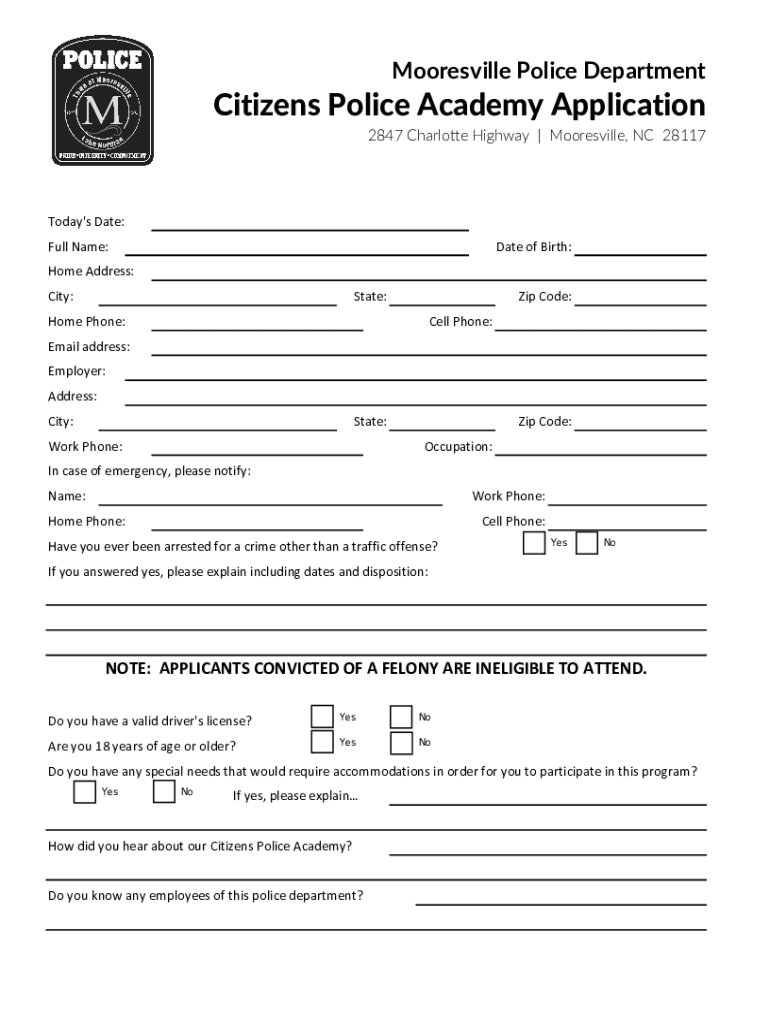
- Begin by entering today's date and your full name in the designated fields. Ensure accuracy as this information is crucial for processing your application.
- Fill out your personal details, including date of birth, home address, city, state, zip code, and contact numbers. Double-check for any typos to avoid delays.
- Provide your employment information by entering your employer's name, address, occupation, and work phone number. This helps the department understand your background.
- In case of emergency contacts, list a person’s name along with their contact numbers. This ensures that someone can be reached if necessary.
- Answer the questions regarding prior arrests and eligibility criteria honestly. If applicable, provide explanations in the space provided.
- Indicate if you have special needs requiring accommodations and explain if necessary. This allows for proper arrangements during the program.
- Complete the sections about how you heard about the academy and your interest in attending. Share any community activities you are involved in.
- List three character references who are not family members or employers along with their contact information.
- Finally, review all entries for accuracy before signing and dating the application at the bottom. Ensure that you understand the certification statement regarding falsifications.
Start filling out your application today using our platform for free!
It's free
See more Mooresville Police Department Citizens Police Academy Application Mooresville Police Department Citi versions
| Versions | Form popularity | Fillable & printable |
|---|---|---|
| 2023 | 4.4 Satisfied (35 Votes) | |
| 2023 | 4 Satisfied (46 Votes) | |
| 2023 | 4.8 Satisfied (25 Votes) | |
| 2018 | 4.8 Satisfied (120 Votes) | |
| 2017 | 4.5 Satisfied (57 Votes) | |
| 2015 | 4.6 Satisfied (34 Votes) | |
| 2015 | 4.9 Satisfied (48 Votes) | |
| 2014 | 4 Satisfied (36 Votes) | |
| 2013 | 4.8 Satisfied (64 Votes) | |
| 2012 | 4 Satisfied (22 Votes) | |
| 2012 | 4 Satisfied (59 Votes) | |
| 2009 | 4.1 Satisfied (36 Votes) | |
| 2005 | 4.2 Satisfied (30 Votes) | |
| 2004 | 4.4 Satisfied (48 Votes) |
Got questions?
Can I sign my Mooresville Police Department Citizens Police Academy Application Mooresville Police Department Citi on a mobile?
Sure, you’ll find numerous apps for this on the web. Nevertheless, if you need to eSign your Mooresville Police Department Citizens Police Academy Application Mooresville Police Department Citi without installing additional software, DocHub is the optimum choice you can make. This robust editor works on mobile devices just like on desktops. Open our editor in any internet browser, register or sign in to your account, and start managing your forms.
How to fill out and sign Mooresville Police Department Citizens Police Academy Application Mooresville Police Department Citi online?
You may quickly complete, edit, and even eSign your Mooresville Police Department Citizens Police Academy Application Mooresville Police Department Citi using DocHub. Create a new account and start your free trial. After that, you can add the file with the form and easily make all the needed edits. No need to print on paper or use a third-party application to sign it, as you can place your electronic signature on your document quicker via DocHub.
Security and compliance
At DocHub, your data security is our priority. We follow HIPAA, SOC2, GDPR, and other standards, so you can work on your documents with confidence.
Learn more




