Open PDF file, 72.29 KB, for RY2021 Hospital Quality Contact Form 2026

Get Form
Open PDF file, 72.29 KB, for RY2021 Hospital Quality Contact Form Preview on Page 1

Here's how it works

01. Edit your form online
Type text, add images, blackout confidential details, add comments, highlights and more.

02. Sign it in a few clicks
Draw your signature, type it, upload its image, or use your mobile device as a signature pad.

03. Share your form with others
Send it via email, link, or fax. You can also download it, export it or print it out.

How to use or fill out Open PDF file, 72.29 KB, for RY2021 Hospital Quality Contact Form

Form edit decoration
9.5
Ease of Setup
DocHub User Ratings on G2
9.0
Ease of Use
DocHub User Ratings on G2
  1. Click ‘Get Form’ to open it in the editor.
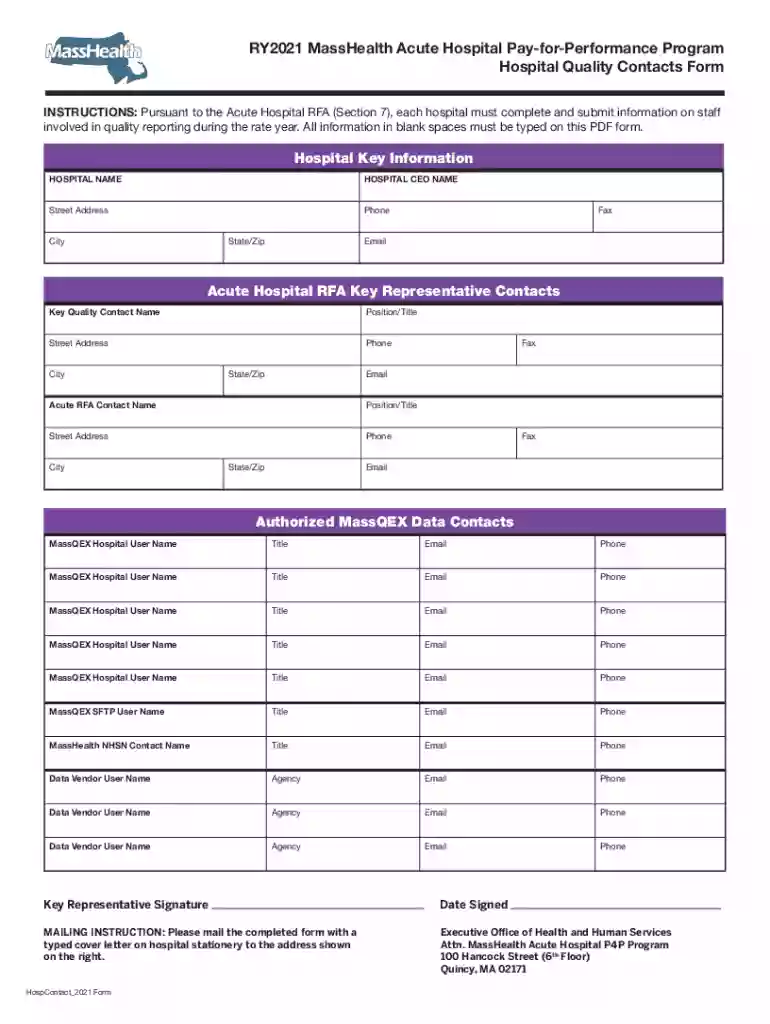
  2. Begin by entering your hospital's key information. Fill in the 'HOSPITAL NAME', 'HOSPITAL CEO NAME', and complete the address fields including street address, city, state/zip, phone, and fax.
  3. Next, provide details for the Acute Hospital RFA Key Representative Contacts. Enter the name and title of your key quality contact along with their contact information.
  4. Continue filling out the Authorized MassQEX Data Contacts section. For each user listed, include their username, title, email, and phone number.
  5. Complete the Key Representative Signature section by signing and dating the form.
  6. Finally, ensure all fields are filled correctly before saving your document. Follow mailing instructions to submit your completed form.

Start using our platform today to easily fill out and manage your forms for free!

See more Open PDF file, 72.29 KB, for RY2021 Hospital Quality Contact Form versions

We've got more versions of the Open PDF file, 72.29 KB, for RY2021 Hospital Quality Contact Form form. Select the right Open PDF file, 72.29 KB, for RY2021 Hospital Quality Contact Form version from the list and start editing it straight away!
Versions Form popularity Fillable & printable
2023 4.9 Satisfied (45 Votes)
2021 4.8 Satisfied (42 Votes)
2020 4 Satisfied (34 Votes)
2014 4.8 Satisfied (63 Votes)
be ready to get more

Complete this form in 5 minutes or less

Get form

Got questions?

We have answers to the most popular questions from our customers. If you can't find an answer to your question, please contact us.
Contact us

As outlined by eSignature regulations, forms approved electronically have the same validity as traditionally approved ones. You can eSign almost any business and private paperwork. Four types of documents still demand wet signatures only - wills and testamentary trusts, court orders and other court papers, state statutes governing divorce, adoption, or other family law, and notice of cancellation of utility services. If you follow the regulations and utilize a safe and compliant software solution, like DocHub, you can eSign your Open PDF file, 72.29 KB, for RY2021 Hospital Quality Contact Form without printing it.

If you edit your Open PDF file, 72.29 KB, for RY2021 Hospital Quality Contact Form with DocHub, you only need a stable web connection and virtually any browser installed on your device. No need to set up any third-party software or research guides. Simply open a tab with DocHub, drag and drop your file, and modify it immediately.

Your healthcare provider - You can request a sample UB-04 form from your healthcare provider. They may have a blank copy of the form that you can use as a reference. Commercial printing companies - Many companies specialize in printing medical forms, including the blank UB-04 form.
Printing UB-04 Claims Select the UB-04 claims. Correct any errors in the UB-04 claims. Add additional information to the UB-04 forms. Right-click on an insurance claim or insurance carrier and select Print UB04 to print the UB-04 form and send it to your insurance carrier in the mail.
Centers for Medicare Medicaid Services (CMS) regulations for hospitals and other healthcare organizations define the federal requirements providers must follow to receive Medicare and Medicaid reimbursement.

Security and compliance

At DocHub, your data security is our priority. We follow HIPAA, SOC2, GDPR, and other standards, so you can work on your documents with confidence.

Learn more
ccpa2
pci-dss
gdpr-compliance
hipaa
soc-compliance

People also ask

The UB-04 claim form is used to submit claims for outpatient services by institutional facilities (for example, outpatient departments, Rural Health Clinics and chronic dialysis centers).