Type text, add images, blackout confidential details, add comments, highlights and more.

02. Sign it in a few clicks
Draw your signature, type it, upload its image, or use your mobile device as a signature pad.

03. Share your form with others
Send mi 2210 instructions via email, link, or fax. You can also download it, export it or print it out.

How to use or fill out mi 2210 with our platform
Ease of Setup
DocHub User Ratings on G2
Ease of Use
DocHub User Ratings on G2
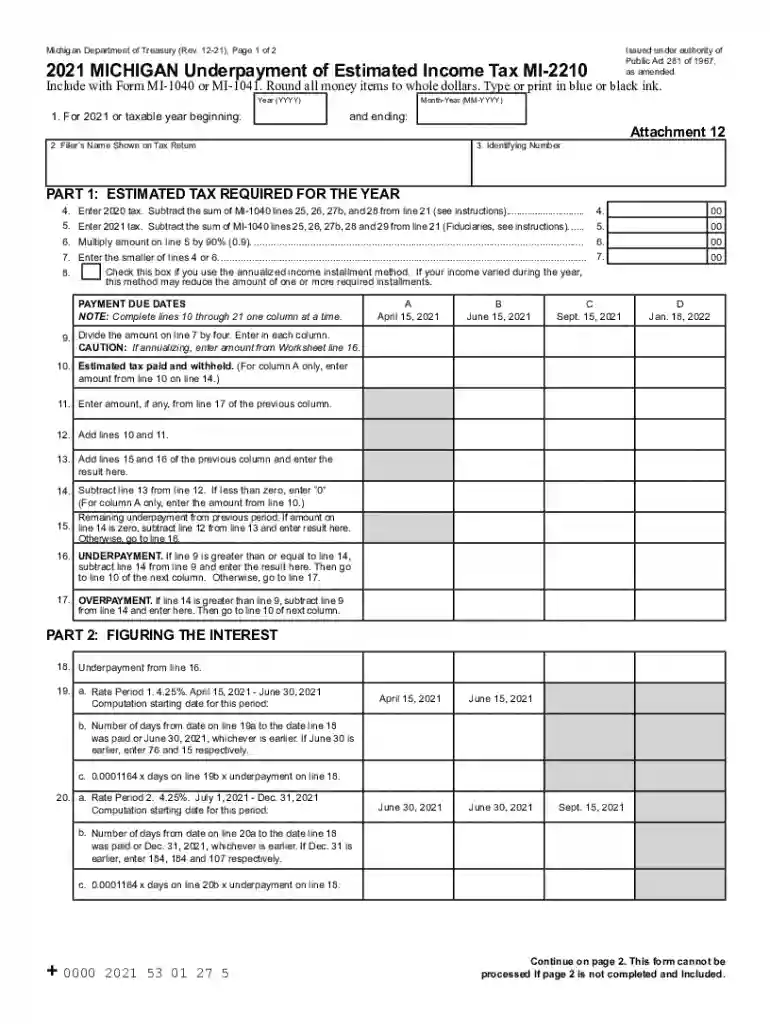
Click ‘Get Form’ to open the MI-2210 in the editor.
Begin by entering the year of your tax return at the top of the form. Ensure you provide your name and identifying number accurately.
In Part 1, calculate your estimated tax required for the year. Enter your previous year's tax on line 4 and this year's tax on line 5, following the instructions provided.
For each payment due date, complete lines 10 through 21 one column at a time. Input any estimated tax paid and withheld in column A first, then proceed to subsequent columns.
In Part 2, figure out any interest owed by completing lines related to underpayment for each period. Follow the instructions carefully to ensure accuracy.
Finally, in Part 3, calculate any penalties based on underpayments. Add up totals from previous sections as instructed.
Start using our platform today for free to simplify filling out your MI-2210!
Technical Protocol for Evaluating Natural Attenuation of
The information in this document was developed through a collaboration between the U.S.. EPA (Subsurface Protection and Remediation Division, National RiskRead more
Cookie consent notice
This site uses cookies to enhance site navigation and personalize your experience.
By using this site you agree to our use of cookies as described in our Privacy Notice.
You can modify your selections by visiting our Cookie and Advertising Notice.