




01. Edit your field trip form online
Type text, add images, blackout confidential details, add comments, highlights and more.

Type text, add images, blackout confidential details, add comments, highlights and more.

Draw your signature, type it, upload its image, or use your mobile device as a signature pad.

Send mdcps field trip form via email, link, or fax. You can also download it, export it or print it out.
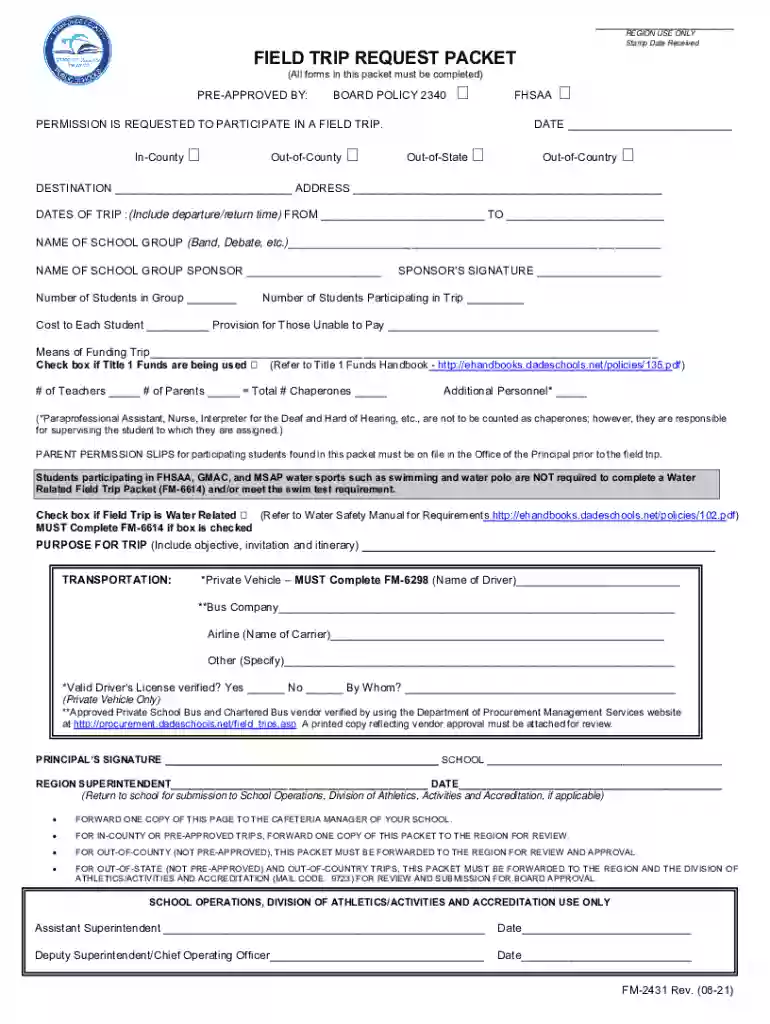
The field trip form Miami Dade is integral to organizing educational trips for students in the Miami-Dade County Public Schools system. This form acts as a formal request to gain approval from the school board for any planned field trips, ensuring that all activities adhere to the district's policies and guidelines. This form encompasses details about the trip such as the destination, purpose, participants, and transportation arrangements. The primary aim is to maintain a structured approach to field trip planning, prioritizing student safety and compliance with legal norms.
Completing the field trip form involves several detailed steps to ensure comprehensive documentation and approval.
Trip Details: Begin by clearly stating the destination, date, and educational purpose of the trip. This provides context and justifies the trip's relevance to the curriculum.
Participant Information: List all student participants, along with any additional chaperones or staff attending. Ensure that you include emergency contact details for each student.
Transportation Arrangements: Specify the mode of transportation. Include provider details if you're using an external service. Confirm that all arrangements meet safety standards set by the board.
Funding Provisions: Detail the sources of funds for the trip. This could include school budgets, fundraising activities, or participants' contributions. Transparency here is key.
Parental Permission: Collect parental consent for each student participating. This typically includes signed permission slips which acknowledge parents' understanding and agreement to the trip's conditions.
The field trip form is comprised of several essential components:
This form ensures compliance with local school district regulations and legal obligations. It acts as a binding document that records the intentions and planned logistics of the trip. By standardizing information, it protects the school and its employees by ensuring all trip details are pre-approved by the necessary authorities.
Teachers and school administrators are the primary users of this form. They are responsible for initiating, completing, and submitting the document to the school's administration for approval. Additionally, parents interact with the form indirectly as they are required to provide signed consent for their child’s participation.


Forms can be submitted through various channels:
While the form complies with general educational protocols, some specifics are aligned with Florida's educational laws. These may include additional consent requirements specifically for out-of-state trips or those involving overnight stays. Ensure that your form complies with these additional rules by consulting with the Miami-Dade County Public Schools policy guide.
Understanding specific terms is vital for effectively navigating the form:
To streamline the completion process, the form can be edited using various document management software tools. This includes platforms like DocHub, which allow for direct edits, digital signatures, and easy sharing with stakeholders. Utilizing such tools ensures an efficient and error-free documentation process.
While the field trip form specific to Miami Dade County is tailored for its own guidelines, other versions may exist for different districts or regions with varying requirements. These alternative forms may cater to different legal environments or specific educational objectives. It's essential to use the appropriate form version to match your district's compliance criteria.
We've got more versions of the field trip form form. Select the right field trip form version from the list and start editing it straight away!
Microsoft Word doesn’t have signing tools to create valid eSignatures and enforceable forms. Luckily, DocHub is an online eSignature-compliant editor that works with different document formats, such as .doc files. Log in to your account and add the Word version of your field trip forms from your device and cloud, or URL - our editor will automatically turn it into an editable PDF. Make all required modifications in your form and click Sign to create your own legally-binding eSignature. You will find four signing methods from which to choose.
As a comprehensive document modifying platform, DocHub is accessible on mobile phones. Open DocHub in your choice of mobile browser and use our smart mobile-friendly toolset to complete your field trip form miami dade.
At DocHub, your data security is our priority. We follow HIPAA, SOC2, GDPR, and other standards, so you can work on your documents with confidence.
PARENT/GUARDIAN FIELD TRIP PERMISSION AND CONSENT FORM AND. RELEASE OF Gilbert, III of the Miami-Dade County Board of County. Commissioners is planning a tripRead more
College Vehicle/Rental Reservation. Funds Request Travel Rationale Form. (for transportation fees only, if applicable).Read more
by K Ramsey Cited by 92 Miami-Ft Lauderdale, FL. 2012. Miami Dade Transit. Miami-Ft Lauderdale, FL. 2012. Tri-Rail. Miami-Ft Lauderdale, FL. 2009. City of Milton-Read more


