Vermont schedule in 2026

Get Form
vermont schedule in Preview on Page 1

Here's how it works

01. Edit your form online
Type text, add images, blackout confidential details, add comments, highlights and more.

02. Sign it in a few clicks
Draw your signature, type it, upload its image, or use your mobile device as a signature pad.

03. Share your form with others
Send it via email, link, or fax. You can also download it, export it or print it out.

How to use or fill out Vermont Schedule IN with our platform

Form edit decoration
9.5
Ease of Setup
DocHub User Ratings on G2
9.0
Ease of Use
DocHub User Ratings on G2
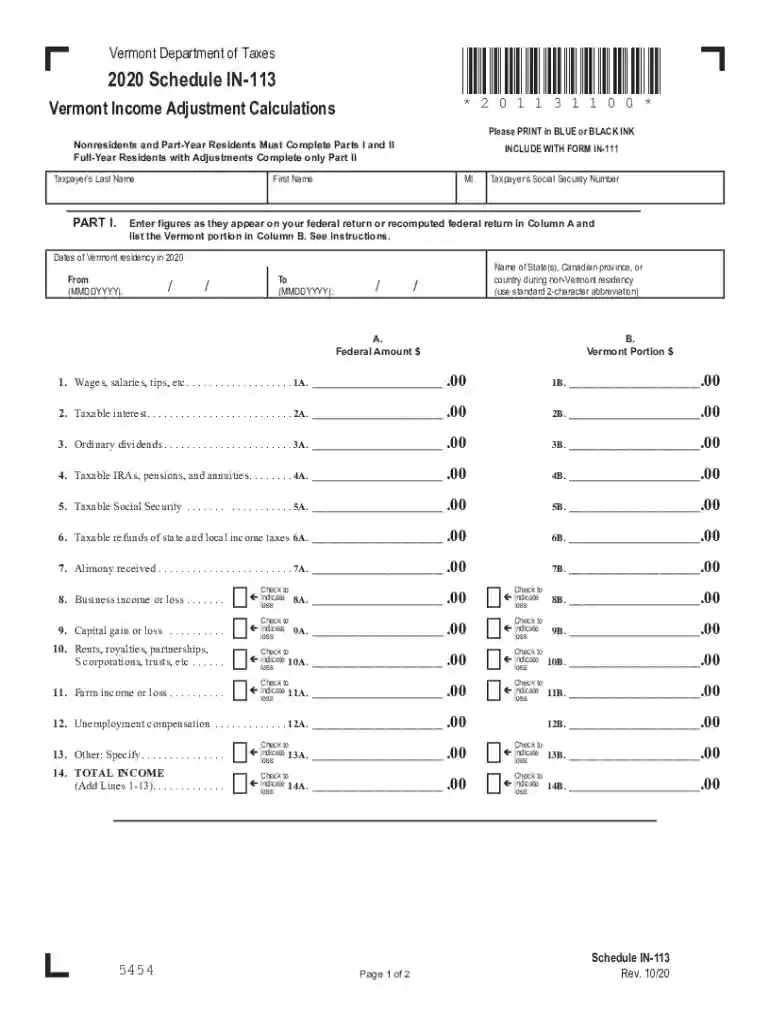
  1. Click ‘Get Form’ to open the Vermont Schedule IN in the editor.
  2. Begin with Part I. Enter your last name, first name, and Social Security Number as they appear on your federal return.
  3. Indicate your dates of Vermont residency in 2020 by filling in the 'From' and 'To' fields.
  4. For each income type listed (wages, interest, dividends, etc.), enter the Federal Amount in Column A and the Vermont Portion in Column B. Ensure accuracy by referring to your federal return.
  5. If applicable, check the boxes next to any losses for business income or capital gains.
  6. Proceed to Part II for adjustments. Enter your Adjusted Gross Income from Part I and follow instructions for military pay and other exemptions.
  7. Review all entries for completeness before saving your work. Use our platform's features to print or share your completed form easily.

Start using our platform today to fill out your Vermont Schedule IN quickly and efficiently!

See more vermont schedule in versions

We've got more versions of the vermont schedule in form. Select the right vermont schedule in version from the list and start editing it straight away!
Versions Form popularity Fillable & printable
2022 4.8 Satisfied (24 Votes)
2021 4.8 Satisfied (157 Votes)
2020 4.4 Satisfied (184 Votes)
2019 4.4 Satisfied (79 Votes)
2018 4.3 Satisfied (173 Votes)
2017 4.4 Satisfied (54 Votes)
2012 4.4 Satisfied (53 Votes)
be ready to get more

Complete this form in 5 minutes or less

Get form

Got questions?

We have answers to the most popular questions from our customers. If you can't find an answer to your question, please contact us.
Contact us
All counties in Vermont use Eastern time.
Vermont is in the Eastern Time Zone (ET) and observes daylight saving time (DST). All counties in Vermont use Eastern time.
Eastern Time in Vermont Time Zone Abbreviation NameOffset ET Eastern Time UTC -5:00 / -4:00
Vermont is in the Eastern Time Zone in the United States of America (USA). Eastern Standard Time (EST) is 5 hours behind Greenwich Mean Time ( GMT-5 ).
But the fact is, with this projected increase, Vermonters will have seen a 33% increase in education property taxes in the last three years. This is the result of unsustainable costs, an aging demographic, and smaller workforce.

Security and compliance

At DocHub, your data security is our priority. We follow HIPAA, SOC2, GDPR, and other standards, so you can work on your documents with confidence.

Learn more
ccpa2
pci-dss
gdpr-compliance
hipaa
soc-compliance

People also ask

Eastern Time Zone Time zone Eastern Time Zone UTC offset EST UTC05:005 more rows
If you make $80,000 a year living in the region of Vermont, USA, you will be taxed $20,184. That means that your net pay will be $59,816 per year, or $4,985 per month. Your average tax rate is 25.2% and your marginal tax rate is 36.3%.

Related links