Forms and Instructions - Vermont Department of Taxes 2026

Get Form
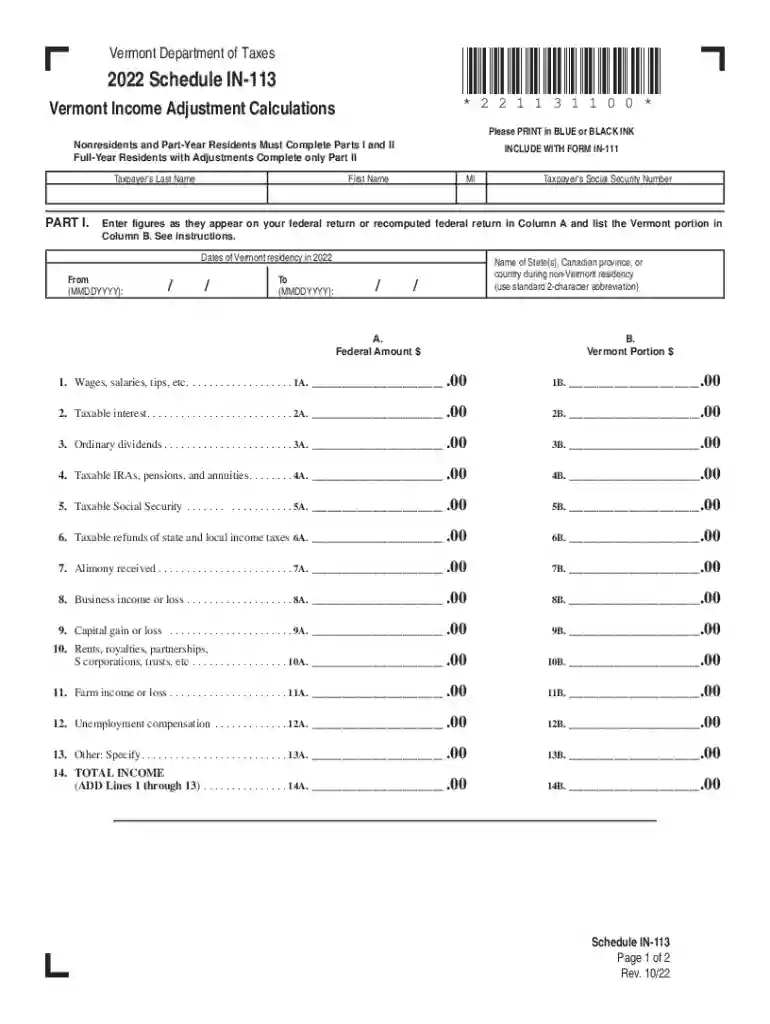
in113 Preview on Page 1

Here's how it works

01. Edit your in113 online
Type text, add images, blackout confidential details, add comments, highlights and more.

02. Sign it in a few clicks
Draw your signature, type it, upload its image, or use your mobile device as a signature pad.

03. Share your form with others
Send vermont in 113 via email, link, or fax. You can also download it, export it or print it out.

How to use or fill out Forms and Instructions - Vermont Department of Taxes with our platform

Form edit decoration
9.5
Ease of Setup
DocHub User Ratings on G2
9.0
Ease of Use
DocHub User Ratings on G2
  1. Click ‘Get Form’ to open it in the editor.
  2. Begin by entering your last name, first name, and middle initial in the designated fields. Ensure that you print in blue or black ink for clarity.
  3. Input your Social Security Number accurately as it appears on your federal return.
  4. For nonresidents and part-year residents, complete Parts I and II. Full-year residents with adjustments should only fill out Part II.
  5. In Part I, enter figures from your federal return in Column A and the Vermont portion in Column B for each income type listed (e.g., wages, interest).
  6. Continue filling out all relevant income sources until you reach the total income line. Make sure to double-check your entries for accuracy.
  7. Proceed to Part II if applicable, where you will adjust for Vermont exempt income and military exempt income as instructed.

Start using our platform today to easily complete your Vermont Department of Taxes forms online for free!

See more Forms and Instructions - Vermont Department of Taxes versions

We've got more versions of the Forms and Instructions - Vermont Department of Taxes form. Select the right Forms and Instructions - Vermont Department of Taxes version from the list and start editing it straight away!
Versions Form popularity Fillable & printable
2022 4.8 Satisfied (24 Votes)
2021 4.8 Satisfied (157 Votes)
2020 4.4 Satisfied (184 Votes)
2019 4.4 Satisfied (79 Votes)
2018 4.3 Satisfied (173 Votes)
2017 4.4 Satisfied (54 Votes)
2012 4.4 Satisfied (53 Votes)
be ready to get more

Complete this form in 5 minutes or less

Get form

Got questions?

We have answers to the most popular questions from our customers. If you can't find an answer to your question, please contact us.
Contact us
Get federal tax forms for current and prior years Download them from IRS.gov. Order online and have them delivered by U.S. mail. Order by phone at 1-800-TAX-FORM (1-800-829-3676)
Step 1: Go to the Income Tax India website at .incometax.gov.in and log in. Step 2: Select the e-FileIncome Tax ReturnsView Filed Returns option to see e-filed tax returns. Step 3: To download ITR-V click on the Download Form button of the relevant assessment year.
Can I get an extension for other Vermont tax forms? Form IN-151 is specifically for requesting an extension on filing Form IN-111, the Vermont Individual Income Tax Return. Extensions are not available for other Vermont tax forms, such as the Homestead Declaration and Property Tax Credit or the Renter Credit Claim.
If you mailed a tax return and havent heard from them, please check expected wait times for current IRS operations and services. Are tax forms available at my local Post Office? No, Post Offices do not have tax forms available for customers.
NON-RESIDENT: Complete Form IN-111, by filing Parts I and II to determine the allocation of Vermont income of Form IN-111. A non-resident is when an individual does not live in the state for at least part of the year or earn income in the state.

Security and compliance

At DocHub, your data security is our priority. We follow HIPAA, SOC2, GDPR, and other standards, so you can work on your documents with confidence.

Learn more
ccpa2
pci-dss
gdpr-compliance
hipaa
soc-compliance
be ready to get more

Complete this form in 5 minutes or less

Get form

People also ask

There are three ways to file your income taxes: Online - Purchase software to prepare your taxes or, if eligible, use Free File. Paper Returns - File a paper return by mail or in person. Tax Professional - Use a tax professional or volunteer assistance to prepare and file your return.
We accept forms that are consistent with the official printed versions and do not have an adverse impact on our processing. This policy includes forms printed from IRS.gov and output on high-quality devices such as laser or ink-jet printers, unless otherwise specified on the form itself.
Form 1040 is used by U.S. taxpayers to file an annual income tax return. Form 1040-SR is available as an optional alternative to using Form 1040 for taxpayers who are age 65 or older. Form 1040-SR uses the same schedules and instructions as Form 1040 does.

2022 vt in